Exams / CLF-C02 / D4 Security and Compliance
Security and Compliance #4: Shared responsibility, service by service, The network perimeter
- Exam domain: Content Domain 2: Security and Compliance
This final slice of the security domain leans even harder on the shared responsibility model — now tested against specific services (EC2, RDS/Aurora, DynamoDB) rather than in the abstract — plus the network perimeter (security groups vs. network ACLs), S3 encryption at rest, and a second pass at the IAM/credential/compliance toolkit (root user, access keys, credential report, Trusted Advisor, Artifact, CloudTrail, Marketplace, Knowledge Center).
Shared responsibility, service by service
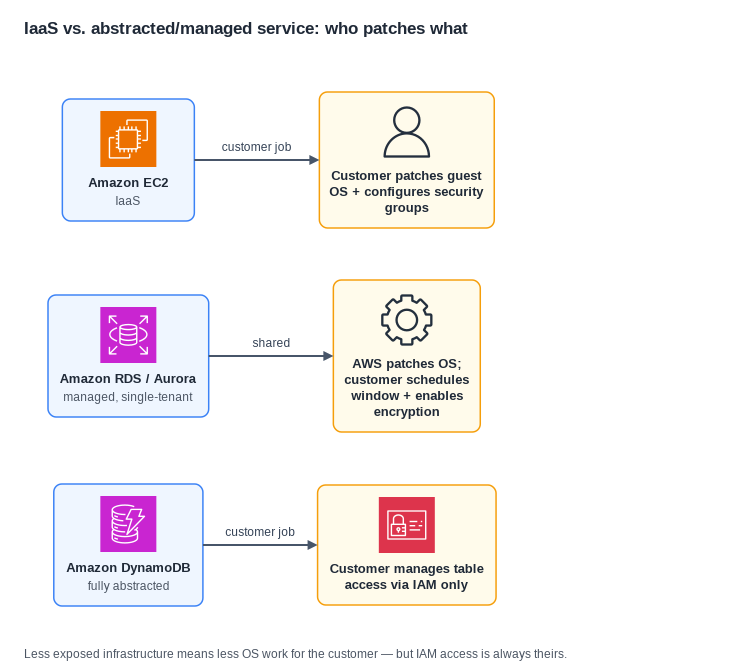
The further a service sits from raw infrastructure, the less OS-level work the customer keeps — but IAM access control and data protection choices never move off the customer's plate.
| Service | AWS manages | Customer manages |
|---|---|---|
| Amazon EC2 (IaaS) | Hypervisor, physical hardware, host OS | Guest OS patching, security groups, encrypting data on attached storage |
| Amazon RDS / Aurora (managed, single-tenant) | Identifies vulnerabilities, builds and releases OS patches | Schedules the maintenance window; turns on and manages encryption of clusters and snapshots |
| Amazon DynamoDB (fully abstracted, multi-tenant) | Infrastructure, OS, platform — AWS applies patches without customer action | Managing table access via IAM permissions only |
AWS's own well-architected guidance splits patch management the same way: "AWS responsibility: Identify vulnerabilities, develop and validate patches, release patches within the service's patching SLA... Customer responsibility: Review available updates and facilitate patching by selecting maintenance windows" for single-tenant managed services like RDS, versus "AWS responsibility: Apply patches without requiring customer action" for multi-tenant abstracted services like DynamoDB.
Encryption is always something the customer turns on, even on a managed database: AWS provides the KMS integration, but enabling encryption on an Aurora cluster or snapshot, and managing the keys, is the customer's job — AWS does not auto-encrypt customer data.
Customer data is the one constant. Whatever the service, the customer is always responsible for their own data — that responsibility never shifts to AWS, unlike networking, encryption-key management, or licensing, which vary by service and configuration.
The network perimeter: security groups vs. network ACLs
| Security group | Network ACL | |
|---|---|---|
| Scope | Instance (ENI) level | Subnet level |
| State | Stateful — return traffic auto-allowed | Stateless — return traffic needs its own rule |
| Rules | Allow only; evaluates all rules | Allow and deny; stops at the first matching rule, lowest number first |
| Typical use | Restrict an instance to a specific port/protocol | Subnet-wide guard rail, defense-in-depth if a security group is misconfigured |
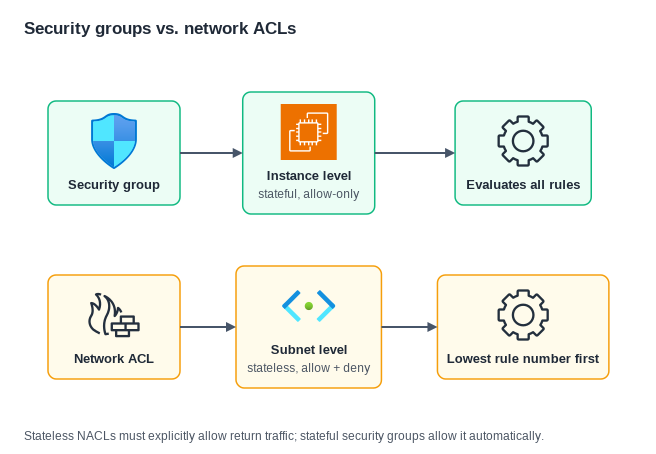
AWS's own comparison is explicit: "Security groups are more versatile than network ACLs, due to their ability to perform stateful packet filtering." For network ACL rule evaluation: AWS "evaluate[s] the rules in order, starting with the lowest numbered rule, when deciding whether [to] allow" traffic, and "NACLs are stateless, which means that information" about a connection is not retained between the request and the response — so a reply must be allowed by its own rule.
S3 encryption at rest
Amazon S3 applies server-side encryption with Amazon S3 managed keys (SSE-S3) as the base level of encryption for every bucket, and customers can instead choose SSE-KMS (AWS KMS managed keys) when they need audit trails or key-policy control. TLS/SSL protect data in transit, not at rest, and Transparent Data Encryption (TDE) is not an S3 feature at all.
IAM, root user, and credentials — round two
| Concept | Exam angle |
|---|---|
| Root user | Required only for a short list of privileged tasks, including closing an AWS account — day-to-day admin work should use a separate IAM administrator user instead |
| MFA on the root user | A best practice to secure the root identity: "Secure your root user sign-in with multi-factor authentication (MFA)" |
| Access keys | Static, long-term credentials — AWS never auto-rotates them; the customer must "update access keys when needed" |
| Programmatic access | "Users need programmatic access if they want to interact with AWS outside of the AWS Management Console" — the right choice when a user only needs CLI/SDK access to a service like RDS |
| Least privilege | "When you set permissions with IAM policies, grant only the permissions required" — attach a scoped policy (e.g., RDS-only), not AdministratorAccess |
| Password policy | A custom account password policy sets "complexity requirements and mandatory rotation periods," including a minimum length |
Security best practices the exam expects here: never share root or any user's credentials; grant only the access a job needs; require MFA; enforce a minimum password length; rotate access keys regularly; use an IAM user with programmatic-only access plus a scoped policy when a workload only needs CLI/SDK access.
Auditing and compliance toolkit, round two
Building on Artifact/Config/CloudTrail/credential report from the previous chapter, three more tools round out the picture for this domain.
| Scenario phrasing | Tool | What it gives you |
|---|---|---|
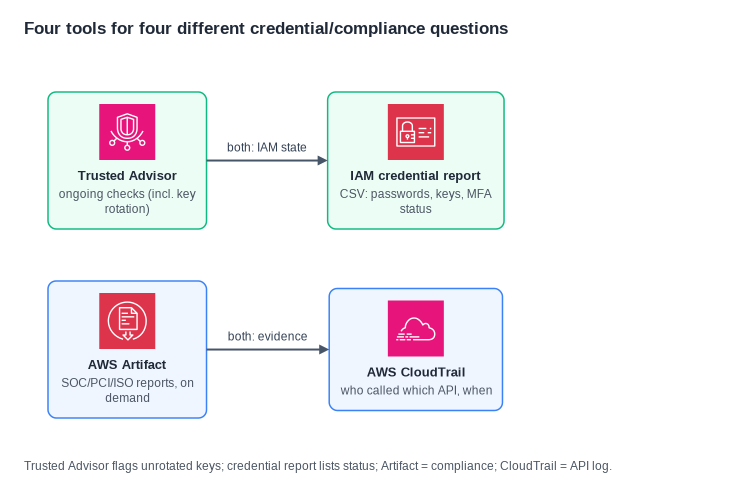
| "keys not rotated recently," "ongoing best-practice checks" | AWS Trusted Advisor | A dedicated check that "checks for active IAM access keys that have not been rotated in the last" recommended period, plus cost/performance/security checks |
| "list of users and credential status," "MFA device status," "audit password/key rotation" | IAM credential report | A downloadable report that "lists all users in your account and the status of their various credentials, including passwords, access keys," and MFA devices |
| "compliance reports before migrating," "submit evidence to an auditor/regulator" | AWS Artifact | On-demand downloads of AWS's own compliance documents, "to demonstrate the security and compliance of the AWS infrastructure and services" |
| "record API calls," "who did what" | AWS CloudTrail | A log "capturing, storing, accessing, and analyzing user and API activity on AWS" |
| "launch third-party IDS/security software from the AWS account" | AWS Marketplace | "A curated digital catalog that customers can use to find, buy, deploy, and manage third-party software" |
| "answers to the most common AWS questions" | AWS Knowledge Center | AWS's published answers to "the most frequent questions and requests" from customers |
Exam traps
- EC2 vs. abstracted services: EC2's guest OS is the customer's job; DynamoDB's and the managed OS layer of RDS/Aurora are AWS's job — but the customer still turns on encryption and manages access everywhere.
- "Always" the customer's job: customer data. Everything else (networking, encryption keys, licensing) depends on the specific service.
- Security groups: stateful, allow-only, instance-level, evaluate every rule. Network ACLs: stateless, allow+deny, subnet-level, stop at the first matching rule in numbered order.
- S3 object encryption = SSE-S3 or SSE-KMS only. TLS/SSL is in-transit; TDE doesn't apply to S3.
- Access keys never auto-rotate — rotation is always a customer action, whether done manually or surfaced by Trusted Advisor / the credential report.
- Credential report vs. Trusted Advisor: the credential report is a full CSV snapshot of every user; Trusted Advisor's key-rotation check is one specific, ongoing best-practice alert — both can answer a "find unrotated keys" question, but only the credential report is a complete audit export.
- Closing an AWS account is one of the few tasks that truly requires root-user sign-in; deleting IAM users, EC2 instances, or creating an Organization do not.
- Least privilege + programmatic access: an IAM user (not a role) with programmatic-only access and a service-scoped policy is the right combination for "CLI/SDK only" scenarios.
- AWS Marketplace, not Security Hub or Quick Starts, is where third-party security software is purchased and deployed into an account.
Docs
- AWS Well-Architected Framework – Shared responsibility
- AWS shared responsibility model
- Security and compliance in Amazon DynamoDB
- Identity and Access Management for Amazon DynamoDB
- Infrastructure security in Amazon VPC
- Control subnet traffic with network access control lists
- Security group rules
- Protecting data with encryption - Amazon S3
- AWS account root user
- Root user best practices for your AWS account
- Secure access keys - AWS Identity and Access Management
- Programmatic access with AWS security credentials
- Security best practices in IAM
- Set an account password policy for IAM users
- Generate credential reports for your AWS account
- Security checks - AWS Support
- What is AWS Artifact?
- What Is AWS CloudTrail?
- What is AWS Marketplace?
- AWS Knowledge Center