Exams / CLF-C02 / D1 Cloud Technology and Services
Cloud Technology and Services #6: VPC networking, Compute duration and starting points
- Exam domain: Content Domain 3: Cloud Technology and Services
This pass is dominated by "name the one right service" questions spread across networking, storage, databases, migration, and account-level tooling. The exam rarely asks for mechanics here — it asks you to recognize the single AWS service that owns a given job, among three plausible-sounding neighbours.
VPC networking: who lets traffic in, and who firewalls it
Three different VPC components get mixed up constantly: the thing that lets the internet reach a VPC at all, the thing that lets a private instance reach out without being reachable, and the thing that firewalls one instance's traffic.
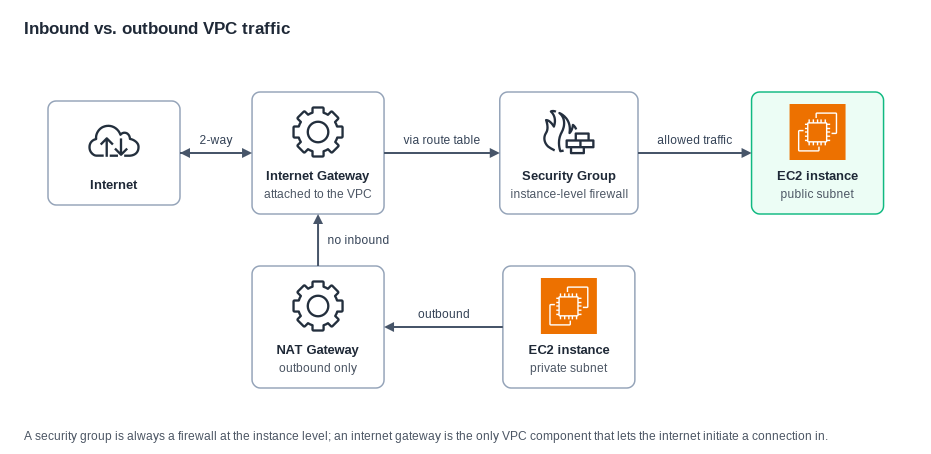
- Internet gateway — attaches to the VPC and "allows communication between your VPC and the internet." It is the only component on this list where "resources on the internet can initiate a connection to resources in your subnet" — the signal phrase is inbound internet access.
- NAT gateway — lives in a public subnet so that instances in a private subnet can reach the internet (updates, package downloads) without ever being reachable from it. If a question says outbound only, no unsolicited inbound, it wants a NAT gateway.
- Security group — attaches to an EC2 instance's network interface and "acts as a virtual firewall" at the instance level: "the only traffic that reaches the instance is the traffic allowed by the security group rules." This is the exam's standard answer for "firewall at the instance level" — a network ACL does the equivalent job one layer up, at the subnet level.
| Component | Level | Job |
|---|---|---|
| Internet gateway | VPC | Two-way internet access, the route-table target for 0.0.0.0/0 |
| NAT gateway | Subnet (via route table) | Outbound-only internet access for private-subnet instances |
| Security group | EC2 instance / ENI | Stateful allow-list firewall for that instance's traffic |
| Network ACL | Subnet | Stateless allow/deny rules for the whole subnet |
Compute duration and starting points
- AWS Lambda has a hard ceiling of 15 minutes per invocation ("Code can run for up to 15 minutes in a single invocation"). Any workload described in hours — a weekly data-processing job that "usually takes approximately 5 hours" — rules Lambda out immediately; Amazon EC2 is the answer whenever duration alone disqualifies Lambda.
- Amazon Lightsail is AWS's deliberately simplified entry point: "the easiest way to get started with Amazon Web Services (AWS) for anyone" with little or no cloud background, bundling compute/storage/networking into one VPS product. A developer with zero AWS experience who "wants to build a web application" is the canonical Lightsail scenario — Lambda and ECS both assume prior cloud/container knowledge, and SageMaker is for ML, not general web apps.
- AWS CloudShell is the pre-authenticated, in-console shell: "a browser-based, pre-authenticated shell that you can launch directly from the AWS Management Console," with no separate CLI credential setup needed.
Storage classes and archival retrieval times
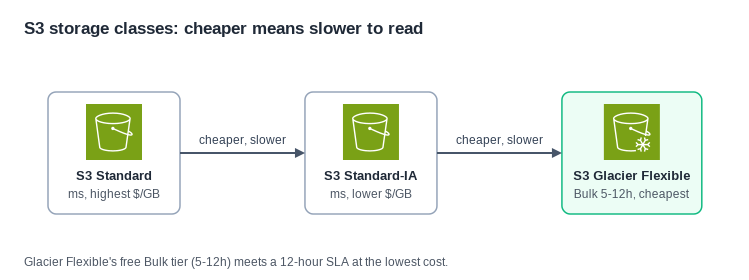
Infrequent-access questions are really asking "how fast do you need the data back, and how much are you willing to pay per GB to store it until then?"
| Storage class | Access | Typical retrieval time | Note |
|---|---|---|---|
| S3 Standard | Frequent | Milliseconds | Highest per-GB cost of the group |
| S3 Standard-IA | Infrequent | Milliseconds | Lower storage cost, per-GB retrieval fee |
| S3 One Zone-IA | Infrequent | Milliseconds | Same speed as Standard-IA, data in a single AZ only |
| S3 Glacier Flexible Retrieval | Archive | Minutes (Expedited) to 5–12 hours (Bulk, free) | Lowest per-GB storage cost of the group |
A requirement of "retrieval within 12 hours" plus "cost-effective per-gigabyte storage" is the exact description of S3 Glacier Flexible Retrieval's Bulk retrieval option: "Bulk retrievals typically finish within 5–12 hours" and are free, while the class itself is priced for "low-cost, long-term data storage and data archiving." S3 Standard-IA and One Zone-IA both answer almost instantly, so they overshoot the requirement at a higher storage cost — they are the wrong trade for an archive scenario.
Databases: match the data shape, not just "relational vs. not"
| Need | Service | Why not the others |
|---|---|---|
| Managed relational engine for OLTP (e.g., PostgreSQL) | Amazon RDS | Athena only queries S3 data; EMR runs big-data frameworks, not a transactional engine |
| Graph queries over highly connected data (fraud detection, relationships) | Amazon Neptune | DocumentDB stores documents; Timestream is time-series; DynamoDB has no native graph traversal |
| Data warehouse for large-scale analytics (OLAP) | Amazon Redshift | RDS/Aurora are OLTP engines; DynamoDB is NoSQL key-value, not warehouse-scale analytics |
| Millions of queries per second, key-value/document, must auto-scale | Amazon DynamoDB | ElastiCache is a cache, not a durable primary store; Neptune is graph-specific |
Neptune's own marketing is explicit about the fraud use case: "Build graph queries for near real-time fraud pattern detection by modeling relationships between people, places, and transactions." DynamoDB is positioned the same way for extreme request volume: it can "serve tens of millions of concurrent users and hundreds of millions of requests per second with single-digit millisecond performance." When a question names the relationship between entities as the thing being analyzed, think Neptune; when it names sheer request volume with simple key-based lookups, think DynamoDB.
Multi-Region/Multi-AZ resilience and traffic distribution
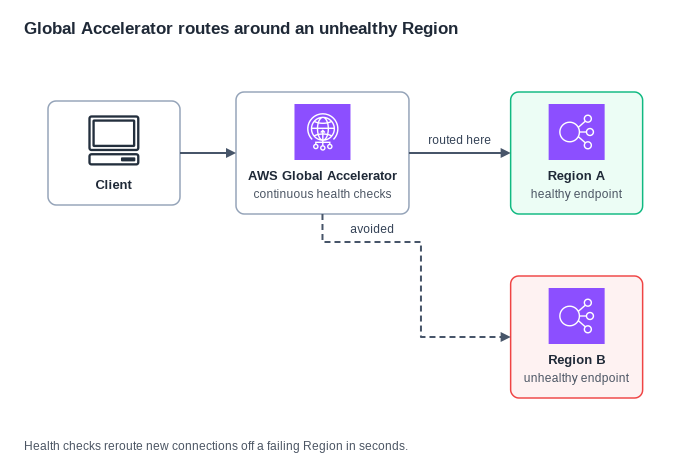
- AWS Regions are the fault-isolation boundary for a geographic disaster: "AWS Region physical infrastructure and software services are isolated and independent" from other Regions, so "Regions limits service failures, when they occur, to a single Region." Surviving a disaster that affects a whole geographic area means running in multiple Regions, not multiple edge locations, CloudFront locations, or Local Zones (all of which still depend on a parent Region).
- AWS Global Accelerator adds fast, health-based failover on top of that multi-Region footprint: it "continuously monitors the health of all endpoints, and instantly begins directing traffic for all new connections to another available endpoint when it determines that an active endpoint is unhealthy."
- Application Load Balancer solves a narrower, single-tier problem — spreading traffic across EC2 targets within a Region: "Elastic Load Balancing automatically distributes your incoming traffic across multiple targets, such as EC2" instances, routing only to healthy ones.
- Amazon CloudFront is unrelated to either of these — it is a CDN for low-latency content delivery, not a failover or load-balancing mechanism.
Migration: discovery, strategy, and the move itself
- AWS Application Discovery Service is the assessment step: its Discovery Agent "collects system configuration, times series utilization or performance data," including hostname, IP address, and MAC address for every on-premises server, to size and plan a migration — it never moves any data itself.
- Rehost ("lift-and-shift") moves a workload to AWS "without worrying about compatibility, performance disruption, long cutover windows" and with no application changes — the answer whenever a scenario insists the workload must stay exactly as it is.
- AWS Database Migration Service (DMS) migrates the databases themselves — "relational databases, data warehouses, NoSQL databases, and other types of data stores" — supporting both same-engine and heterogeneous (different-engine) migrations.
- AWS Snowball Edge is the offline option: a physical device with its own compute and storage that can "process data locally, run edge-computing" workloads and "accelerate application performance in disconnected... environments... with little or no connectivity," then ships the device back to AWS to load the data — the answer whenever connectivity is intermittent or unavailable, even for tens of terabytes.
Exam traps
- Internet gateway (two-way) vs. NAT gateway (outbound only) — "internet hosts can initiate a connection" is always an internet gateway; "private instance needs outbound internet, no inbound" is always a NAT gateway.
- Security group (instance-level firewall) vs. network ACL (subnet-level filter) — "virtual firewall at the EC2 instance level" is always a security group.
- Lambda's 15-minute cap disqualifies it for anything described in hours — reach for EC2 instead.
- S3 Glacier Flexible Retrieval's Bulk tier (5–12h, free) is the answer whenever a question pairs "infrequent access" with "retrieval within 12 hours" and "lowest per-GB storage cost" — Standard-IA/One Zone-IA retrieve almost instantly but cost more per GB.
- Neptune (graph/relationships) vs. DynamoDB (extreme-scale key-value) — a fraud-detection "relationships between people, addresses, transactions" question is Neptune; a "millions of requests per second" scaling question is DynamoDB.
- Multi-Region survives a geographic disaster; Global Accelerator adds fast health-based failover on top; an ALB only balances within a Region — don't substitute one for another.
- Application Discovery Service only assesses (including hostname/IP/MAC inventory) — it never migrates data; that is DMS (databases) or Snowball Edge (offline bulk/local processing).
- Rehost = zero changes. If a question explicitly rules out application changes, it wants rehost, not replatform or refactor.
- AWS Infrastructure Event Management (IEM) was the planned-event, scaling-readiness engagement for Enterprise/Business Support customers; AWS has since folded this into AWS Countdown — expect either name.
- Amazon Connect is the cloud contact center with built-in AI (speech/sentiment analysis); current AWS docs now call the product Amazon Connect Customer, so don't be thrown by the renamed service in newer material.
- Security of the cloud (AWS) vs. security in the cloud (customer) — infrastructure protection is AWS's job; Lifecycle policies, Versioning, and bucket policies are the customer's.
Docs
- Amazon EBS snapshots
- Enable internet access for a VPC using an internet gateway
- Control traffic to your AWS resources using security groups
- What is Amazon Lightsail?
- What is AWS CloudShell?
- Lambda quotas
- Understanding archive retrieval options
- Understanding and managing Amazon S3 storage classes
- Amazon Neptune
- Amazon DynamoDB
- Amazon RDS for PostgreSQL
- Amazon Redshift
- Regions – AWS Fault Isolation Boundaries
- How AWS Global Accelerator works
- What Is an Application Load Balancer?
- AWS Application Discovery Service — Discovery Agent
- About the migration strategies (the 6 R's)
- What is AWS Database Migration Service?
- What is Snowball Edge?
- Amazon CloudWatch
- Logging IP traffic using VPC Flow Logs
- Secret encryption and decryption in AWS Secrets Manager
- AWS Shared Responsibility Model
- AWS Compute Optimizer
- What is EC2 Image Builder?
- AWS Countdown
- What is Amazon Connect?
- AWS Elastic Beanstalk