Exams / CLF-C02 / D1 Cloud Technology and Services
Cloud Technology and Services #8: Connecting VPCs, Traffic filtering
- Exam domain: Content Domain 3: Cloud Technology and Services
This pass covers networking fan-out (peering vs. Transit Gateway, traffic filtering, VPC components), migration strategy and tooling, EC2 instance choices, a handful of serverless/database services, and the account-level identity, security, and management tools the exam likes to mix up.
Connecting VPCs: peering (point-to-point) vs. Transit Gateway (hub)
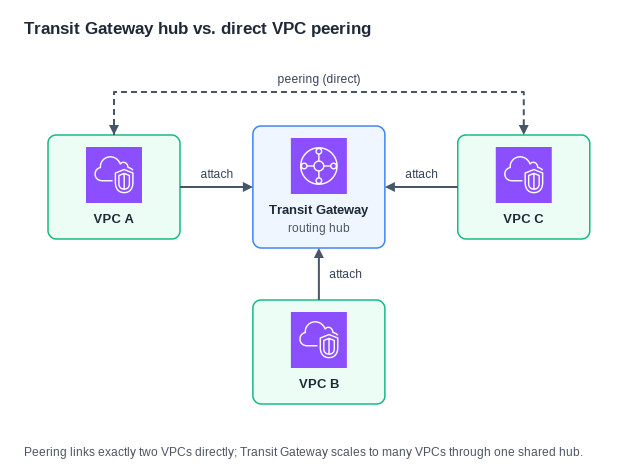
- VPC peering is "a networking connection between two VPCs that enables you to route traffic between them using private IPv4 addresses or IPv6 addresses." It is a direct, one-to-one link — no gateway, no extra hop, and traffic never leaves the AWS backbone.
- AWS Transit Gateway is "a network transit hub used to interconnect virtual private clouds (VPCs)" and on-premises networks. Attach any number of VPCs to it and configure routes, and they can all reach each other through the shared hub — the answer whenever a question implies many VPCs need to talk to each other, not just two.
- Neither a VPC endpoint (connects a VPC privately to an AWS service) nor Direct Connect (a dedicated link from on-premises to AWS) connects two VPCs to each other.
Traffic filtering: security group (instance) vs. network ACL (subnet)
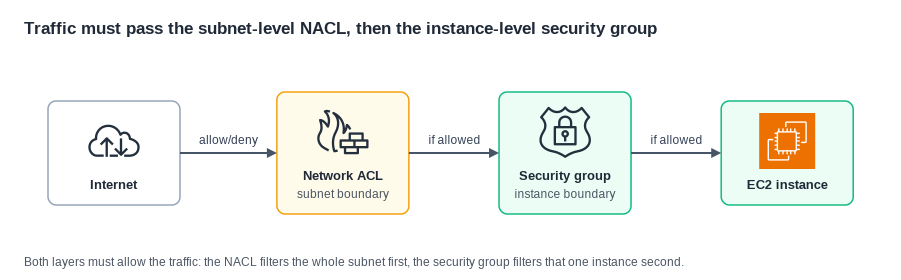
- A security group attached to an instance "controls the inbound and outbound traffic for the instance." It is the virtual firewall at the EC2 instance / ENI level — the standard answer for "prevent traffic from reaching an instance" at that scope.
- A network ACL "allows or denies specific inbound or outbound traffic at the subnet level," filtering everything entering or leaving an entire subnet before security groups even see it.
- Both are allow/deny traffic-blocking controls. VPC Flow Logs, CloudWatch, and CloudTrail only observe and record activity — none of them can stop a packet.
VPC building blocks
| Component | What it is | Quote |
|---|---|---|
| Subnet | A range of IP addresses inside the VPC where resources are deployed | "A subnet is a range of IP addresses in your VPC." |
| Internet gateway | A horizontally scaled, redundant VPC component for two-way internet access | "An internet gateway is a horizontally scaled, redundant, and highly available VPC component that allows communication between your VPC and the internet." |
Amazon API Gateway, S3 buckets/objects, and AWS Storage Gateway are not VPC components — API Gateway is a standalone managed service, S3 data lives at the account/Region level outside any VPC, and Storage Gateway is a separate hybrid-storage service.
Amazon Route 53 is the AWS DNS service: "a highly available and scalable Domain Name System (DNS) web service," also handling domain registration and health checks — the only one of its family that resolves names.
Migration: discovery, strategy, and moving the data
| Step | Service | Job |
|---|---|---|
| Assess | AWS Application Discovery Service | Collects on-premises server usage/configuration data to plan the migration; "helps you plan your migration to the AWS cloud by collecting usage and configuration data about your on-premises" infrastructure. It never moves data. |
| Track | AWS Migration Hub | "Provides a single place to discover your existing servers, plan migrations, and track the status of each application migration," aggregating progress from whichever migration tool is used. |
| Move unstructured data | AWS DataSync | Transfers files/objects into AWS storage with built-in encryption in transit and end-to-end data-integrity validation. |
| Move a whole tape backup workflow unchanged | AWS Storage Gateway (Tape Gateway) | Exposes cloud-backed virtual tape drives as iSCSI devices, so "existing client backup applications" keep working unchanged while the data lands in Amazon S3/Glacier. |
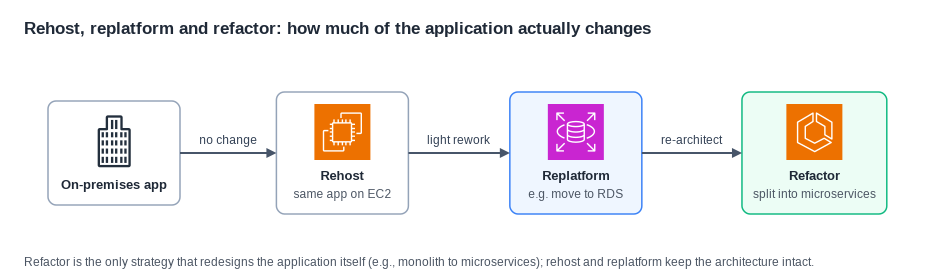
The migration strategy itself ("the R's") ranges from no architectural change to a full redesign:
- Rehost ("lift-and-shift") — moves the workload as-is, no application changes.
- Replatform — a light rework (e.g., moving a SQL Server database to Amazon RDS) without redesigning the application.
- Refactor / re-architect — "the most complex and costly of the migration strategies because you modernize the application during the migration, which involves redesigning the core components." Splitting a monolith into microservices is the textbook example.
- Repurchase replaces the application with a different commercial/SaaS product entirely, rather than modifying the existing one.
Exam-content note: AWS Migration Hub stopped accepting new customers on November 7, 2025 (AWS now points new customers to AWS Transform for similar discovery/tracking capability). Existing customers keep using it, and it is still the answer the exam expects for "a single place to track migration progress" — but this is worth knowing if the question set is ever updated.
EC2 instance choices and rightsizing
| Need | Choice | Why |
|---|---|---|
| CPU-intensive workload (batch, HPC) | Compute optimized instances | High vCPU-to-memory ratio: "designed for compute intensive applications that benefit" from extra CPU, as opposed to general purpose, memory optimized, or storage optimized families. |
| Bring your own per-socket/per-core/per-VM license (e.g., Windows Server) | Dedicated Hosts | "Allow you to use your existing per-socket, per-core, or per-VM software" licenses — only Dedicated Hosts expose the physical socket/core visibility that model needs; Dedicated Instances do not. |
| Rightsize EC2 with least effort | Change instance size/type based on utilization | Direct instance modification, no re-architecture — adding an AZ addresses availability, Savings Plans only change pricing, and blindly upsizing is the opposite of rightsizing. |
| Free EC2 rightsizing recommendations | AWS Cost Explorer | Its rightsizing-recommendations feature flags idle/underutilized EC2 instances for downsizing or termination, and "you can view your costs and usage using the Cost Explorer user interface free of charge." |
| Auto-adjust capacity to demand, lowest cost | AWS Auto Scaling | "Monitors your applications and automatically adjusts capacity to maintain steady, predictable performance at the lowest possible cost." |
| SSH/console access to a current Amazon Linux 2 instance | EC2 Instance Connect (preinstalled, browser/CLI SSH) or Systems Manager Session Manager (SSM-based browser shell, no SSH keys) | RDP is Windows-only; AWS Batch and Amazon Connect provide no instance logon at all. |
Databases and serverless compute
- Amazon Aurora is "a fully managed relational database engine that's compatible with MySQL and PostgreSQL."
- Aurora Serverless takes that further for unpredictable or infrequent workloads: "instead of provisioning and managing database servers, you specify database capacity," and with auto-pause it "can automatically pause after a period with no user connections" — scaling to zero ACUs when idle. This beats RDS or provisioned Aurora whenever "infrequent access" and "least management overhead" appear together.
- AWS Lambda and AWS Fargate are AWS's serverless compute services — Lambda "runs code without provisioning or managing servers," and Fargate is "a serverless, pay-as-you-go compute engine" for containers. EC2, AWS Outposts, and a bare EKS cluster all still require managing the underlying servers.
Storage, identity, and account-management grab bag
| Need | Service | Note |
|---|---|---|
| Store files, downloadable by a public URL | Amazon S3 | Requires disabling Block Public Access and granting public read access via a bucket policy. |
| Cloud backup storage with a local cache | Storage Gateway — cached volumes | Stores primary data in S3 and "retain[s] a copy of frequently accessed data subsets locally." |
| Send both SMS text and email notifications | Amazon SNS | Pub/sub service whose subscribers "can send push email messages and text messages (SMS messages) to individuals." Amazon SES only does email. |
| Social-media login on a website | Amazon Cognito | User pools "integrate... with social identity providers" (Facebook, Google, Amazon, etc.) — customer-facing identity, unlike IAM or IAM Identity Center. |
| Central portal for workforce SSO into third-party SAML 2.0 apps | AWS IAM Identity Center | "Enables you to provide your users with single sign-on access to SAML 2.0" applications from one AWS access portal. |
| Programmatic AWS CLI/API credentials | Access keys | "Sign programmatic requests to the AWS CLI or AWS API." (AWS still recommends temporary credentials/IAM roles where possible.) |
| Manage resource permissions via policies | AWS IAM | Grants/denies access to AWS resources through attached policies; Inspector/Detective/GuardDuty are security assessment tools, not permission managers. |
| Identify which services/actions a user used in a date range | IAM Access Analyzer | "Analyzes your AWS CloudTrail logs to identify actions and services that have been used" by an IAM entity in that range. |
| Continuously scan EC2 for software vulnerabilities | Amazon Inspector | "A vulnerability management service that automatically discovers workloads and continually scans them for software vulnerabilities and unintended network exposure." |
| Fully customer-controlled encryption keys (dedicated HSM) | AWS CloudHSM | "Gives you full control of the algorithms and keys you use" — distinct from AWS Certificate Manager, which manages certificates, not general-purpose keys. |
| Managed virtual desktop reachable from personal devices | Amazon WorkSpaces | "Provision[s] virtual, cloud-based desktops" (DaaS) — not Cloud9 (an IDE), Outposts, or Lightsail. |
| Web interface to manage AWS resources | AWS Management Console | "Access and manage over 200 AWS services from one web interface." |
| Infrastructure as code | AWS CloudFormation | Templates "describe all the AWS resources that you want," and CloudFormation provisions/manages them as a stack. |
| Single intelligent search interface over company content | Amazon Kendra | "A managed information retrieval and intelligent search service" using NLP — not Connect (contact center), Lex (chatbots), or Comprehend (text analytics). |
| Recurring QuickSight billing dashboard | AWS Cost and Usage Report | The detailed billing export AWS wires directly into a "pre-built Cost and Usage Dashboard powered by Amazon QuickSight." |
Exam traps
- VPC peering (exactly two VPCs, direct) vs. Transit Gateway (hub for many VPCs) — "connect two VPCs" tolerates either; "many VPCs need to reach each other" points to Transit Gateway.
- Security group (instance-level) vs. network ACL (subnet-level) — both block traffic; Flow Logs/CloudWatch/CloudTrail only observe it.
- Dedicated Hosts (BYOL, socket/core visibility) vs. Dedicated Instances — per-socket/per-core/per-VM licensing specifically needs a Dedicated Host, not just dedicated hardware.
- Rightsizing = change instance size/type to match utilization — not an AZ change, not a pricing-model change, and not blindly upsizing.
- Aurora Serverless's auto-pause (scale to zero ACUs when idle) is the answer whenever "infrequently accessed" + "least management overhead" appear together for a relational database.
- AWS Migration Hub closed to new customers on 2025-11-07 (successor direction: AWS Transform) — still the textbook/exam answer for centralized migration tracking, but worth flagging if newer question sets replace it.
- Cognito (customer social login) vs. IAM Identity Center (workforce SSO to SAML apps) vs. IAM (AWS account permissions) — three different "identity" services for three different audiences.
Docs
- What is VPC peering?
- What is AWS Transit Gateway for Amazon VPC?
- Control traffic to your AWS resources using security groups
- Control subnet traffic with network access control lists
- How Amazon VPC works
- Enable internet access for a VPC using an internet gateway
- What Is Amazon Route 53?
- What is AWS Application Discovery Service?
- What Is AWS Migration Hub?
- What is AWS DataSync?
- What is Tape Gateway? - AWS Storage Gateway
- Requirements for setting up Tape Gateway
- About the migration strategies (the 7 R's)
- Specifications for Amazon EC2 compute optimized instances
- Bring your own software licenses to Amazon EC2 Dedicated Hosts
- AWS Compute Optimizer
- Optimizing your cost with rightsizing recommendations
- Analyzing your costs and usage with AWS Cost Explorer
- AWS Auto Scaling
- Install EC2 Instance Connect on your EC2 instances
- Connect to your Amazon EC2 instance using Session Manager
- Amazon Aurora documentation
- How Aurora Serverless works
- Scaling to Zero ACUs with automatic pause and resume for Aurora Serverless
- AWS Lambda
- AWS Fargate
- What Is Amazon S3?
- Setting permissions for website access
- What is Volume Gateway? - AWS Storage Gateway
- What is Amazon SNS?
- Configuring identity providers for your user pool – Amazon Cognito
- Single sign-on access to SAML 2.0 and OAuth 2.0 applications - AWS IAM Identity Center
- Manage access keys for IAM users
- AWS Identity and Access Management
- Using AWS Identity and Access Management Access Analyzer
- What is Amazon Inspector?
- What is AWS CloudHSM?
- What is Amazon WorkSpaces?
- AWS Management Console
- AWS CloudFormation Documentation
- What is Amazon Kendra?
- What are AWS Cost and Usage Reports?
- Creating a cost and usage dashboard