Exams / CLF-C02 / D4 Security and Compliance
Security and Compliance #3: Shared responsibility model, Compliance and audit toolkit
- Exam domain: Content Domain 2: Security and Compliance
This part of the bank is dominated by three recurring themes: the shared responsibility model (which specific task belongs to AWS vs. the customer), the compliance/audit toolkit (Artifact, Config, CloudTrail, the IAM credential report — four services that each answer a different question), and IAM fundamentals (groups, roles, root user, access keys, least privilege, best practices). A smaller cluster covers the detection and protection services (GuardDuty, Macie, Inspector, WAF, Shield) and governance tools (Service Catalog, Trusted Advisor, AWS CAF perspectives).
Shared responsibility model: security OF vs. IN the cloud
AWS is responsible for security OF the cloud — everything from the host operating system and virtualization layer down to the physical facilities. The customer is responsible for security IN the cloud — IAM configuration, data-encryption choices, security group rules, and guest-OS patching.
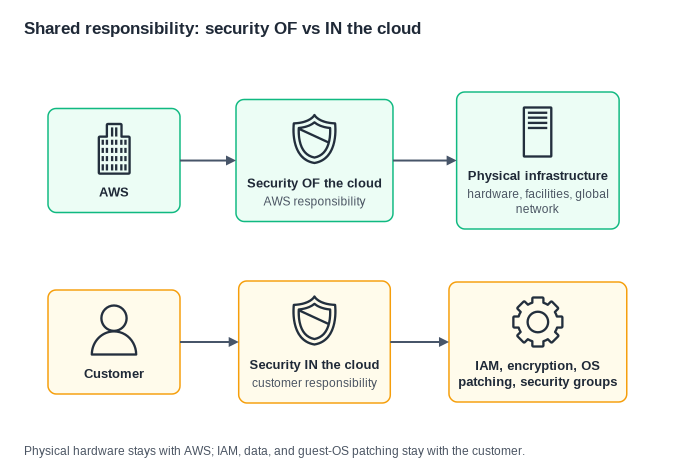
| Task | Who |
|---|---|
| Physical hardware, facilities, global network | AWS |
| Patching the underlying infrastructure | AWS |
| Physical and environmental controls (data center access, power, cooling) | AWS — solely AWS's responsibility |
| Configuring IAM (users, policies, password policy) | Customer |
| Choosing encryption options for stored data | Customer |
| Configuring EC2 security groups | Customer |
| Patching the guest operating system and applications on EC2 | Customer |
| Security awareness and training of a company's own staff | Customer |
Inherited controls are the one category the customer has zero part in — physical/environmental security is the textbook example, and the exam asks for it directly ("solely AWS's responsibility").
Compliance and audit toolkit: four tools, four different questions
The exam repeatedly tests whether you can match the exact wording of a scenario to the right tool. These four services never substitute for each other.
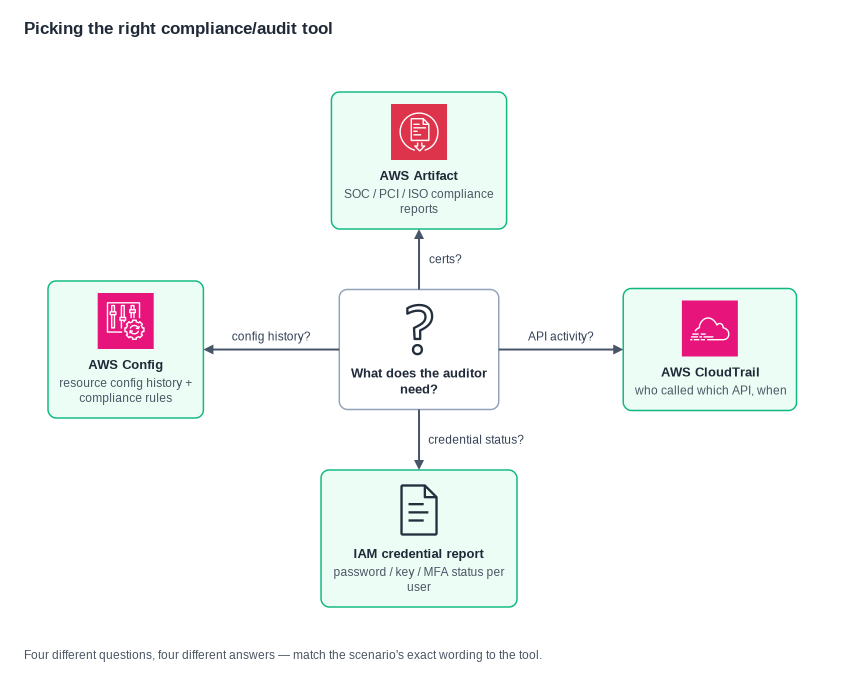
| Scenario phrasing | Tool | What it actually gives you |
|---|---|---|
| "compliance reports," "SOC/PCI/ISO," "attestation," "certifications" | AWS Artifact | On-demand downloads of AWS's own security/compliance documents and ISV compliance reports |
| "configuration changes," "evaluate compliance," "remediate noncompliant resources" | AWS Config | Resource configuration history + compliance rules + automated remediation |
| "who did what," "which user deleted/changed," "API activity" | AWS CloudTrail | A log of every API call: who/what, which action, which resource, when |
| "list of IAM users," "status of passwords/keys/MFA," "auditor wants credential status" | IAM credential report | A downloadable CSV of every IAM user's password, access key, MFA, and certificate status |
A WORM (write-once, read-many) archival requirement is a different, more specific tool: S3 Glacier Vault Lock locks a vault with a retention policy so archived objects can't be modified or deleted before the retention period ends — this is the Glacier-specific implementation of WORM (S3 Object Lock is the equivalent for standard S3 storage classes).
For ongoing, ongoing (not point-in-time) optimization and security recommendations after a migration or rightsizing exercise, the answer is AWS Trusted Advisor — it continuously inspects the environment across cost optimization, performance, security, fault tolerance, and operational excellence, catching regressions as the workload grows.
IAM: the core identity building blocks
| Concept | What it is | Exam angle |
|---|---|---|
| Root user | The single sign-in identity created automatically with the account, with complete access to everything | "First sign-in identity" is the correct description — not MFA-exclusive, not console-exclusive, password can be changed |
| IAM users | Individual identities for people/apps | Create one per person — never share credentials |
| IAM user groups | A collection of users that share an attached policy | Least operational overhead for managing permissions by job role — move a user between groups instead of editing per-user policies |
| IAM roles | Temporary credentials assumed by a service, application, or federated user | Not the tool for standing human-user permission management |
| Access keys | Access key ID + secret access key, a long-term credential | Used to sign programmatic requests (CLI/SDK/API) — not console sign-in |
| IAM credential report | CSV of every user's password/access-key/MFA/certificate status | The audit/compliance answer whenever the scenario needs a list of users and their credential state |
| IAM Access Analyzer | Analyzes resource-based policies to find resources shared with an external entity (including other AWS accounts) | Cross-account / external-sharing visibility — not the same job as the credential report |
IAM best practices the exam expects:
- Create individual users; never share access keys or passwords.
- Use groups to assign permissions at scale rather than per-user policies.
- Prefer customer managed policies over inline policies (reusable, centrally manageable).
- Enforce least privilege — grant only the permissions a task actually needs, nothing more.
- Enable MFA; regularly review, rotate, and delete unused access keys.
- Don't use the root user, or long-term access keys hard-coded on EC2, for everyday work.
What IAM controls, specifically: access to AWS service APIs and resources, plus authentication mechanisms including MFA. IAM does not do threat detection (GuardDuty), web-attack protection (WAF), or physical data-center access control (an AWS facility concern).
Detection and protection services, by threat type
Five services keep showing up in the same kind of question — "which service detects/protects against X" — and each owns exactly one job.
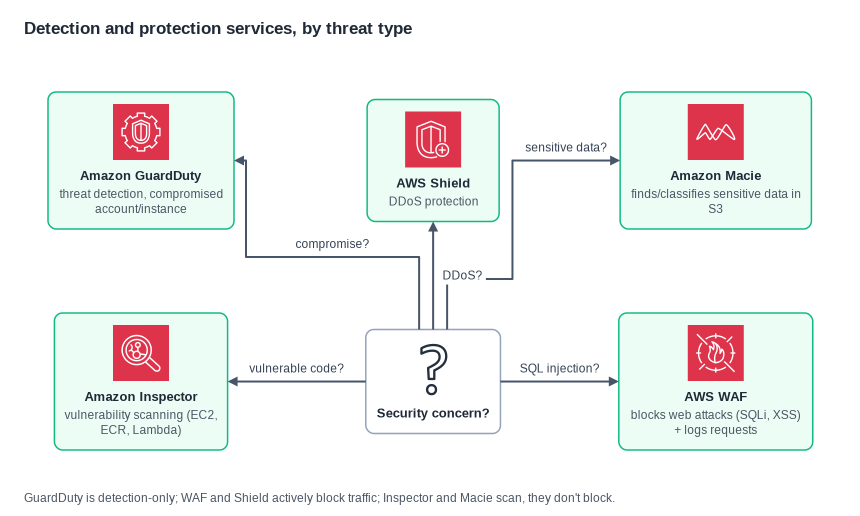
| Service | Job | Detects/blocks |
|---|---|---|
| Amazon GuardDuty | Continuous threat detection | Compromised accounts/instances, anomalous and malicious activity — detection only, uses ML + threat-intel feeds |
| Amazon Macie | Sensitive-data discovery | Classifies sensitive data (and custom-defined intellectual property) in S3, using ML + pattern matching |
| Amazon Inspector | Vulnerability scanning | Software vulnerabilities on EC2, ECR images, and Lambda |
| AWS WAF | Web application firewall | Blocks SQL injection, XSS and other web-layer attacks; also provides detailed web ACL logging of inspected requests |
| AWS Shield | DDoS protection | Distributed denial-of-service attacks |
The key distinction the exam tests: GuardDuty, Macie, and Inspector find/report problems; WAF and Shield actively block traffic.
Governance: who can do what, and keeping it that way
- AWS Service Catalog — lets administrators centrally curate approved IT service catalogs, governing who can deploy, manage, and decommission resources in line with organizational standards. This is a provisioning-governance tool, not a monitoring one (that rules out CloudWatch, GuardDuty, Security Hub as answers to "govern who can deploy resources").
- AWS Secrets Manager — centrally stores secrets (including database credentials) and supports a built-in automatic rotation schedule, the least-operational-overhead way to rotate database user credentials on a schedule.
- AWS Cloud Adoption Framework (CAF) — Security perspective — owns multiple capabilities, including Identity and Access Management (managing identities and permissions at scale) and Threat Detection (using logging/monitoring to identify misconfigurations and unexpected behavior, so protective controls can be prioritized). Don't confuse this perspective's capabilities with each other: IAM is about who can access what; Threat Detection is about finding problems to fix.
Exam traps
- "Solely AWS's responsibility" always points to physical and environmental controls — every other answer choice in these questions is at least partly a customer task.
- IAM user groups, not individual policies or roles, is the "least operational overhead" answer whenever employees move between teams/roles.
- Access keys = CLI/API (programmatic), never console sign-in, root-user access, or multi-account access.
- Credential report vs. Access Analyzer: the credential report lists a user's own credential status (passwords/keys/MFA); Access Analyzer finds resources shared with another account — match "status of credentials" to the report and "shared with another account" to Access Analyzer.
- AWS Artifact is reports/certifications/attestations (SOC, PCI, ISO) — a read-only download portal, not a certification authority and not a consulting service.
- AWS Config is the only one of the four audit tools that evaluates compliance and remediates resources; CloudTrail only logs API calls, and neither Artifact nor the credential report touch resource configuration at all.
- GuardDuty detects, WAF/Shield block — don't pick GuardDuty for a question that asks for active protection against SQL injection or DDoS.
- S3 Glacier Vault Lock is the WORM answer specifically for Glacier archives; it's a different feature from S3 Versioning or MFA Delete, neither of which prevents deletion by itself.
- The root user is defined by being the account's first sign-in identity with full access — not by being MFA-exclusive, console-exclusive, or having an unchangeable password.
Docs
- AWS Shared Responsibility Model
- Shared responsibility — AWS Well-Architected Framework Security Pillar
- What is AWS Artifact?
- AWS Artifact
- What Is AWS Config?
- What Is AWS CloudTrail?
- Generate credential reports for your AWS account
- AWS account root user
- IAM user groups
- Manage access keys for IAM users
- Security best practices in IAM
- Multi-factor authentication in IAM
- Prepare for least-privilege permissions
- Using AWS IAM Access Analyzer
- What is Amazon GuardDuty?
- What is Amazon Macie?
- SQL injection attack rule statement - AWS WAF
- Logging AWS WAF protection pack (web ACL) traffic
- AWS Service Catalog
- Get started with AWS Trusted Advisor
- What is AWS Secrets Manager?
- AWS Cloud Adoption Framework
- Create Write-Once-Read-Many Archive Storage with Amazon Glacier