Exams / CLF-C02 / D1 Cloud Technology and Services
Cloud Technology and Services #1: Migration, Compute
- Exam domain: Content Domain 3: Cloud Technology and Services
This first pass covers the services that show up constantly across Domain 3: moving data and workloads into AWS, the storage/compute/database building blocks, and the account-wide tools for networking, messaging, and basic observability/security.
Migration: assess, cost out, then move
Before anything moves, two services answer "what do we even have, and what will it cost?":
| Service | Question it answers | Output |
|---|---|---|
| AWS Application Discovery Service | What is running on-premises right now? | Server configuration, utilization, dependencies — feeds Migration Hub |
| AWS Migration Evaluator | What would it cost to run this in AWS? | A directional business case, projecting AWS cost from measured on-premises usage |
Application Discovery Service "helps you plan your migration to the AWS cloud by collecting usage and" configuration data — it is strictly the assessment step, and it does not replicate any workload. Migration Evaluator goes a step further and "provides a clear baseline of what your organization is running today and projects AWS costs based on measured on-premises provisioning and utilization" — it can even reuse Discovery Service's inventory as its input. Neither one moves a single byte of data.
Once a strategy is chosen, three very different tools actually move the data, and the exam tests picking the right one by how the data needs to move:
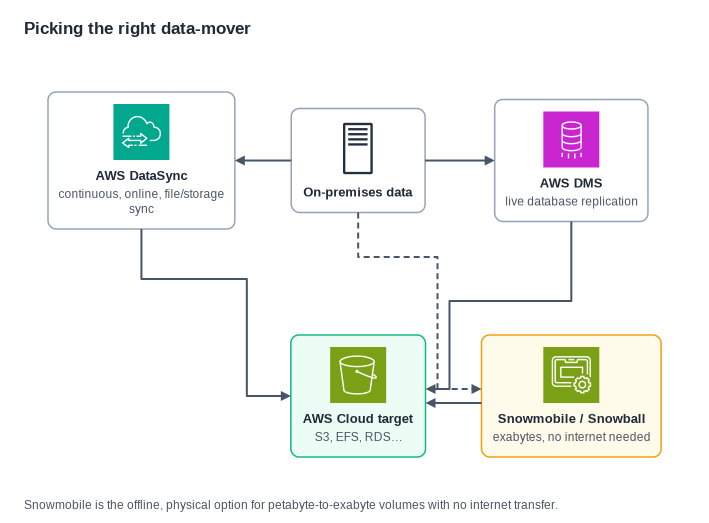
- AWS DataSync — online, automated, for files and storage services. It "works with the following AWS storage services" (S3, EFS, FSx) and the matching on-premises storage systems, moving datasets "rapidly over the network."
- AWS DMS — for databases specifically, including heterogeneous moves (e.g., a NoSQL source into DynamoDB). DMS can "perform one-time migrations or replicate ongoing changes," covering "relational databases, data warehouses, NoSQL databases, and other types of data stores."
- AWS Snowmobile — the offline, physical option, for data "especially when network conditions are limited" and volumes reach petabyte-to-exabyte scale. If a question says "no internet connection," Snowmobile (or a smaller Snowball) is the answer — DataSync and Direct Connect both still use the network.
The 7 Rs, as the exam actually uses them
AWS's own prescriptive guidance narrows a long migration-strategy list down to the ones it recommends for large migrations: rehost, relocate, replatform, and retire — refactor is explicitly discouraged for a large migration because "you modernize the application during the migration," and AWS recommends doing that only after a simpler move, "for a large migration, refactor only when the other migration strategies are not an acceptable option."
| Strategy | What changes | Example from AWS's own guidance |
|---|---|---|
| Rehost | Nothing — "lift and shift" | Move VMs/physical servers as-is, no compatibility work |
| Replatform | Some optimization, same core architecture | "you might replatform a Microsoft SQL Server database to Amazon RDS for SQL Server" |
| Refactor | Re-architect during the move | Discouraged for large migrations — most complex and costly |
| Repurchase | Switch products entirely | Move to a different (often SaaS) product instead of migrating the same software |
Self-managed database → the matching AWS managed service (MySQL on EC2/on-prem → RDS for MySQL, SQL Server → RDS for SQL Server) is the canonical Replatform example: the engine and data model stay the same, but day-to-day administration shifts to AWS.
Compute: how much infrastructure AWS takes off your hands
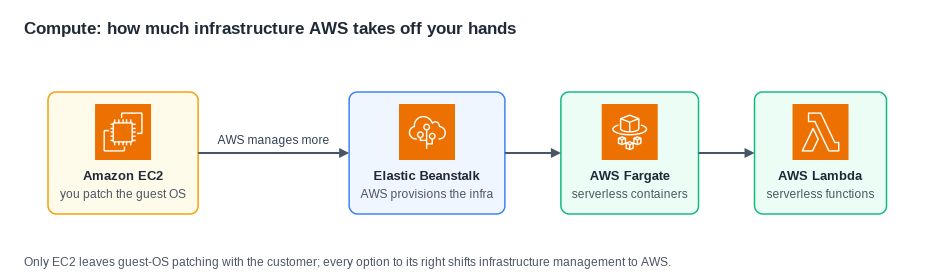
- Amazon EC2 — the only one of the four where the customer explicitly keeps guest-OS control. AWS's shared-responsibility guidance is blunt about it: "customers are responsible for patching their guest operating system and applications," while "AWS is responsible for patching and fixing flaws within the infrastructure." Any question that says a company must keep control over guest-OS patching is pointing at EC2, not a managed or serverless option.
- AWS Elastic Beanstalk — a PaaS layer: give it application code, and "Elastic Beanstalk automatically launches an environment and creates and configures the AWS resources needed to run your code" (capacity, load balancing, scaling). The developer still deploys an application, just not the infrastructure under it.
- AWS Fargate — serverless compute, but specifically for containers. It is "a serverless, pay-as-you-go compute engine that lets you focus on building applications without managing servers," removing cluster/EC2 management that a self-run ECS/EKS cluster would still need.
- AWS Lambda — serverless functions, billed per invocation; the standard low-cost pattern for short, event-driven work is S3 event → SQS → Lambda.
Serverless computing in general means the provider — not the customer — "provisions, scales, and maintains the underlying components of your server infrastructure based on demand," including OS management and patching. It does not mean the customer's application security, deployment, or monitoring/logging responsibilities disappear — those stay with the customer.
A visual, drag-and-drop way to design a serverless app before deploying it is AWS Application Composer: "you can drag, drop, and connect AWS services into an application architecture" on a browser canvas, and it keeps the diagram in sync with generated CloudFormation/SAM infrastructure-as-code.
Storage: match the S3 feature to the risk or access pattern
| Feature | Protects against / optimizes for | Key fact |
|---|---|---|
| S3 Versioning | Accidental delete or overwrite | Delete → S3 "inserts a delete marker instead of" removing the object; overwrite → the prior version is retained |
| S3 Intelligent-Tiering | Unknown or changing access patterns | "automatically moving data to the most cost-effective access tier when access patterns change," no retrieval fee |
| S3 Lifecycle | Scheduled transitions/expirations | Separate from Versioning — it manages when objects move or are deleted, not recovery of prior versions |
Versioning and Intelligent-Tiering solve different problems and are a common exam substitution trap: "accidental deletion/overwriting" → Versioning, never Intelligent-Tiering or Lifecycle; "unknown/changing access pattern, optimize cost automatically" → Intelligent-Tiering, not Versioning or a fixed storage class.
For compute-attached storage, pick by sharing model:
- Amazon EBS — block storage, attached to a single EC2 instance.
- Amazon EFS — a fully managed NFS file system ("supports the Network File System version 4 (NFSv4.1 and NFSv4.0) protocol") that many compute resources can mount concurrently, with no provisioning or patching required on the customer's side.
Databases: pick by data model and who manages it
| Need | Service | Why |
|---|---|---|
| Relational (SQL), fully managed | Amazon RDS | "manages backups, software patching, automatic failure detection" for an industry-standard relational engine, including SQL Server |
| NoSQL, key-value/document | Amazon DynamoDB | Managed NoSQL target; DMS can migrate into it, including from on-premises NoSQL sources |
| Graph (highly connected data) | Amazon Neptune | Fully managed graph engine; supports "Apache TinkerPop Gremlin," "Neo4j's openCypher," and "the W3C's RDF query language, SPARQL" |
| Data warehouse, no infra to manage | Amazon Redshift Serverless | "automatically provisions data warehouse capacity" — analyze data "without having to manage data warehouse infrastructure" |
"Least operational overhead" + "SQL-based databases" on self-managed servers is almost always RDS, not EC2 (which still requires installing/administering the engine) and not DynamoDB/OpenSearch (not relational at all). Note that Aurora does not support SQL Server — if the engine in the scenario is SQL Server, RDS is the only managed option among the choices, even though Aurora generally has less administrative overhead than RDS for the engines it does support.
Networking and content delivery
- AWS Direct Connect — a dedicated, private network connection from on-premises to AWS, "bypassing internet service providers in your network path"; a private virtual interface then reaches a VPC over private IPs.
- AWS Transit Gateway — the hub that replaces a mesh of VPC/on-premises peering connections. It "can be configured as a centralized router that connects all of your VPCs" and on-premises networks through one attachment point — the "cloud router" phrasing in exam questions points here, not at Direct Connect (which only provides the link, not the routing hub).
- Application Load Balancer — "serves as the single point of contact" for clients and "distributes incoming application traffic across multiple" registered EC2 targets, performing health checks and routing only to healthy ones.
- Amazon CloudFront — a CDN serving from "a worldwide network of data centers called edge locations," picking whichever edge gives the "lowest latency" to the requester. This is the answer for a public website needing low latency for a worldwide audience — not ElastiCache (which caches application/database data, not end-user web content).
Messaging and analytics
- Amazon SQS — the general-purpose managed queue: it "decouples and scales distributed software systems and components," letting them exchange messages independently of each other. FIFO queues add a guarantee on top: "the order in which messages are sent and received is strictly preserved," plus exactly-once processing — reach for FIFO specifically when a question says order matters.
- Amazon QuickSight — AWS's BI service, for "visualization and business intelligence" and building "dashboards" from business data.
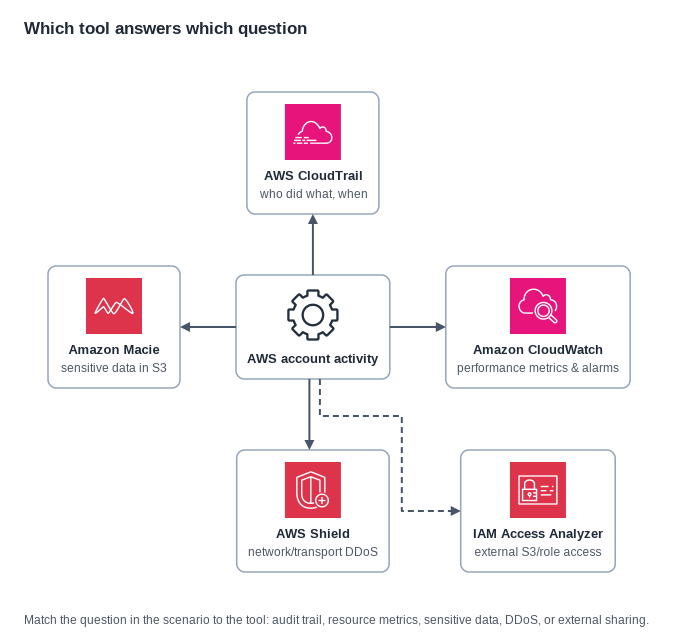
Account-wide tools: match the question to the tool
| Question in the scenario | Tool | What it actually does |
|---|---|---|
| "Who did what, and when?" | AWS CloudTrail | Captures a record of AWS account activity (API calls, console/CLI actions) for "governance, and compliance" |
| "Is a resource's performance normal?" (e.g., disk write spikes) | Amazon CloudWatch | Instance-level metrics — EC2 sends DiskWriteBytes/DiskReadBytes and other metrics to CloudWatch, with alarms for real-time spikes |
| "Is there sensitive data sitting in S3?" | Amazon Macie | "discovers sensitive data by using machine learning," generating findings per S3 object/bucket |
| "Is an S3 bucket or IAM role shared outside the account?" | AWS IAM Access Analyzer | Its external access analyzer identifies "resources in your organization and accounts, such as Amazon S3 buckets or IAM roles, shared with an external entity" |
| "Stop a network/transport-layer flood" | AWS Shield | Shield Standard "defends against the most common, frequently occurring network and transport layer DDoS attacks" (Layer 3/4) |
Two pairs are easy to swap by mistake:
- CloudTrail vs. CloudWatch — CloudTrail is the activity/audit log (who, what action); CloudWatch is performance monitoring (metrics, alarms). A "disk write spike" question is CloudWatch, not CloudTrail.
- Shield vs. WAF — Shield covers the network/transport layers (L3/L4); AWS WAF covers the application layer (L7, e.g., HTTP request filtering). "Network layer DDoS" → Shield specifically.
Infrastructure as code and cost tools
- AWS CloudFormation — a template describes the resources to create, and "CloudFormation takes care of provisioning" them; the same template can be reused "to create your resources in a consistent and repeatable" way. It reduces provisioning time through automation — it cannot transfer infrastructure to another company, reuse on-premises hardware, or make resources free.
- AWS Compute Optimizer and AWS Cost Explorer (rightsizing recommendations) are the pair for optimizing already-running EC2 resources: Compute Optimizer gives "recommendations to help you choose optimal configurations for over-provisioned resources," while Cost Explorer's rightsizing view surfaces the same kind of over-provisioned or idle instances from billing data. Neither Elastic Beanstalk (deployment), Amazon Detective (security investigation), nor Billing Conductor (custom billing groups) does this job.
Exam traps
- Discovery vs. Evaluator vs. DMS/DataSync/Snowmobile: Discovery Service only assesses; Migration Evaluator only costs out; DataSync/DMS/Snowmobile are the ones that actually move data — and among those three, pick by what moves (files/storage vs. databases vs. offline bulk, no-internet).
- "No internet connection" for a very large migration → Snowmobile, not DataSync (which is online) or Direct Connect (which is a network link, not a migration tool).
- Replatforming a self-managed database onto its AWS managed equivalent (e.g., MySQL: RDS for MySQL) is Replatform, not Rehost (no change) or Refactor (AWS discourages refactor for large migrations).
- "Keep full control of guest-OS patching" → EC2 only. Every other compute option in this chapter shifts that responsibility to AWS.
- S3 Versioning (delete/overwrite protection) vs. Intelligent-Tiering (cost via access-pattern changes) — these solve different problems; don't substitute one for the other.
- EBS is single-instance block storage; EFS is the shared, concurrent NFS file system — "mountable by many compute resources at once" is the EFS signal.
- Transit Gateway is the hub/cloud router; Direct Connect is just the dedicated link — a "simplify peering between many VPCs" question wants Transit Gateway.
- CloudTrail (who/what action) vs. CloudWatch (performance metrics) — a disk, CPU, or network metric question is always CloudWatch.
- Shield (network/transport layer DDoS) vs. WAF (application layer, L7) — match the layer named in the question.
- Aurora does not support SQL Server — if the engine is SQL Server, RDS is the managed option, not Aurora.
Docs
- What is AWS DataSync?
- What is Serverless Computing?
- AWS Snowmobile
- How AWS Transit Gateway works
- AWS Fargate
- What Is Amazon Neptune?
- What is AWS Direct Connect?
- What is AWS Application Discovery Service?
- Using AWS Identity and Access Management Access Analyzer
- What is SDK (Software Development Kit)
- About the migration strategies (7 Rs)
- Amazon SQS FIFO queues
- What is Amazon Simple Queue Service?
- Amazon QuickSight
- AWS Shield Standard overview
- What Is AWS CloudTrail?
- Amazon Macie User Guide
- AWS Application Composer is now generally available
- What is AWS Database Migration Service?
- What is Amazon RDS?
- Retaining multiple versions of objects with S3 Versioning
- AWS Well-Architected Framework: Shared responsibility
- Managing storage costs with Amazon S3 Intelligent-Tiering
- What is Amazon Elastic File System?
- Amazon EFS
- CloudWatch metrics that are available for your instances
- What is an Application Load Balancer?
- What is AWS CloudFormation?
- Migration Evaluator features
- AWS Compute Optimizer
- What Is Amazon CloudFront?
- What Is AWS Elastic Beanstalk?
- What is Amazon Redshift Serverless?