Exams / CLF-C02 / D4 Security and Compliance
Security and Compliance #2: The shared responsibility model, IAM roles and AWS STS
- Exam domain: Content Domain 2: Security and Compliance
This pass is dominated by one idea tested from a dozen different angles — the AWS shared responsibility model — plus the small set of security services (IAM roles/STS, Security Hub, GuardDuty, Macie, WAF, Trusted Advisor, Artifact, Backup, Service Catalog) that show up whenever a scenario asks "which service does X."
The shared responsibility model: "of" the cloud vs. "in" the cloud
AWS splits security into two sides. Security "of" the cloud is AWS's job: the physical facilities, the global network, and the virtualization layer (hypervisor/host OS). Security "in" the cloud is the customer's job: everything they run or configure on top of that — starting point depends on how abstracted the service is.
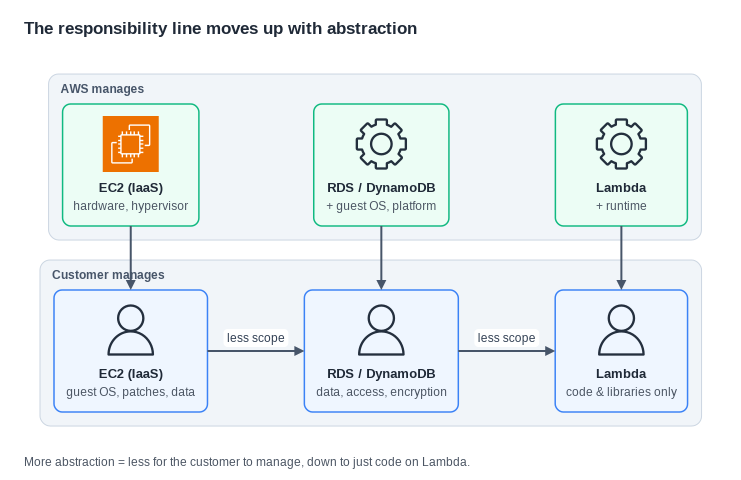
| Service type | AWS manages | Customer manages |
|---|---|---|
| IaaS (EC2) | Hardware, hypervisor, host OS | Guest OS, patches, security-group config, app software, data |
| Managed/abstracted (RDS, DynamoDB, S3) | Infrastructure layer and the operating system/platform | Data classification, access permissions (IAM), encryption options |
| Serverless (Lambda) | Hardware, networking, the Lambda runtime itself | Only the function's code and the libraries it ships with |
Two recurring exam patterns inside this topic:
- Patch management is explicitly called out as a shared control: AWS patches and fixes flaws in its own infrastructure; the customer patches the guest OS and applications it runs. For single-tenant managed services (RDS, ElastiCache, OpenSearch) AWS identifies/releases the patch and the customer schedules applying it; for multi-tenant managed services (DynamoDB, S3) AWS applies patches without any customer action at all.
- "Which responsibility is AWS's for a managed service" questions usually want "patch management of the underlying infrastructure/platform" — not EC2-guest-OS patching, not application-level IAM, not application data security, all of which stay with the customer no matter which service is used.
IAM roles and AWS STS: how a workload should authenticate
The exam's single most-repeated best-practice scenario is "an EC2 instance (or any AWS workload) needs to call another AWS service — how should it authenticate?" The answer is never a stored or hard-coded access key.
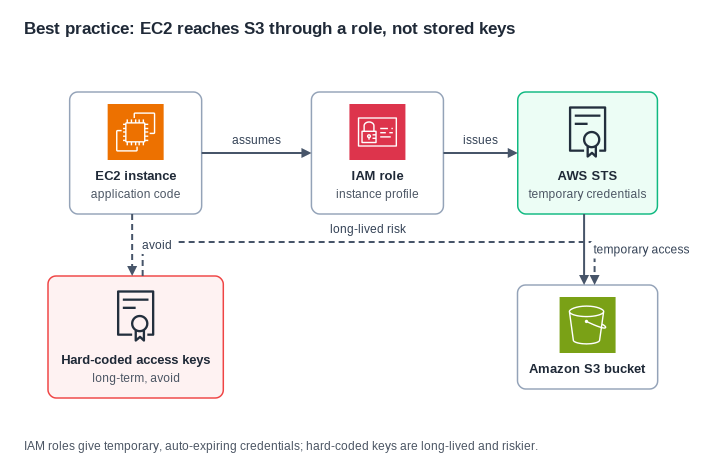
- IAM role — attached to the instance through an instance profile; the workload assumes the role instead of holding its own long-term credentials.
- AWS Security Token Service (STS) — the service that actually issues the temporary, limited-privilege credentials behind the assumed role (or a federated/cross-account session).
- Hard-coding a secret/access key in code, or storing one in a file on the instance, exposes a long-lived credential that keeps working even after the breach is discovered — the opposite of the best practice.
The same logic is why an IAM user can change their own console password through the AWS
Management Console or the AWS CLI (aws iam update-login-profile style commands) — but AWS KMS,
AWS RAM, and AWS Secrets Manager have no password-change interface at all; they manage encryption
keys, cross-account resource sharing, and application secrets respectively, not a user's own sign-in
password.
Network-layer vs. application-layer protection
| Control | Layer | Scope |
|---|---|---|
| Security groups | Instance | Stateful virtual firewall; separate inbound/outbound rules per EC2 instance |
| Network ACLs | Subnet | Stateless firewall applied to every instance in the subnet |
| AWS WAF | Application (L7) | Inspects HTTP(S) request content — blocks SQL injection, XSS, and other web exploits via rule statements |
| AWS Shield | Network/transport | DDoS protection only — no request-content inspection |
SQL injection is always a WAF question, never Shield, security groups, or NACLs — only WAF inspects the body of a web request for malicious SQL. Security groups and NACLs only ever filter by IP address and port, with zero visibility into request content.
Detection, aggregation, and compliance services
| Service | What it actually does | Exam trigger phrase |
|---|---|---|
| Amazon GuardDuty | Continuous, automatic threat/anomaly detection across accounts and workloads | "automatically monitor for threats" |
| Amazon Macie | Discovers and alerts on sensitive data (PII) stored in Amazon S3 | "monitor S3 for PII," "alert on sensitive data" |
| Amazon Inspector | Scans workloads for software vulnerabilities | feeds Security Hub; rarely the direct answer in this bank |
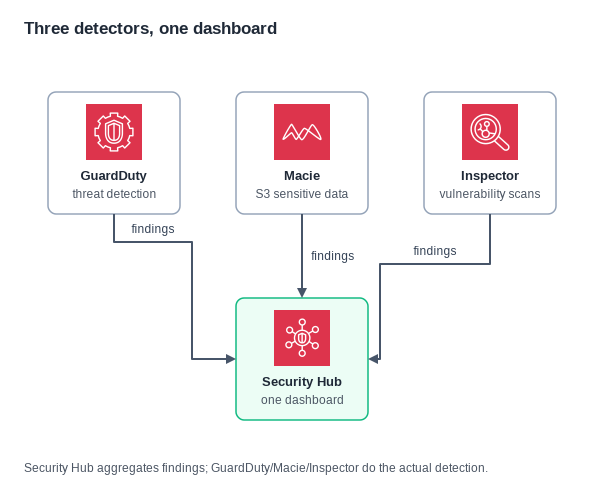
| AWS Security Hub | Consolidates findings from GuardDuty, Macie, Inspector, etc. into one dashboard | "manage alerts in one place," "consolidated dashboard" |
| AWS Trusted Advisor | Best-practice checks, including a dedicated security category | "security checks," "configuration gaps" |
| AWS CloudTrail | Records every API call: caller identity, time, source IP, parameters, response | "review user activity through API calls" |
| AWS Artifact | On-demand, self-service download of AWS's own compliance documents (PCI, SOC, ISO) | "PCI/compliance reports on demand" |
| AWS Backup | Centralizes and automates backup policies across EC2, EBS, FSx, RDS, DynamoDB, etc. | "single data-protection policy across services" |
| AWS Service Catalog | Centrally governs pre-approved IaC templates/products for compliant self-service deployment | "govern IaC templates for compliance" |
Security Hub does not detect anything itself — it only aggregates findings that GuardDuty, Macie, Inspector, and other integrated services already generated. A question asking for "one dashboard for security alerts" is Security Hub even if GuardDuty/Macie/Inspector are also listed as choices.
Artifact is a download service, not a request/ticket service — "contact AWS Support," "contact a TAM" are always wrong whenever a compliance report (PCI, SOC, ISO) is needed on demand.
MFA and account hardening
- Requiring MFA for privileged/root users is the standard "improve account security" answer — it adds a second factor beyond the password, so a leaked password alone can't take over the account.
- Creating more access keys (for the root user or for every privileged user) is a trap answer: it expands the pool of long-lived credentials that could leak, which is the opposite of a security improvement.
- Regularly reviewing, updating, and rotating access keys limits how long a leaked key stays usable — the correct answer whenever long-term keys are already in play. (Current IAM guidance goes further and prefers temporary credentials via roles over long-term keys altogether, but rotation is still the right answer among typical exam choices.)
- Amazon Cognito user pools can enable MFA for end users signing in to an application, which is a distinct, application-facing version of the same "require a second factor" pattern.
Exam traps
- Patch management is a shared responsibility — AWS patches its own infrastructure; the customer patches the guest OS/applications it runs. Don't mark it as 100% AWS or 100% customer.
- The shared-responsibility boundary shifts with abstraction: EC2 (customer owns the guest OS) → RDS/DynamoDB (AWS also owns the OS/platform): Lambda (customer owns only code/libraries).
- SQL injection → always AWS WAF. Security groups and NACLs can't inspect request content at all.
- Security groups are instance-level; NACLs are subnet-level — don't swap them.
- Security Hub aggregates; it does not generate findings. GuardDuty/Macie/Inspector do the actual detection work that Security Hub then displays in one dashboard.
- "Monitor S3 for PII and alert" is always Macie, never GuardDuty (general threat detection), Detective (investigation), or Shield (DDoS only).
- AWS Artifact, not AWS Support or a TAM, is how a company self-serves PCI/SOC/ISO compliance reports on demand.
- EC2 → other AWS service access should always go through an IAM role (and the temporary credentials STS issues behind it) — never hard-coded or stored long-term access keys.
- An IAM user can change their own password via the Console or the CLI only — KMS, RAM, and Secrets Manager have no password-change function at all.
- Creating more long-lived access keys never improves security — requiring MFA does.
- AWS Site-to-Site VPN is the fast (days, not weeks/months), no-physical-infrastructure way to connect on premises to AWS; Direct Connect needs a physical carrier circuit and takes much longer to provision.
Docs
- AWS Shared Responsibility Model
- Shared responsibility — AWS Well-Architected Security Pillar
- The pillars of the Well-Architected Framework
- Security in Amazon EC2
- IAM roles for Amazon EC2
- AWS Security Token Service API Reference
- Security best practices for Amazon S3
- Security in AWS Lambda
- Security and compliance in Amazon DynamoDB
- Managing passwords for IAM users
- IAM best practices — access keys
- AWS multi-factor authentication
- Managing security in Amazon Cognito user pools
- Amazon EC2 security groups
- AWS WAF SQL injection rule statement
- What is AWS Site-to-Site VPN?
- What is Amazon GuardDuty?
- Monitoring data security and privacy with Macie
- Introduction to AWS Security Hub CSPM
- AWS Support security checks (Trusted Advisor)
- Welcome — AWS CloudTrail API Reference
- What Is AWS Artifact?
- What is AWS Backup?
- What Is AWS Service Catalog?
- Shared responsibility model — Amazon WorkSpaces Core
- Introduction to backups — Amazon RDS