Exams / CLF-C02 / D1 Cloud Technology and Services
Cloud Technology and Services #5: Compute, Networking
- Exam domain: Content Domain 3: Cloud Technology and Services
Compute: how much control do you want?
| Need | Service | Control vs. operations |
|---|---|---|
| Full control of the underlying compute (instance selection, configuration, maintenance) | Amazon EC2 | Customer manages everything above the hypervisor |
| Managed container orchestration, can run on EC2 or Fargate capacity | Amazon ECS / Amazon EKS | Customer still manages capacity unless using Fargate |
| Serverless containers — no cluster sizing, scheduling, or host patching | AWS Fargate | AWS manages the underlying infrastructure |
| Run AWS infrastructure and services inside a customer's own data center | AWS Outposts | AWS-managed hardware, on-premises, for latency/data-residency/compliance needs |
"Full control - You manage the underlying Amazon EC2 instances directly, including instance selection, configuration, and maintenance." — Amazon ECS clusters
"Amazon Elastic Container Service (Amazon ECS) is a fully managed container orchestration service that helps you easily" [deploy, manage, and scale containerized applications.] — What is Amazon Elastic Container Service?
"AWS Fargate is a serverless, pay-as-you-go compute engine that lets you focus on building applications without managing servers." — AWS Fargate
"AWS Outposts is a family of fully managed services delivering AWS infrastructure and services to virtually any on-premises or edge location for a truly consistent hybrid experience." — AWS Outposts
"Outposts supports workloads and devices requiring low latency access to on-premises systems, local data processing, data residency, and application migration with local system interdependencies." — AWS Outposts
Exam trap: "Maximum control over infrastructure" always means EC2, never ECS/EKS/Fargate — those are orchestration or serverless layers that sit on top of compute, they don't maximize control over it. "Keep it on-premises but still get AWS management/console" is always AWS Outposts, not Dedicated Instances (still an AWS Region) or Fargate (serverless, not on-premises).
Amazon EC2 itself exists specifically because workloads differ: the service offers many instance types so a company can match CPU, memory, storage, and network capacity to each application rather than running everything on one shape of server.
"Amazon EC2 provides a wide selection of instance types optimized to fit different use cases." — Amazon EC2 instance types
"Instance types comprise varying combinations of CPU, memory, storage, and networking capacity" — Amazon EC2 instance types
Networking: how traffic gets in, and how it's filtered
A VPC needs an internet gateway attached before any resource inside it can send or receive internet traffic; a NAT gateway only lets private subnets reach out.
"An internet gateway enables resources in your public subnets (such as EC2 instances) to connect" [to the internet.] — Enable internet access for a VPC using an internet gateway
Two VPC firewalls work at different layers and with different statefulness:
| Network ACL | Security group | |
|---|---|---|
| Applies at | Subnet boundary | Instance (ENI) boundary |
| State | Stateless — inbound and outbound rules evaluated independently | Stateful — return traffic for an allowed request is automatically permitted |
| Rule type | Allow and deny rules, evaluated in numbered order | Allow rules only |
"NACLs are stateless, which means that information" [about an incoming request has no bearing on the outgoing response.] — Control subnet traffic with network access control lists
"The security group acts as a virtual firewall." — Control traffic to your AWS resources using security groups
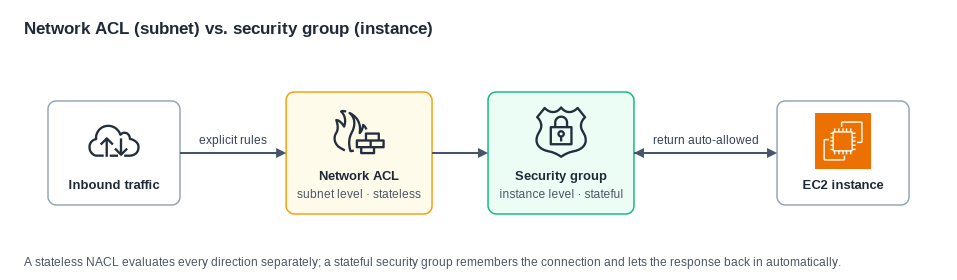
Exam trap: a question that says "stateless" or "subnet level" always wants the Network ACL; "stateful" or "per-instance" always wants the security group — AWS WAF and AWS Shield are unrelated (WAF filters web application layer requests on specific resource types, Shield mitigates DDoS).
For connecting a VPC to on-premises and to other VPCs:
| Need | Service |
|---|---|
| Dedicated, private circuit to AWS, bypassing the public internet | AWS Direct Connect |
| Centralized hub connecting many VPCs and on-premises networks (hub-and-spoke) | AWS Transit Gateway |
| Encrypted, quick-to-set-up connection that still crosses the public internet | AWS Site-to-Site VPN |
"Amazon VPC, bypassing internet service providers in your network path." — What is AWS Direct Connect?
"AWS Transit Gateway is a network transit hub used to interconnect virtual private clouds (VPCs)" [and on-premises networks.] — What is AWS Transit Gateway?
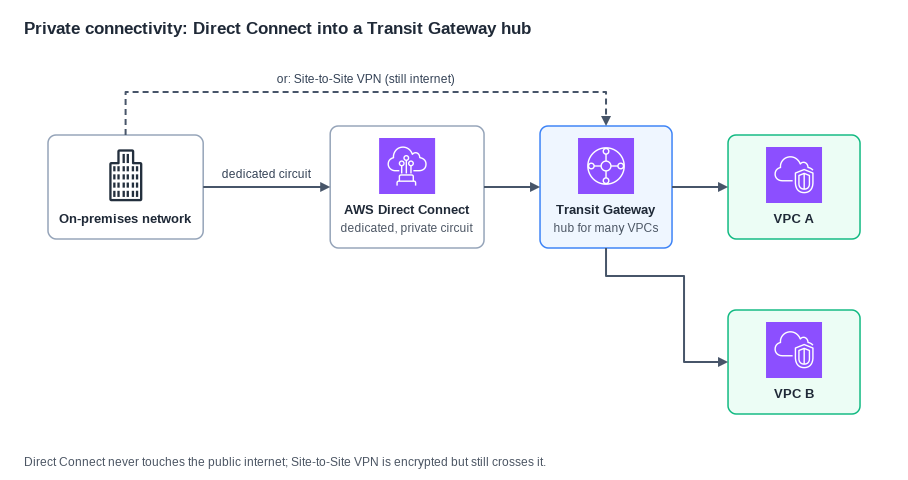
Exam trap: "consistent, low-latency, private connection for real-time data feeds" is Direct Connect, not VPN (crosses the internet, variable latency) or the public internet (unreliable). "Centralized gateway between multiple VPCs and on-premises" is Transit Gateway, not a Gateway VPC endpoint (private access to one service like S3/DynamoDB) or AWS PrivateLink (private access to a specific service/application across accounts).
Distributing and accelerating traffic
| Need | Service | Layer |
|---|---|---|
| Distribute HTTP/HTTPS traffic across instances, routing by host/path | Application Load Balancer | 7 (application) |
| Distribute raw TCP/UDP traffic at extreme performance | Network Load Balancer | 4 (transport) |
| Insert third-party virtual appliances transparently | Gateway Load Balancer | 3 (network) |
| Deliver content from edge locations close to end users, worldwide, cost-effectively | Amazon CloudFront | CDN |
| Route traffic to the closest AWS edge location, then across the AWS global network | AWS Global Accelerator | Edge-based routing |
"An Application Load Balancer functions at the application layer, the seventh layer of the Open Systems" [Interconnection (OSI) model.] — What is an Application Load Balancer?
"a worldwide network of data centers called edge locations." — How CloudFront delivers content
"network from the edge location that is closest to your users." — How AWS Global Accelerator works
Exam trap: "deploy an application nearer to end users" / "distribute images and videos worldwide with minimal latency, cost-effectively" always means CloudFront, not S3 cross-Region replication (duplicates storage, doesn't cache at the edge) or a VPN/PrivateLink (neither is a CDN). Among AWS's own services, CloudFront and Global Accelerator are the two that run on AWS's global edge-location network — Fargate, AWS Wavelength (5G edge, a different kind of "edge"), and Amazon VPC do not.
Storage and data transfer for very large or disconnected datasets
| Scenario | Service |
|---|---|
| Multi-petabyte to exabyte-scale offline migration, lowest operational overhead | AWS Snowmobile (truck-based, up to 100 PB per unit) |
| Collect data at sites with no internet connectivity, then physically ship it to AWS | AWS Snow Family (Snowball Edge) |
| Extend an existing physical tape backup library into the cloud, keep using existing backup software | AWS Storage Gateway — Tape Gateway |
| Give on-premises workloads SMB access to Windows file shares hosted in AWS, no new on-prem infrastructure | Amazon FSx File Gateway |
"Tape Gateway provides cloud-backed virtual tape storage." — What is Tape Gateway?
"Amazon FSx File Gateway (FSx File Gateway) is a new File Gateway type that provides low latency and" [efficient access to in-cloud FSx for Windows File Server file shares from your on-premises facility.] — What is Amazon FSx File Gateway
AWS S3 Express One Zone is the S3 storage class marketed specifically for single-digit millisecond object access — S3 Standard is low-latency but not engineered to guarantee that figure, and the Glacier tiers trade latency for lower archival cost.
"Amazon S3 Express One Zone is a high-performance, single-Availability Zone storage class purpose-built to deliver consistent single-digit millisecond data access for your most frequently accessed data and latency-sensitive applications." — S3 Express One Zone
Two services the exam still tests that AWS is retiring
-
AWS Snowball Edge is closed to new customers today, and AWS will discontinue support for all AWS Snowball devices on December 31, 2026 — new customers are pointed to AWS DataSync (online transfer) or AWS Data Transfer Terminal (physical transfer). The exam still expects Snow Family/Snowball Edge as the answer for a disconnected, remote-collection scenario.
"AWS Snowball Edge is no longer available to new customers." — What is Snowball Edge?
"On December 31, 2026, AWS will discontinue support for AWS Snowball devices in all AWS commercial Regions." — AWS Snowmobile
-
Amazon FSx File Gateway is also closed to new customers, though existing customers keep using it normally. The exam still expects it as the answer for "Windows file shares in AWS, no new on-premises infrastructure."
"customers of FSx File Gateway can continue to use the service normally." — What is Amazon FSx File Gateway
Databases: Multi-AZ, compatible engines, and where PostgreSQL can run
Multi-AZ deployment is the RDS feature that automatically provisions a primary plus a synchronous standby in another Availability Zone for automatic failover — read replicas are asynchronous and built for read scaling, not HA.
"When you create or modify your DB instance to run as a Multi-AZ deployment, Amazon RDS automatically provisions and maintains a synchronous "standby" replica in a different Availability Zone." — Multi-AZ deployments for Amazon RDS
PostgreSQL can be hosted on AWS in more than one way: as a managed, compatible engine on Amazon Aurora, or self-managed on Amazon EC2 (any software the customer chooses to install). It is not something S3 (object storage), OpenSearch (search/analytics), or EFS (a file system) provide.
"Amazon Aurora PostgreSQL is a fully managed, PostgreSQL–compatible, and ACID–compliant relational" [database engine] — Working with Amazon Aurora PostgreSQL
"An EC2 instance is a virtual server in the AWS Cloud." — Amazon EC2 instance types
Monitoring, automation, and governance
| Need | Service |
|---|---|
| Real-time performance metrics (e.g., CPU utilization) for EC2 | Amazon CloudWatch |
| Best-practice checks: cost optimization and security, among other categories | AWS Trusted Advisor |
| Template infrastructure once, deploy repeatedly and consistently | AWS CloudFormation |
| Scale that same template's stacks across many accounts/Regions in one operation | CloudFormation StackSets |
| Script AWS service calls for rapid, repeatable provisioning | AWS CLI |
"Amazon EC2 sends metrics to Amazon CloudWatch." — CloudWatch metrics available for your instances
"AWS Trusted Advisor helps you optimize costs, increase performance, improve security and resilience, and operate at scale in the cloud." — AWS Trusted Advisor
"Reuse your CloudFormation template to create your resources in a consistent and repeatable" [way.] — What is AWS CloudFormation?
"CloudFormation StackSets extends the capability of stacks by allowing you to create, update, or delete" [stacks across multiple accounts and AWS Regions with a single operation.] — Managing stacks across accounts and Regions with StackSets
"With just one tool to download and configure, you can control multiple AWS services from the command line and automate them through scripts." — AWS CLI
Exam trap: AWS Config tracks configuration history, CloudTrail logs caller activity — neither reports live performance metrics like CPU utilization; that's CloudWatch. Trusted Advisor's hourly service-limit refresh and cost/security checks are specific, named advantages — IAM approval management and SQS access are not things Trusted Advisor does.
Analytics and ML building blocks
| Need | Service |
|---|---|
| Serverless ETL: discover, prepare, move, integrate data from many sources | AWS Glue |
| Run standard SQL directly against objects already in S3, no data movement | Amazon Athena |
| Automatically classify unstructured text/documents into custom categories (NLP) | Amazon Comprehend |
"AWS Glue is a serverless data integration service that makes it easy for" [analytics users to discover, prepare, move, and integrate data from multiple sources.] — What Is AWS Glue?
"You can run SQL queries using Amazon Athena on data sources that are registered with the" [AWS Glue Data Catalog.] — Run SQL queries in Amazon Athena
"Use custom classification to organize your documents into categories (classes) that you" [define.] — Custom classification - Amazon Comprehend
Migration strategies: the 6 R's, by effort
| Strategy | What changes | Typical trigger |
|---|---|---|
| Rehost | Nothing — lift-and-shift | Fast migration at scale, no compatibility blockers |
| Replatform | A few cloud optimizations | "Lift-tinker-and-shift"; e.g. move a VM's SQL Server to RDS for SQL Server |
| Repurchase | Move to a different product, usually SaaS | Legacy app can't run in the cloud as-is but a SaaS/cloud-native equivalent exists |
| Refactor / re-architect | Full redesign, e.g. monolith → microservices | Need cloud-native capabilities the current architecture can't reach |
| Retire | Nothing migrates — decommissioned | App no longer needed |
"Repurchasing — Moving to a different product." — 6 Strategies for Migrating Applications to the Cloud
"This approach breaks down a monolithic application into smaller services, where each service serves a single purpose and is deployed as a container." — Re-architecting as microservices in Linux containers
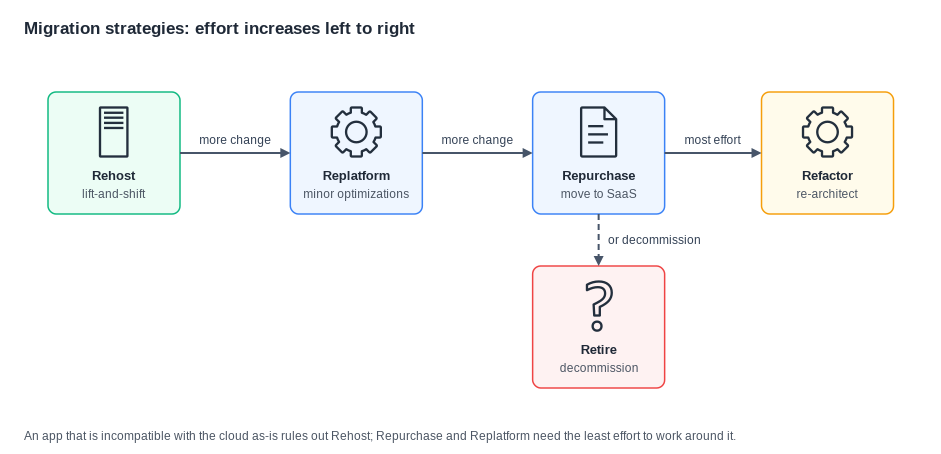
Exam trap: when a workload is incompatible with the cloud outright, Rehost is ruled out by definition (it moves the app unchanged) and Refactor demands the most redevelopment — so the least-effort fixes are always Repurchase and Replatform, not Retire (abandons it) and not Refactor (too much work). "Converting a monolith into microservices" is always Refactor, never Rehost/Replatform/Repurchase.
Exam traps
- "Maximum control over container compute" = EC2; Fargate is serverless, ECS/EKS are orchestration layers that can run on either.
- "Keep EC2-hosted workloads on-premises for compliance" = AWS Outposts — not Dedicated Instances (still in an AWS Region) and not Fargate.
- An internet gateway must be attached to a VPC before any inbound/outbound internet traffic is possible; a NAT gateway only covers outbound from private subnets.
- Network ACL = subnet-level, stateless (both directions need explicit rules); security group = instance-level, stateful (return traffic auto-allowed). Neither is AWS WAF (web app layer) or AWS Shield (DDoS).
- Direct Connect never touches the public internet; Site-to-Site VPN is encrypted but still does. Transit Gateway is the hub-and-spoke answer for "centralized gateway, many VPCs + on-premises."
- Application Load Balancer = Layer 7/HTTP(S); Network Load Balancer = Layer 4/TCP-UDP; Gateway Load Balancer = Layer 3/third-party appliances.
- CloudFront and AWS Global Accelerator are the two services built on AWS's global edge-location network — the answer whenever a question wants content or traffic near end users.
- AWS Snowmobile = truck-based, exabyte-scale, lowest operational overhead for a multi-petabyte migration; AWS Snow Family (Snowball Edge) = portable device for disconnected/remote-site data capture. Both are being wound down (Snowball support ends 2026-12-31) but the exam still expects them.
- Tape Gateway extends a physical tape library into the cloud while keeping existing backup software; FSx File Gateway gives on-premises SMB access to FSx for Windows File Server with no new on-prem infrastructure (also closed to new customers, but existing usage continues).
- S3 Express One Zone is the storage class marketed for single-digit-millisecond access — not S3 Standard or either Glacier tier.
- Multi-AZ deployment = automatic primary + synchronous standby for failover; read replicas are asynchronous, for read scaling only.
- PostgreSQL can run on Amazon Aurora (managed, compatible engine) or Amazon EC2 (self-managed) — not on S3, OpenSearch, or EFS.
- On a self-managed EC2 database, the customer handles backups, DB software patches, and guest OS patches; AWS's documented piece is the underlying infrastructure (and, per the exam's framing, the initial OS install baked into its AMIs).
- CloudWatch = live performance metrics; AWS Config = configuration history; CloudTrail = caller activity log — don't swap them.
- Trusted Advisor gives cost-optimization recommendations and security checks (plus performance, resilience, operational excellence, and hourly-refreshed service-limit checks) — it doesn't manage IAM approvals or grant SQS access.
- CloudFormation templates infrastructure; StackSets extend that to many accounts/Regions in one operation; the AWS CLI is the scripting tool for calling AWS APIs directly.
- AWS Glue discovers/prepares/integrates data (serverless ETL); Amazon Athena runs SQL directly on S3 objects; Amazon Comprehend classifies text/documents with NLP.
- Of the 6 R's, an app incompatible with the cloud rules out Rehost; the least-effort fixes are Repurchase and Replatform. "Monolith to microservices" is always Refactor.
Docs
- Amazon ECS clusters
- What is Amazon Elastic Container Service?
- AWS Fargate
- AWS Outposts
- Amazon EC2 instance types
- Enable internet access for a VPC using an internet gateway
- Control subnet traffic with network access control lists
- Control traffic to your AWS resources using security groups
- What is AWS Direct Connect?
- What is AWS Transit Gateway?
- What is an Application Load Balancer?
- How CloudFront delivers content
- How AWS Global Accelerator works
- AWS Snowmobile
- What is Snowball Edge?
- What is Tape Gateway?
- What is Amazon FSx File Gateway
- S3 Express One Zone
- Multi-AZ deployments for Amazon RDS
- Working with Amazon Aurora PostgreSQL
- AWS shared responsibility model
- CloudWatch metrics available for your instances
- AWS Trusted Advisor
- What is AWS CloudFormation?
- Managing stacks across accounts and Regions with StackSets
- AWS CLI
- What Is AWS Glue?
- Run SQL queries in Amazon Athena
- Custom classification - Amazon Comprehend
- 6 Strategies for Migrating Applications to the Cloud
- Re-architecting as microservices in Linux containers