Exams / CLF-C02 / D3 Billing, Pricing, and Support
Billing, Pricing, and Support #3: Four cost-management tools, four different jobs, Rightsizing in practice (multi-select pattern)
- Exam domain: Content Domain 4: Billing, Pricing, and Support
This pass covers three themes: matching a workload to the cheapest AWS compute/storage option (EC2 purchasing options again, plus Lambda-vs-servers and S3 storage-class scenarios), moving large amounts of data to AWS at the lowest cost (Snowball Edge vs Snowmobile), and the cost-visibility and support tooling that completes the domain: Pricing Calculator, Cost Explorer, AWS Budgets, the Cost and Usage Report, and what each AWS Support tier actually unlocks.
Four cost-management tools, four different jobs
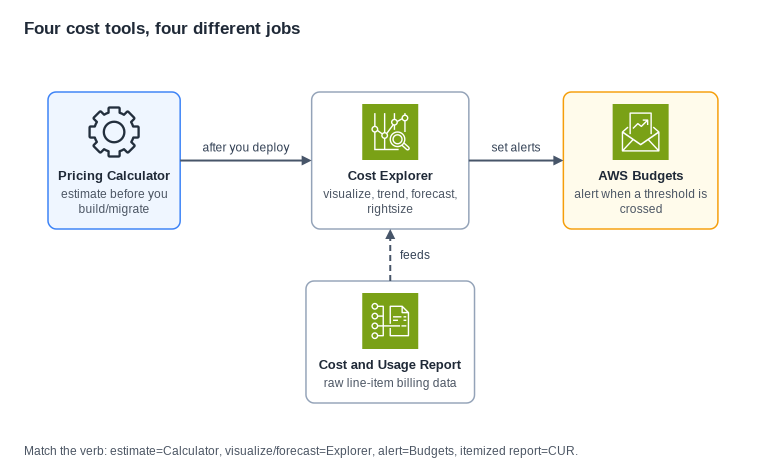
| Tool | Answers | Key quote |
|---|---|---|
| AWS Pricing Calculator | "Estimate the cost of this before I build/migrate it" | "AWS Pricing Calculator is a free web-based planning tool that you can use to create cost estimates for using AWS services"; "Model your solutions before building them" |
| AWS Cost Explorer | "Visualize, analyze, and forecast actual spend" (and surface rightsizing opportunities) | "An easy way to visualize, understand, and manage your AWS costs and usage over time" |
| AWS Budgets | "Track usage/cost and alert me when a threshold is crossed" (cost, usage, RI/Savings Plans coverage) | "You can use AWS Budgets to track and take action on your AWS costs and usage"; "Use AWS Budgets to set custom budgets based on your costs, usage, reservation" utilization, and coverage |
| AWS Cost and Usage Report (CUR) | "Give me the raw, itemized line-level billing data" for custom analysis or finance pipelines | the most granular, non-visual export of billing data — not a dashboard or calculator |
Rightsizing (matching provisioned capacity to observed demand) is a Cost Explorer feature: its rightsizing recommendations "identify cost-saving opportunities by downsizing or terminating instances in Amazon EC2" — this is the tool that tells you to shut down an idle instance, not Trusted Advisor or Compute Optimizer in this exam's phrasing of the scenario. AWS Budgets Reports can also deliver recurring (daily/weekly/monthly) automated cost-and-usage reports by email, which is the feature finance teams use for "automatically generate a report each quarter."
Rightsizing in practice (multi-select pattern)
Two actions genuinely rightsize a workload to its observed usage: choosing an EC2 instance type from past utilization data, and using S3 Lifecycle policies to move infrequently accessed objects to a cheaper storage class. Switching database engines (RDS → DynamoDB), turning on Multi-AZ, or replacing EC2 with Elastic Beanstalk are architecture or availability changes, not rightsizing — they don't match capacity to measured demand.
EC2 purchasing options: the same decision, more scenarios
The rule from the previous chapter still governs every scenario here: how long does the workload run, and can it be interrupted?
| Scenario pattern | Correct option | Why |
|---|---|---|
| Runs continuously for a fixed term (12 months, 3 years) | Reserved Instances | "Reduce your Amazon EC2 costs by making a commitment to a consistent instance" configuration for 1 or 3 years |
| Flexible timing, can tolerate interruption, lowest cost wins (batch ML, stateless services, test/dev) | Spot Instances | "Spot Instances are recommended for stateless, fault-tolerant, flexible applications"; Amazon EC2 "can interrupt your Spot Instance when it needs it back" |
| Unpredictable workload, no long-term commitment, don't know the pattern yet | On-Demand Instances | "We recommend that you use On-Demand Instances for applications with short-term, irregular workloads" |
| Needs dedicated physical hardware (licensing/compliance) | Dedicated Hosts/Instances | can help address compliance requirements tied to physical hardware |
AWS Lambda vs. always-on compute: a workload invoked only a few times a day with each run under 5 minutes is the textbook case for Lambda, not EC2/ECS/EKS — "AWS Lambda is a serverless compute service that charges you only for what you use" (per invocation and execution duration), so there is no idle-capacity cost between the rare invocations.
S3 storage classes: known pattern vs. "rarely but needs it NOW"
Building on the Intelligent-Tiering/Glacier split from the previous chapter, this pass adds the instant-retrieval archive tier:
| Access pattern | Class | Why |
|---|---|---|
| Accessed ~twice a year, but must come back instantly when it is | S3 Glacier Instant Retrieval | "Amazon S3 Glacier Instant Retrieval is an archive storage class that delivers the lowest-cost storage for long-lived data that is rarely accessed and requires retrieval in milliseconds" — cheaper than Standard-IA for data accessed about quarterly or less |
| Rarely accessed, small objects, must be retrieved immediately (not archival) | S3 Standard-IA | objects remain available "for millisecond access (similar to the S3 Standard storage class)" at a lower storage price than Standard |
| Access pattern unknown or changes over time | S3 Intelligent-Tiering | monitors access and moves objects between tiers automatically |
The trap: both Glacier Instant Retrieval and Standard-IA give millisecond access, so the deciding word is how rarely the data is touched — "twice a year"/"quarterly or less" points to Glacier Instant Retrieval, while ordinary infrequent-but-regular access (daily-to-monthly audio/media files) points to Standard-IA.
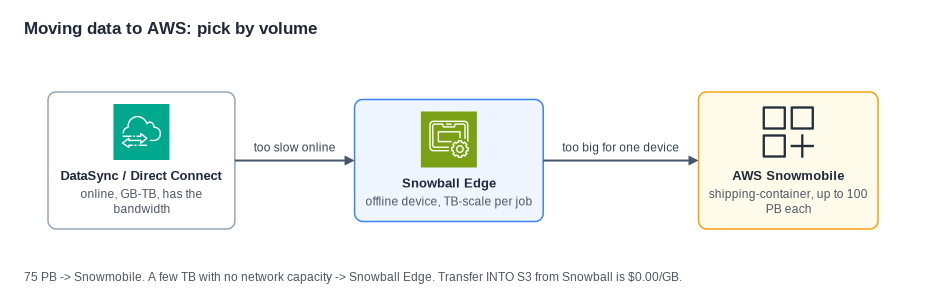
Moving data to AWS: pick by volume, not by habit
Two more offline transfer options complete the Snow Family picture:
- AWS Snowball Edge — a physical device ordered as a job; AWS charges a per-job service fee, optional per-day fees after the free usage period, and shipping — but "Data transfer IN to Amazon S3 is $0.00 per GB" once the device is plugged back in. Right-sized for terabyte-to-low-petabyte, one-off or recurring transfers where the network link is too slow or absent.
- AWS Snowmobile — "an exabyte-scale data transfer service": "You can transfer up to 100PB per Snowmobile, a 45-foot long ruggedized shipping container, pulled by a semi-trailer truck." This is the answer whenever the stated volume is in the tens-of-petabytes-or-more range (e.g., 75 PB) — far beyond what any number of Snowball Edge jobs would move cost-effectively.
What each AWS Support tier unlocks
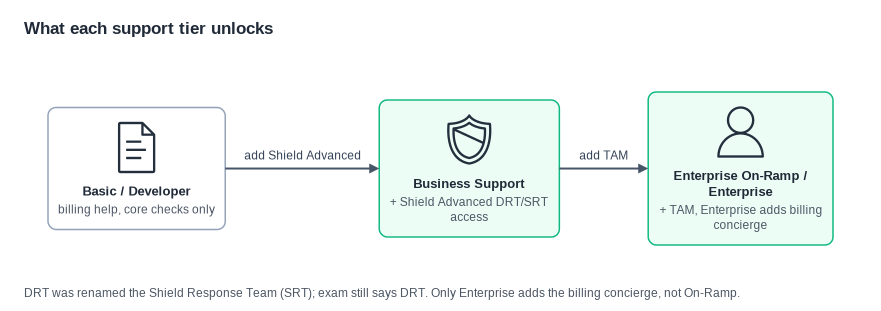
Beyond the Trusted Advisor checks covered in the previous chapter, three more tier-gated perks show up on the exam:
- AWS Shield Advanced's DDoS response team, at Business Support or above — "For customers on Business or Enterprise support plans, AWS Shield Advanced gives you 24/7 access to the SRT, which can be engaged before, during, or after a DDoS attack." Terminology note: what the exam still calls the "DDoS Response Team (DRT)" AWS now calls the AWS Shield Response Team (SRT) — same capability, renamed. Shield Advanced itself (not Shield Standard, which is free and automatic for everyone) plus a qualifying Support plan is what's required; AWS WAF alone does not provide this.
- A designated Technical Account Manager (TAM), at Enterprise On-Ramp and Enterprise Support — "A designated Technical Account Manager (TAM)" is listed as a benefit of both tiers; Developer and Business Support do not include one.
- A billing "concierge," at Enterprise Support only — the Enterprise tier adds a "Designated Senior Billing and Account Specialist" (a white-glove billing concierge) that Enterprise On-Ramp does not include, even though On-Ramp shares the TAM benefit.
Current-state note: AWS is retiring the classic Developer, Business, and Enterprise On-Ramp tiers — "On January 1, 2027, AWS will discontinue Enterprise On-Ramp", consolidating customers into Business Support+ and Enterprise Support. The exam still tests the classic five-tier structure; keep answering with Developer/Business/Enterprise On-Ramp/Enterprise until that changes.
Economic benefits: naming the right "why"
Several questions ask which cloud characteristic makes a scenario cost-effective — the exam wants a specific mechanism, not a general cloud virtue:
- Consumption-based (pay-as-you-go) pricing — you pay only "when you consume computing resources, and pay only for how much" you use, eliminating payment for idle, over-provisioned capacity.
- Economies of scale — AWS's aggregate demand across all customers means "AWS can achieve higher economies of scale, which translates into lower pay as-you-go" prices than any single company buying its own hardware could get.
- Elasticity — the ability to "scale up and down as required with only a few minutes'" notice is what makes a highly dynamic/spiky workload (e.g., an ecommerce site) cost-effective in the cloud: capacity tracks demand instead of being sized for peak load year-round.
- Eliminating on-premises data-center costs — moving to AWS means a company stops "spending money running and maintaining data" centers (power, cooling, physical security, hardware refresh cycles).
Not economic benefits: perpetual software licenses and "bring your own hardware" describe the on-premises model, not the cloud; reliability, security, and high availability are real cloud advantages but are not what specifically drives cost-effectiveness in these scenarios; and "AWS Enterprise Support at no additional cost" is false — Enterprise Support is a paid plan.
Exam traps
- Rightsizing = matching capacity to observed usage: EC2 instance choice from utilization history, S3 Lifecycle to a cheaper tier. Switching DB engines, enabling Multi-AZ, or moving to Elastic Beanstalk are not rightsizing actions.
- Cost Explorer's rightsizing recommendations are the thing that tells you to terminate an idle instance — not a database/OS/language choice, which is outside its scope.
- Lambda beats EC2/ECS/EKS for short, infrequent invocations (minutes-long, a few times a day): no idle-capacity cost between runs.
- S3 Glacier Instant Retrieval ("rarely," ~quarterly or less, but needs millisecond access) is cheaper than Standard-IA for that specific access frequency; Standard-IA is for data accessed somewhat more often but still infrequently.
- 75 PB+ one-time migration → Snowmobile (up to 100 PB per unit); terabyte-to-petabyte jobs without network capacity: Snowball Edge. Data transferred into S3 from Snowball is $0.00/GB; data out of S3, and device usage itself, are chargeable.
- DRT = SRT: the exam's "AWS DDoS Response Team (DRT)" is AWS's current "AWS Shield Response Team (SRT)" — same Business/Enterprise Support + Shield Advanced requirement, new name.
- TAM: Enterprise On-Ramp AND Enterprise. Concierge: Enterprise only (not On-Ramp).
- Name the mechanism, not the virtue: consumption-based pricing and economies of scale explain lower cost; elasticity + pay-as-you-go explain cost-effectiveness for variable workloads; reliability/HA/ security are not cost arguments.
Docs
- Getting started - AWS Pricing Calculator
- What is AWS Pricing Calculator?
- Generate an estimate in AWS Pricing Calculator
- Analyzing your costs and usage with AWS Cost Explorer
- AWS Cost Explorer (product page)
- Optimizing your cost with rightsizing recommendations
- Managing your costs with AWS Budgets
- Best practices for AWS Budgets
- Reporting your metrics with AWS Budgets Reports
- Creating a usage budget
- Cost optimization - Amazon Simple Storage Service
- Amazon S3 storage classes
- S3 Glacier Instant Retrieval
- Amazon EC2 billing and purchasing options
- Purchasing On-Demand Instances for Amazon EC2
- Amazon EC2 Spot Instances
- Best practices for Amazon EC2 Spot
- Spot Instance interruptions
- How billing works with Reserved Instances
- AWS Lambda pricing
- AWS Snowball Pricing
- Move Exabyte-Scale Data Sets with AWS Snowmobile
- AWS Shield Advanced features
- AWS Support Plans (user guide)
- Compare AWS Support Plans
- Six advantages of cloud computing
- AWS Cloud Economics