Exams / CLF-C02 / D1 Cloud Technology and Services
Cloud Technology and Services #4: VPC networking, Private isolation, connectivity, and compute access
- Exam domain: Content Domain 3: Cloud Technology and Services
VPC networking: who filters what
| Feature | Scope | Direction | Stateful? |
|---|---|---|---|
| Security group | One or more individual instances/ENIs | Rules you attach | Stateful — return traffic is auto-allowed |
| Network ACL (NACL) | The whole subnet (every instance in it) | Separate inbound/outbound rules, numbered | Stateless — return traffic needs its own rule |
| Internet gateway | The whole VPC | Enables VPC ↔ internet communication | — |
Both security group rules and NACL rules accept an IP range in CIDR block notation as the source/destination.
"A range of IPv4 addresses, in CIDR block notation." — Security group rules
"If you add a rule using a command line tool or the Amazon EC2 API, the CIDR range is" — Network ACL rules
"The security group acts as a virtual firewall." — Control traffic with security groups
"A network access control list (ACL) allows or denies specific inbound" [or outbound traffic at the subnet level] — Control subnet traffic with network ACLs
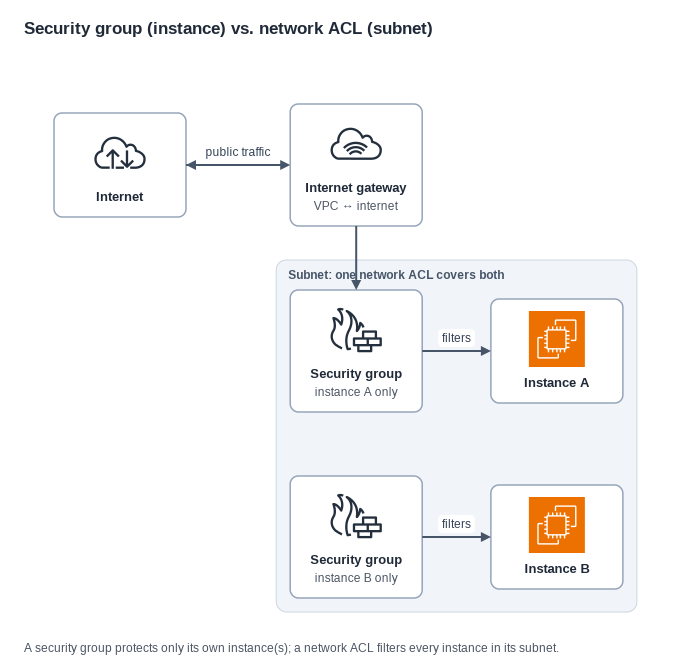
An internet gateway's only job is to let a VPC and the internet talk to each other — it never imposes bandwidth limits and it never load balances traffic across instances.
"that allows communication between your VPC and the internet." — Enable internet access for a VPC using an internet gateway
Exam trap: "a firewall for a single instance, not affecting other instances in the same subnet" is always a security group; "affects every instance in the subnet" is always a network ACL.
Private isolation, connectivity, and compute access
- Amazon VPC is the answer for "a company's own logically isolated section of the AWS Cloud" — a customer-defined virtual network, IP range, subnets, and routing.
- AWS Direct Connect is the private, dedicated connection from on-premises infrastructure to AWS that bypasses the public internet entirely.
- An IAM role attached to an EC2 instance is the secure way to let applications on that instance call other AWS services: it supplies automatically rotated temporary credentials, so no long-term access keys or SSH keys need to live on the instance.
"With Amazon Virtual Private Cloud (Amazon VPC), you can launch AWS resources in a logically isolated virtual" [network that you've defined] — What is Amazon VPC?
"Direct Connect links your internal network to a Direct Connect location over a standard Ethernet" [connection] — What is AWS Direct Connect?
"Instead, you can and should use an IAM role to manage temporary credentials for applications that run on an Amazon EC2 instance." — Use an IAM role to grant permissions to applications running on Amazon EC2 instances
Exam trap: "secure access from EC2 to other AWS services" is an IAM role, never IAM user SSH keys — storing long-term credentials on an instance is exactly what a role avoids.
IAM policies: managed vs. customer-managed
AWS managed policies are created and maintained by AWS; a customer cannot edit one. When an AWS managed policy is missing a permission a team needs, the fix is to create a customer managed policy with exactly the required permissions and attach it — not to try to modify the AWS managed policy.
"You can create customer managed policies" — Define custom IAM permissions with customer managed policies
"AWS managed policies are created and managed by AWS, and you" [can't change their permissions] — Define custom IAM permissions with customer managed policies
Compute elasticity: Auto Scaling and purchasing options
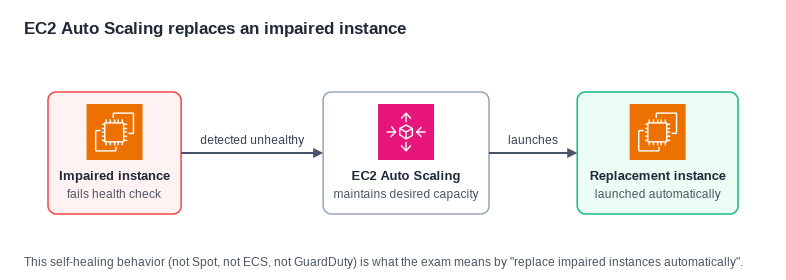
Amazon EC2 Auto Scaling does two distinct things, both tested:
- Automatically adds/removes instances as demand on the application rises and falls (elasticity in action).
- Automatically replaces impaired instances that fail health checks, to preserve the group's desired capacity.
"as demand on your application increases or decreases." — What is Amazon EC2 Auto Scaling?
"When Amazon EC2 Auto Scaling determines that an InService instance is unhealthy, it replaces" [it] — Health checks for instances in an Auto Scaling group
For a fault-tolerant, interruption-tolerant workload (batch jobs, flexible/stateless apps), Spot Instances give the largest possible discount versus On-Demand — up to 90% — because they use spare EC2 capacity that can be reclaimed at any time.
"Amazon EC2 Spot Instances let you take advantage of unused EC2 capacity in the AWS cloud and are available at up to a 90% discount compared to On-Demand prices." — Amazon EC2 Spot Instances
"Spot Instances are ideal for fault-tolerant, flexible workloads such as batch processing, data analytics, CI/CD pipelines, and stateless web servers." — Choosing a purchasing option for Amazon EC2
Exam trap: among On-Demand, Standard/Convertible Reserved Instances, Dedicated Hosts, and Spot — Spot is always the one with the deepest discount, and it is only appropriate when the question says the workload tolerates interruption.
Amazon EC2 instance store is the ephemeral storage type: data survives a reboot but is erased on stop, hibernate, or terminate. EBS, EFS, and S3 are all durable and outlive the instance.
"the data does not persist if the instance is stopped, hibernated, or terminated." — Data persistence for Amazon EC2 instance store volumes
Resilience and design principles
Loose coupling is the Well-Architected principle that keeps an application available when one component fails: independent components communicate through queues/APIs so a failure in one doesn't cascade into the others. It is distinct from disposable resources (easy replacement), automation (less manual work), and rightsizing (cost optimization).
"Implementing loose coupling between dependencies isolates a failure in one from impacting another." — REL04-BP02 Implement loosely coupled dependencies
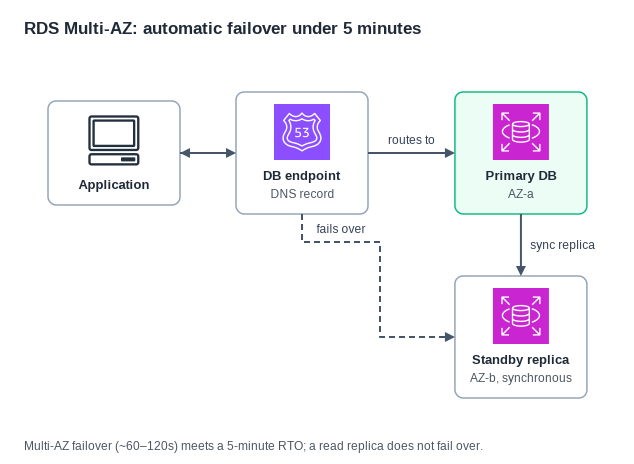
For a managed relational database that needs an automatic, fast (<5 min) failover, use an RDS Multi-AZ deployment: a synchronous standby in another AZ, with automatic failover in roughly 60-120 seconds via a DNS record change. A read replica, a snapshot, or a CloudFormation template do not provide this automatic failover.
"Amazon RDS handles failovers automatically so you can resume database operations as quickly as possible without administrative" [intervention] — Failing over a Multi-AZ DB instance for Amazon RDS
Amazon RDS as a whole is the managed relational database service that handles automated backups and snapshots on the customer's behalf.
"Amazon RDS manages backups, software patching, automatic failure detection, and" [failover] — What is Amazon RDS?
Storage services: match the protocol and the use case
| Need | Service |
|---|---|
| Nonrelational (NoSQL), serverless, no hardware/software to manage | Amazon DynamoDB |
| Fully managed Windows file server, native SMB | Amazon FSx for Windows File Server |
| Migrate an on-premises NFS share into Amazon S3 objects | Amazon S3 File Gateway (NFS v3/v4.1 + SMB in, S3 objects out) |
"As a fully managed database service, DynamoDB handles the undifferentiated heavy" [lifting] — What is Amazon DynamoDB?
"and for the industry-standard Server Message Block (SMB) protocol to access file storage" — What is FSx for Windows File Server?
"You can store and retrieve files directly using the NFS version 3 or 4.1" [protocol] — What is Amazon S3 File Gateway
Exam trap: FSx File Gateway caches an existing FSx for Windows share (SMB); it is not the answer for a generic on-premises NFS workload — that is S3 File Gateway.
Migrating databases
- On-premises PostgreSQL → Amazon RDS: use AWS DMS, which supports migrating data from a PostgreSQL source into RDS (or another PostgreSQL target).
- AWS Application Discovery Service, AWS DMS, AWS Application Migration Service, and AWS Migration Hub each solve a different step: discover on-prem inventory, migrate database data, lift-and-shift servers, and track migrations across tools, respectively — don't swap them.
"You can migrate data from one or many PostgreSQL databases using AWS DMS." — Using a PostgreSQL database as an AWS DMS source
Migration planning and expert help
AWS Application Discovery Service collects usage and configuration data about on-premises servers/applications so a migration can be planned and sized correctly. It is no longer open to new customers; AWS now points this discovery/wave-planning capability to AWS Transform. The exam still expects Application Discovery Service as the answer for this classic scenario.
"AWS Application Discovery Service helps you plan your migration to the AWS cloud by collecting usage and" [configuration data] — What is AWS Application Discovery Service?
"AWS Application Discovery Service is no longer open to new customers." — What is AWS Application Discovery Service?
AWS Professional Services is AWS's own global team of experts, engaged (paid, scoped) to design, build, migrate, and manage AWS workloads using AWS's internal best practices — the answer whenever a question specifically asks for "AWS's own" global expert team, as opposed to third-party AWS Partner Network consultants.
"AWS Professional Services combines AI-enhanced delivery, specialized solutions, deep industry expertise, and dedicated centers of delivery excellence (VMware, SAP, and more) to help organizations design, build, migrate, and manage their AWS workloads and applications." — AWS Professional Services
For stringent low-latency on-premises access + data residency, AWS Outposts brings AWS infrastructure physically into the customer's own data center.
"AWS Outposts supports workloads that require low latency, local data processing, data" [residency] — What is AWS Outposts?
Cloud concepts: elasticity, global footprint
Elasticity = acquiring resources when you need them and releasing them when you don't — distinct from scalability (handling more load) and from operational excellence (a Well-Architected pillar).
"The ability to acquire resources as you need them and release resources when you no" [longer need them] — Elasticity - AWS Well-Architected Framework
Hosting an application in a specific geographic area for compliance/data-residency reasons is enabled by AWS's global footprint (its worldwide set of Regions) — not by scalability, availability, or performance, which are different infrastructure benefits.
"AWS provides a more extensive global footprint than any other cloud provider, and to support its global footprint and ensure customers are served across the world, AWS opens new Regions rapidly." — Regions and Availability Zones
AI/ML and application services
| Need | Service |
|---|---|
| Build, train, deploy ML models end to end | Amazon SageMaker (Personalize/Comprehend/Forecast are each narrower, single-purpose AI services) |
| Organize, characterize, and search large image collections | Amazon Rekognition |
| Cloud contact center: voice calls + web chat | Amazon Connect (now renamed Amazon Connect Customer, see below) |
| Improve performance of public apps behind load balancers for global users | AWS Global Accelerator |
"Build, train, and deploy ML models—including FMs—for any use case with fully managed infrastructure, tools, and workflows." — Amazon SageMaker AI
"Searchable Media Libraries - Rekognition detects labels," [objects, concepts and scenes in images and videos] — What is Amazon Rekognition?
"AWS Global Accelerator is a service in which you create accelerators to improve the performance" [of your applications for local and global users] — What is AWS Global Accelerator?
Exam trap — a service renamed since the exam was written: current AWS documentation states that the product previously called "Amazon Connect" is now named Amazon Connect Customer, while "Amazon Connect" itself has been repurposed for a separate line of agentic AI solutions. The exam's expected answer text is still "Amazon Connect" for the classic voice + web chat customer-service scenario.
"Amazon Connect Customer is the current name for the product previously called" [Amazon Connect] — What is Connect Customer?
AWS Health: account-specific vs. overall service status
| Need | (Historical) service name | Current AWS Health Dashboard view |
|---|---|---|
| Events affecting your account/resources | AWS Personal Health Dashboard | "Your account health" |
| Public, regional service availability for everyone | AWS Service Health Dashboard | "Service health" |
To confirm both that a company's own resources and the overall AWS infrastructure are healthy, the exam expects both the Personal Health Dashboard and the Service Health Dashboard together — AWS Systems Manager (operations), Trusted Advisor (best-practice checks), and Service Catalog (product governance) do none of this.
"Account-specific events are local to either your AWS account or an account in your" [organization] — Concepts for AWS Health
"You can find public events from your AWS Health Dashboard and the AWS Health Dashboard – Service health." — Concepts for AWS Health
AWS CDK supported languages
The AWS CDK has first-class support for TypeScript, JavaScript, Python, Java, C#, and Go — not Swift, Ruby, or PHP.
"The AWS Cloud Development Kit (AWS CDK) has first-class support for the following general-purpose programming languages:" — Supported programming languages for the AWS CDK
Exam traps
- A firewall affecting only one instance = security group; affecting every instance in a subnet = network ACL. Both accept CIDR block ranges.
- An internet gateway only enables VPC ↔ internet communication — never bandwidth limits, never load balancing.
- Secure access from an EC2-hosted app to other AWS services = IAM role attached to the instance, never long-term SSH keys/access keys.
- An AWS managed IAM policy can't be edited — missing permissions mean creating a customer managed policy, not modifying the managed one.
- EC2 shared responsibility: AWS patches the physical infrastructure; the customer patches the guest OS, configures security groups, and owns database-layer HA.
- EC2 Auto Scaling both scales capacity to demand and replaces impaired instances via health checks — two different exam phrasings, one service.
- Spot Instances = largest discount vs. On-Demand (up to 90%), only for interruption-tolerant workloads.
- EC2 instance store is erased on stop/hibernate/terminate (survives only a reboot) — EBS/EFS/S3 are durable.
- Loose coupling is the design principle for surviving a single component's failure.
- RDS Multi-AZ gives automatic failover in ~60-120 seconds — satisfies a sub-5-minute RTO; read replicas and snapshots do not fail over automatically.
- SMB file storage: FSx for Windows File Server; on-premises NFS into S3 → S3 File Gateway.
- On-prem PostgreSQL: RDS data migration = AWS DMS; discovering on-prem inventory = AWS Application Discovery Service (now closed to new customers, superseded by AWS Transform).
- AWS Professional Services = AWS's own paid expert team; don't confuse with the third-party AWS Partner Network.
- AWS Outposts = AWS infrastructure physically on premises, for low latency + data residency.
- Elasticity = acquire/release resources on demand; distinct from scalability (handle more load).
- A specific geographic hosting requirement for compliance = AWS's global footprint (its Regions), not scalability/availability/performance.
- Amazon SageMaker = general-purpose build/train/deploy ML; Personalize/Comprehend/Forecast are narrower single-purpose AI services.
- Amazon Connect (voice + web chat contact center) has been renamed Amazon Connect Customer in current AWS docs; the exam still expects "Amazon Connect" as the answer text.
- Confirming AWS infrastructure/service health needs both the (historical) Personal Health Dashboard (account-specific) and Service Health Dashboard (public/regional) — now unified as the AWS Health Dashboard's two views.
- AWS CDK supports TypeScript/JavaScript/Python/Java/C#/Go — not Swift, Ruby, or PHP.
Docs
- Security group rules
- Control traffic with security groups
- Network ACL rules
- Control subnet traffic with network ACLs
- Enable internet access for a VPC using an internet gateway
- What is Amazon VPC?
- What is AWS Direct Connect?
- Use an IAM role to grant permissions to applications running on Amazon EC2 instances
- Define custom IAM permissions with customer managed policies
- Shared responsibility - Security Pillar
- What is Amazon EC2 Auto Scaling?
- Health checks for instances in an Auto Scaling group
- Amazon EC2 Spot Instances
- Choosing a purchasing option for Amazon EC2
- Data persistence for Amazon EC2 instance store volumes
- REL04-BP02 Implement loosely coupled dependencies
- Failing over a Multi-AZ DB instance for Amazon RDS
- What is Amazon RDS?
- What is Amazon DynamoDB?
- What is FSx for Windows File Server?
- What is Amazon S3 File Gateway
- Using a PostgreSQL database as an AWS DMS source
- What is AWS Application Discovery Service?
- AWS Professional Services
- What is AWS Outposts?
- Elasticity - AWS Well-Architected Framework
- Regions and Availability Zones
- Amazon SageMaker AI
- What is Amazon Rekognition?
- What is AWS Global Accelerator?
- What is Connect Customer?
- Concepts for AWS Health
- Supported programming languages for the AWS CDK