Exams / CLF-C02 / D3 Billing, Pricing, and Support
Billing, Pricing, and Support #2: Four EC2 purchasing options, one decision, AWS Support plans and Trusted Advisor
- Exam domain: Content Domain 4: Billing, Pricing, and Support
This pass covers two tightly related exam themes: choosing an Amazon EC2 purchasing option (by far the most repeated question pattern in this domain — the same four options, dressed up in a dozen scenarios) and the cost-management and support tooling that surrounds billing: AWS Support plans, Cost Explorer, Cost allocation tags, the Pricing Calculator, S3 storage-class economics, and AWS Organizations consolidated billing.
Four EC2 purchasing options, one decision
Every "which EC2 purchasing option" question reduces to two questions about the workload: how long does it run, and can it be interrupted?
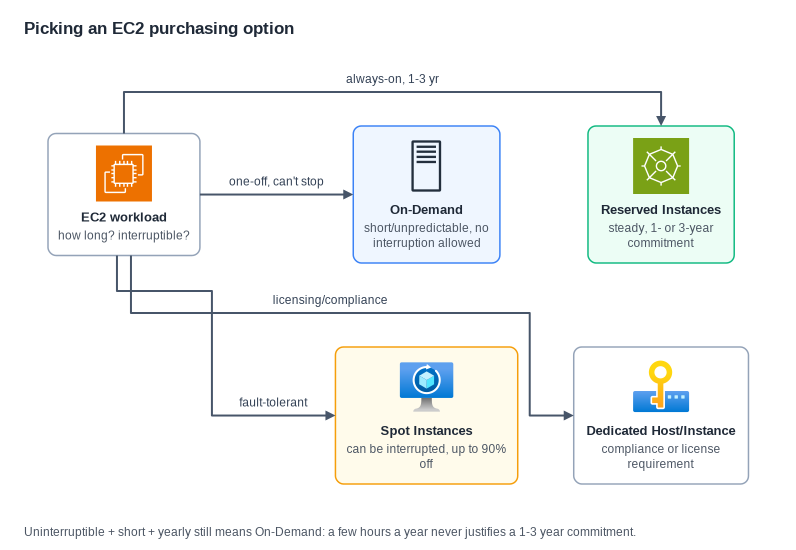
| Option | Billing | Best for | Key quote |
|---|---|---|---|
| On-Demand | Per second, 60-second minimum, no commitment | Short, irregular, or one-off runs that must not be interrupted | "With On-Demand Instances, you pay for compute capacity by the second with no long-term commitments." |
| Reserved Instances (RI) | 1- or 3-year commitment for a billing discount | Steady, predictable, always-on workloads | "Reserved Instances are not physical instances, but rather a billing discount applied to the use of On-Demand Instances" |
| Spot Instances | Up to ~90% off On-Demand, can be reclaimed | Flexible, fault-tolerant, interruptible batch work | "Spot Instances are a cost-effective choice if you can be flexible about when your applications run" (and interrupted) |
| Dedicated Host/Instance | Priced for a physical host dedicated to you | Compliance or software-license requirements tied to physical hardware | "Dedicated Hosts or Dedicated Instances can help you address compliance requirements" |
The recurring trap: a workload that runs only a few hours — even if it repeats every year, every week, or runs "continuously" for exactly 12 hours before being stopped — is still a short, one-off use of capacity. It never accumulates enough usage to justify a 1- or 3-year RI commitment, and On-Demand remains the most cost-effective choice as long as the workload cannot be interrupted. Only when the scenario itself states the run is steady and continues for the length of the commitment (a year or more) does Reserved become correct.
Reserved Instance flavors
- Standard RI — "These provide the most significant discount, but can only be modified" (can't change instance family). This is the answer whenever a question asks for the single most cost-effective option for an uninterrupted workload and doesn't mention needing to change instance attributes later.
- Convertible RI — "discount than Standard Reserved Instances, but can be exchanged for another Convertible" RI with different attributes. Pick this only when the scenario needs flexibility to change instance family/OS/tenancy later; it costs more than Standard for the same commitment.
- Payment options, ordered by discount size: All Upfront > Partial Upfront > No Upfront — "you can save more money making a higher upfront payment." All Upfront is the cheapest total cost for a workload that runs the full commitment term without interruption.
- No longer need a Standard RI (e.g., you're moving to a different instance family it doesn't cover)? Sell it on the EC2 Reserved Instance Marketplace — "The Amazon EC2 Reserved Instance Marketplace is a platform that facilitates the sale of unused Standard Reserved Instances." Convertible RIs cannot be resold there.
AWS Support plans and Trusted Advisor
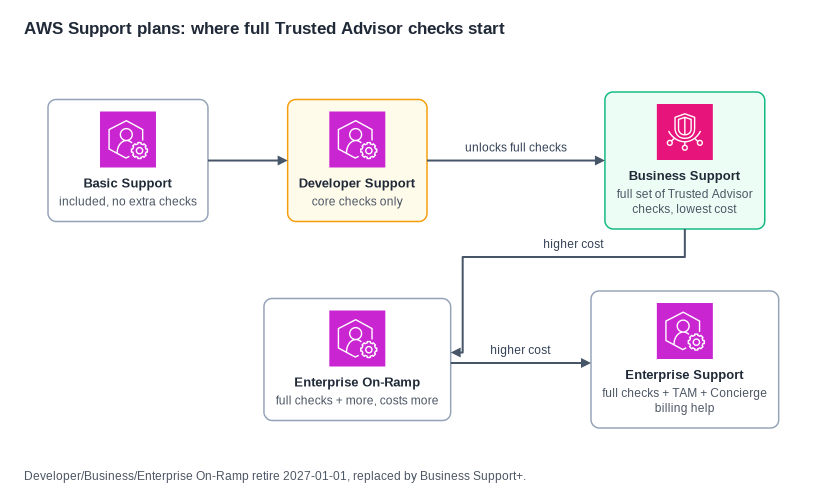
AWS Trusted Advisor gives "checks and recommendations" across cost optimization, security, fault tolerance, performance, and service quotas. The exam's core fact: Business Support is the lowest-cost plan that unlocks the full set of Trusted Advisor checks — Developer Support includes only core checks, and Enterprise On-Ramp/Enterprise cost more for the same full-check access plus extras (a designated Technical Account Manager, faster response times, a Concierge team for billing/account help — "You can get help with billing and account questions" describes that function in current AWS docs).
Current-state note (exam traps a classic model): AWS has announced that Developer Support, (classic) Business Support, and Enterprise On-Ramp retire on 2027-01-01, consolidating into Business Support+ and Enterprise Support. The CLF-C02 exam still tests the classic five-tier structure shown above (Basic / Developer / Business / Enterprise On-Ramp / Enterprise) — keep answering with those names until Microsoft/AWS updates the exam content.
Cost-management tools: four different jobs
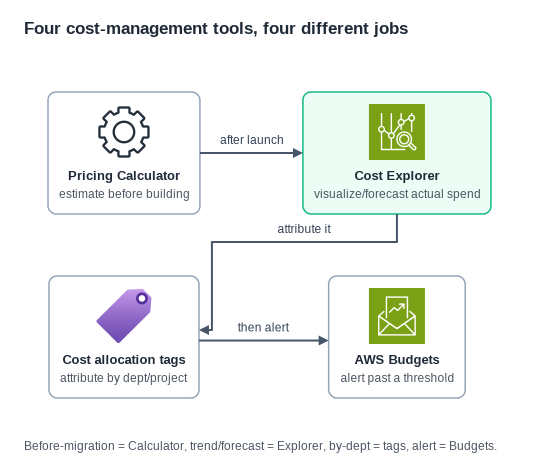
| Tool | Answers | Key quote |
|---|---|---|
| AWS Pricing Calculator | "What will this cost before I build/migrate it?" | "AWS Pricing Calculator is a free web-based planning tool that you can use to create cost estimates for using AWS services." |
| AWS Cost Explorer | "What have I spent, and where is it heading?" (visualize, trend, forecast, rightsizing) | "You can view data for up to the last 13 months, forecast how much you're likely to spend"; rightsizing: "The rightsizing recommendations feature in Cost Explorer helps you identify cost-saving" opportunities on underutilized EC2 instances |
| Cost allocation tags | "Whose spend is this?" (department, project, cost center) | "You can apply tags that represent business categories (such as cost centers, application names, or owners) to organize your costs" |
| AWS Budgets | "Alert me when spend crosses a line" | sets thresholds and alerts — not a visualization tool, and not the answer to "detailed tracking by category" (that's cost allocation tags) |
Rightsizing (matching provisioned capacity to actual demand) is the cloud concept demonstrated by Cost Explorer's rightsizing recommendations — not reliability, resilience, or modernization, which describe architectural qualities, not a cost practice.
AWS Organizations consolidated billing combines multiple accounts into "one bill" and "shares the volume pricing discounts, Reserved Instance discounts, and Savings Plans" across member accounts — this is the feature to pick when a question wants volume/RI/Savings Plans discounts shared across accounts without requiring any workload to be interruptible. Organizations is also the single answer whenever a question needs both a consolidated bill and centralized security/compliance governance (via Service Control Policies) in one service.
S3 storage class economics
| Need | Storage class | Why |
|---|---|---|
| Access pattern unknown or mixed (some data daily, some yearly) | S3 Intelligent-Tiering | "Storage class for automatically optimizing data with changing or unknown access patterns" — moves objects between tiers automatically, no retrieval fee |
| Known archival / long-term backup, infrequent access | S3 Glacier Flexible Retrieval (or Deep Archive for the cheapest, slowest tier) | "If you are planning to archive infrequently accessed data for a period of" months or years, Glacier classes "can reduce your storage costs" |
The trap: when the question gives you a known, fixed access pattern (always archival, or always infrequent), pick the Glacier/IA class directly — Intelligent-Tiering is for unpredictable or mixed patterns, not every "infrequent access" scenario.
Why cloud TCO beats on-premises
Two of the "six advantages of cloud computing" drive the lower total cost of ownership questions: "Trade fixed expense for variable expense" (no upfront capital expenditure, pay only for what you use) and "Benefit from massive economies of scale" ("AWS can achieve higher economies of scale, which translates into lower pay as-you-go" prices). High availability and a single EC2 pricing model are not the TCO argument — TCO is about CapEx-to-OpEx and aggregated demand, not uptime.
Exam traps
- A workload that runs only a few hours, even yearly/weekly/once, and cannot be interrupted → On-Demand, never Reserved — duration this short never earns back a 1-3 year commitment.
- "Uninterrupted for 1 year, steady" → Reserved (Standard, usually All Upfront for the lowest total cost); Convertible only when the scenario needs to change instance attributes later.
- Standard RIs that no longer fit (wrong instance family) → sell on the EC2 Reserved Instance Marketplace, not AWS Support, not AWS Marketplace, and Convertible RIs can't be resold there at all.
- Business Support, not Developer, is the cheapest plan with the full set of Trusted Advisor checks — Developer only gets core checks; Enterprise tiers add TAM/response-time perks at a higher price for the same full-check access.
- Cost Explorer visualizes/forecasts; cost allocation tags attribute by category; AWS Budgets alerts; Pricing Calculator estimates before you build. Matching the verb in the question ("visualize," "track by department," "alert," "estimate before migrating") picks the tool.
- AWS Cost Explorer's rightsizing recommendations demonstrate the "rightsizing" concept, not reliability or resilience.
- S3 Intelligent-Tiering is for unknown/changing access patterns; a known, fixed archival pattern goes straight to a Glacier class.
- Customer pays for application software licenses; AWS pays for hardware, power, and physical data-center security.
- IAM is free; services you reach through it (S3, ELB, WAF) are not.
- Cloud TCO advantage = CapEx→OpEx (variable expense) + economies of scale, not "no downtime" or "one pricing model."
Docs
- Purchasing On-Demand Instances for Amazon EC2
- Amazon EC2 billing and purchasing options
- Spot Instances - Amazon EC2
- Reserved Instances for Amazon EC2 overview
- Sell Reserved Instances in the Reserved Instance Marketplace
- Compare AWS Support Plans
- AWS Support Plans (user guide)
- AWS Trusted Advisor - AWS Support
- Account and billing support cases
- AWS Pricing Calculator (what is it)
- Create and configure an estimate — AWS Pricing Calculator
- Analyzing your costs and usage with AWS Cost Explorer
- Optimizing your cost with rightsizing recommendations
- Organizing and tracking costs using AWS cost allocation tags
- Consolidating billing for AWS Organizations
- What is AWS Organizations?
- Understanding Amazon S3 storage classes
- How S3 Intelligent-Tiering works
- Understanding archival storage in S3 Glacier Flexible Retrieval
- What is Amazon EC2 Auto Scaling?
- AWS Shared Responsibility Model
- What is IAM?
- Six advantages of cloud computing