Exams / CLF-C02 / D3 Billing, Pricing, and Support
Billing, Pricing, and Support #1: EC2 purchasing options, The cost-management tool chain
- Exam domain: Content Domain 4: Billing, Pricing, and Support
This pass covers the two biggest scenario families in Domain 4: choosing the right Amazon EC2 purchasing option for a described workload (by far the most repeated question pattern in this domain), and the cost-management and support tooling — the Pricing Calculator, Migration Evaluator, Cost Explorer, AWS Budgets, CloudWatch billing alarms, rightsizing, AWS Organizations consolidated billing, and the four AWS Support plans.
EC2 purchasing options: match the workload trait to the discount
Every "which purchasing option is MOST cost-effective" question is really asking you to read one trait out of the scenario — can this workload be interrupted, and for how long will it run — and map it to the matching option.
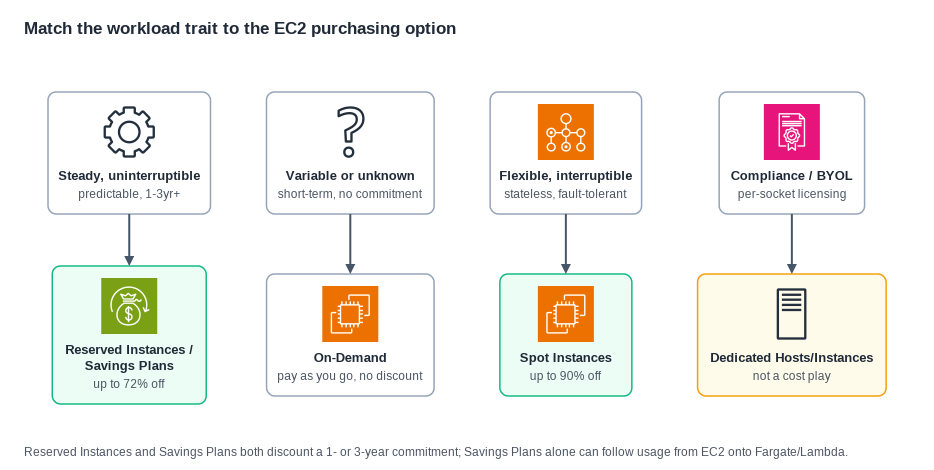
| Option | Commitment | Discount vs On-Demand | Fits |
|---|---|---|---|
| On-Demand | None | None | Short-term, unpredictable, or can't commit |
| Reserved Instances | 1 or 3 years, to a specific instance configuration | Standard RIs: up to 72%; Convertible RIs: up to 66% | Steady, predictable, uninterrupted usage |
| Savings Plans | 1 or 3 years, to a consistent $/hour spend | Compute SP: up to 66%; EC2 Instance SP: up to 72% | Steady, predictable usage — Compute SP also follows you onto Fargate/Lambda |
| Spot Instances | None | Up to 90% | Stateless, fault-tolerant, interruption-tolerant (big data, CI/CD, batch, dev/test) |
| Dedicated Hosts / Instances | Varies | Not a cost optimization | Compliance or bring-your-own-license (per-socket/per-core/per-VM) requirements |
Key distinctions the exam tests:
- Reserved Instances vs Savings Plans — "with Reserved Instances, you make a commitment to a specific instance configuration, whereas with Savings Plans... you make a commitment to a consistent usage amount, in USD per hour, for a term of 1 or 3 years." Both reward steady, uninterrupted usage with a discount; neither should be picked for workloads that tolerate interruption.
- Compute Savings Plans vs EC2 Instance Savings Plans — "Compute Savings Plans automatically apply to any Amazon EC2 instance usage regardless of Region, instance family, operating system, or tenancy, and also cover Fargate and Lambda usage." EC2 Instance Savings Plans give a deeper discount (up to 72%) but only within one instance family/Region. If a scenario says the workload will partially shift to serverless later, Compute Savings Plans is the one that keeps paying off.
- RI terms are only 1 or 3 years — there is no 2-year or 5-year Reserved Instance term; if a question offers those as distractors, they're wrong by definition, and the 3-year term always gives the bigger discount.
- Spot Instances can be interrupted — "Amazon EC2 can interrupt your Spot Instance when it needs it back", with a two-minute interruption notice. This is the single reason Spot is wrong for any workload described as continuous, stateful, or unable to tolerate downtime, no matter how much it would save.
- Dedicated Hosts/Instances are not a cost play — they exist for compliance and for bringing existing per-socket/per-core/per-VM software licenses to AWS, not to reduce the bill.
- Current AWS guidance already points most new commitments toward Savings Plans over Reserved Instances (RIs are now described as the older option), but on this exam RIs remain the textbook answer whenever a question's choices don't offer a Savings Plan alternative.
The cost-management tool chain
Four tools cover four different moments in the cost lifecycle — pick the one that matches the verb in the question (estimate, see what happened, get notified, fix sizing).
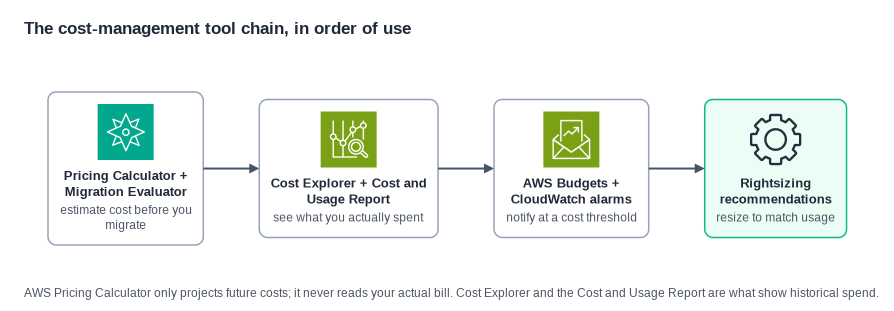
| Tool | What it actually does | What it does NOT do |
|---|---|---|
| AWS Pricing Calculator | "generates an estimate that includes the upfront, monthly, annual costs" for a planned configuration | Doesn't read your actual bill or historical usage |
| Migration Evaluator | "Discover over-provisioned on-premises instances and get recommendations for cost-effective AWS alternatives" — builds the on-premises-to-AWS total cost of ownership business case | Doesn't estimate AWS service pricing by itself — pairs with Pricing Calculator for TCO |
| Cost Explorer / Cost and Usage Report | Shows historical costs and usage, and (via Cost Explorer) rightsizing recommendations | Doesn't project future costs for a new configuration |
| AWS Budgets | "track and take action on your AWS costs and usage" and "receive alerts when costs approach or exceed your defined threshold" | — |
| CloudWatch billing alarms | "The alarm triggers when your account billing exceeds the threshold you specify" — a second, simpler way to get a cost-threshold alert | Doesn't forecast; it only reacts to the current estimated bill |
| Rightsizing | "the process of matching instance types and sizes to your workload performance and capacity requirements at the lowest possible cost" | Doesn't choose a purchasing option — it chooses the instance size |
Exam-specific pairing: a question that asks for total cost of ownership before migrating wants Pricing Calculator + Migration Evaluator together — Application Discovery Service only inventories on-premises servers (no cost modeling), and AWS DMS only moves databases.
AWS Organizations: consolidated billing
When a company needs to separate and track costs per business unit with the least operational overhead, the answer is always AWS Organizations, not a spreadsheet or a custom database: "An account is the only true way to separate items at a billing level." One member account per business unit gives clean cost separation automatically, while "every organization in AWS Organizations has a management account that pays the charges of all the member accounts" — a single bill, paid centrally, with costs still broken out per account.
AWS Support plans
The four plans stack: each one includes everything below it, plus one headline addition.
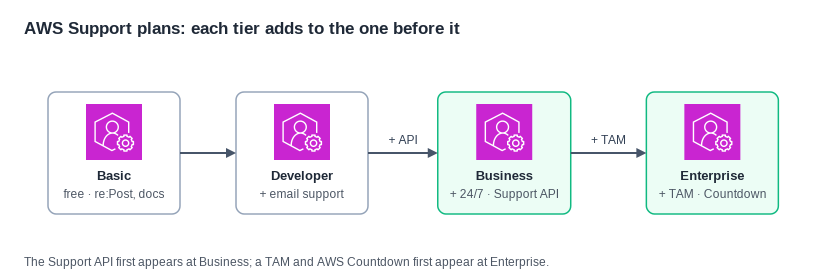
| Plan | Signature addition | Exam angle |
|---|---|---|
| Basic | Free for every AWS customer: account/billing support, docs, and "24/7 access to customer service, documentation, whitepapers, and AWS re:Post" | The only benefit guaranteed free "regardless of Support plan" — on this exam tested as "AWS Developer Forums," the older name for what AWS now calls AWS re:Post |
| Developer | Business-hours email access to Cloud Support Engineers | Still no Support API |
| Business | 24/7 phone/chat/email, full Trusted Advisor checks, and "the AWS Support API to interact with Support Center and Trusted Advisor" | Lowest-cost plan with programmatic case management — the answer whenever a question needs the Support API "most cost-effectively" |
| Enterprise | "A designated Technical Account Manager (TAM)" plus "access to AWS Countdown event management" for product launches and go-live events | TAM and Countdown are the two benefits that distinguish Enterprise from Business |
Watch this: AWS has announced that Developer Support and (classic) Business Support will be discontinued on 2027-01-01, replaced by a new Business Support+ tier. As of this review both plans are still active, so the comparisons above hold; expect this area of the exam content to be revised once the change takes effect.
Exam traps
- "Steady, predictable, uninterruptible" and "stateless, fault-tolerant, can tolerate interruption" are the two phrases to spot immediately — they send you to opposite ends of the EC2 purchasing table (Reserved Instances/Savings Plans vs Spot).
- A 2-year or 5-year Reserved Instance term is never a real option — AWS only sells 1-year and 3-year RIs.
- "Dedicated Hosts/Instances" is a compliance/licensing answer, not a cost-savings answer — don't pick it just because the question says "cost-effective."
- AWS Pricing Calculator ≠ Cost Explorer ≠ AWS Billing console: projecting future cost, reading historical cost, and viewing your actual bill are three different tools.
- AWS Budgets and CloudWatch billing alarms are both correct for "notify me at a cost threshold" multi-select questions — don't assume only one tool does alerting.
- A question about consolidating billing or tracking cost per business unit with least overhead is almost always answered by AWS Organizations, never a custom-built (spreadsheet/DynamoDB) tracking solution.
- "AWS Developer Forums" on the exam = AWS re:Post today — same idea (free community support for every customer), renamed.
Docs
- Amazon EC2 billing and purchasing options
- Choosing a purchasing option for Amazon EC2
- What are Savings Plans?
- Amazon EC2 Reserved Instances
- Reserved Instances pricing
- Using Spot Instances
- Spot best practices
- Spot Instance interruptions
- Amazon EC2 On-Demand or Amazon EC2 Spot — AWS Batch
- Select the best pricing model — Well-Architected Cost Optimization Pillar
- S3 Intelligent-Tiering
- AWS Pricing Calculator
- AWS Migration Evaluator
- Optimizing cost with rightsizing recommendations
- Right Sizing — AWS Cost Optimization
- Managing your costs with AWS Budgets
- Create a CloudWatch billing alarm
- Benefits of using multiple AWS accounts
- Consolidating billing for AWS Organizations
- AWS Support plans
- Compare AWS Support plans
- Six advantages of cloud computing