Exams / CLF-C02 / D3 Billing, Pricing, and Support
Billing, Pricing, and Support #4: EC2 purchasing options, Data-transfer pricing
- Exam domain: Content Domain 4: Billing, Pricing, and Support
This pass closes out Domain 4 with the long tail of duration variants on the EC2 purchasing-option question (2 months a year, 3–6 months, 1 year, 3 years, "as long as it's uninterruptible"), plus the billing-fundamentals questions this part of the bank leans on: data-transfer pricing (what's actually free), what AWS never charges for (IAM, Organizations membership), chargeback mechanisms (accounts + consolidated billing vs. tags), AWS Marketplace, and the cost-effectiveness/rightsizing concepts behind "why is the cloud cheaper."
EC2 purchasing options: duration is the whole question
Every scenario here reduces to one axis: how long does the workload run, and can it ever be interrupted? A short or one-off run — even repeated every week or every year — never earns back a 1- or 3-year commitment; only a workload that genuinely runs continuously for the length of the term belongs on Reserved Instances or Savings Plans; and only a workload that tolerates losing capacity on short notice belongs on Spot.
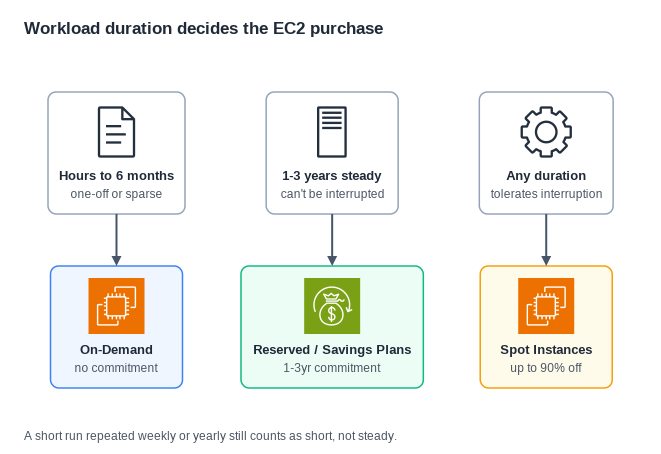
| Scenario phrasing in this bank | Duration read | Correct pick |
|---|---|---|
| "Runs once a week and once a month, shut down otherwise" | Short, recurring, sparse | On-Demand |
| "2 months each year, cannot tolerate downtime" | Short (2 of 12 months), per year | On-Demand |
| "Experimental workload for 3 to 6 months" | Short, uncertain | On-Demand |
| "Right-sized DB server for a 1-year project, steady" | Exactly 1 year, continuous | Standard Reserved Instances |
| "Web server for at least 1 year, cannot be interrupted" (choices: On-Demand / Partial Upfront RI / Spot / No Upfront RI) | 1 year, continuous | Partial Upfront RI — the best of the two RI payment options actually offered |
| "24/7 workload, same instance family/type, for 12 months" (choose two) | 1 year, continuous, fixed configuration | Standard RI + All Upfront |
| "Continuous workload for longer than 1 year" (choices include a Savings Plan) | 1+ year, continuous | EC2 Instance Savings Plans |
| "Critical production migrating for 3+ years" (no Savings Plan offered) | 3+ years, continuous | Reserved Instances |
| "Predictable, business-critical, 3-year workload" (no RI offered) | 3+ years, continuous | Savings Plans |
The trap to spot immediately: a workload described as happening "24 hours a day, 7 days a week" for only 2 months, or "every week," is still short in total duration. Don't let "24/7" or "continuously" inside a short window read as a multi-year commitment signal — look at how long the pattern runs in total, not whether it's busy while it runs.
The other trap: several questions in this part don't offer the same four or five choices. One asks you to pick between Standard/Convertible RI vs. Spot, another between RI payment tiers only (Partial vs. No Upfront, no All Upfront on the list), another between Savings Plans vs. Spot/Dedicated Hosts with no RI option at all. Always pick the best available answer for the stated duration and interruptibility — don't mark a question wrong because "Savings Plans would also have worked" when it isn't one of the choices.
- Standard vs. Convertible RI: pick Standard whenever the instance family/type is fixed for the whole term — it gives the bigger discount. Convertible only earns its place when the scenario needs to change attributes later.
- Payment tiers, ordered by discount: All Upfront > Partial Upfront > No Upfront — a higher upfront payment always saves more over the term.
- Compute Savings Plans vs. EC2 Instance Savings Plans: Compute Savings Plans apply automatically to any EC2 family/Region/OS and also cover Fargate/Lambda; EC2 Instance Savings Plans go deeper (up to 72% off) but only within one instance family and Region.
Data-transfer pricing: only ingress is free
The one data-transfer direction the exam treats as a hard, memorizable fact: moving data from the public internet into AWS is always free. Every other direction shown below can show up on the bill.
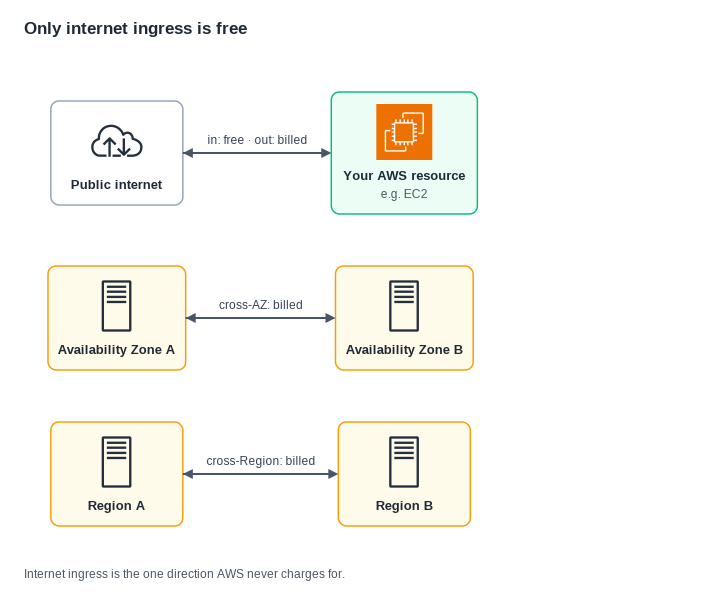
| Direction | Billed? |
|---|---|
| Internet → AWS (ingress) | Never |
| AWS → internet (egress) | Yes, based on the source Region |
| Between Availability Zones in the same Region | Yes, for both the "in" and "out" leg |
| Between AWS Regions | Yes, based on the source Region |
What AWS never charges for
Two names the exam expects you to recognize as always free, regardless of usage:
- AWS IAM (plus AWS IAM Identity Center and AWS STS) — a feature of the account itself; you're only billed once you use IAM credentials to call a billable service like S3 or EC2.
- AWS Organizations membership — the service that lets you create and manage accounts is free; only the resources running inside those member accounts are billed.
Everything else in a "which service is free" question (Athena, Secrets Manager, ElastiCache, SageMaker, Config, CloudWatch…) bills for the usage it provides, even if it has a limited free tier.
The AWS Free Tier itself only ever discounts usage up to its limit, for a limited time (commonly 6 months, or until promotional credits run out): once that period ends or usage goes over the limit, the excess usage is billed at standard pay-as-you-go rates — usage that stayed inside the Free Tier is never billed retroactively.
Two different ways to charge departments for their AWS spend
A "separate costs per business unit" question is really asking which mechanism does the separating — and this bank tests both of the mechanisms AWS offers, as two different question families.
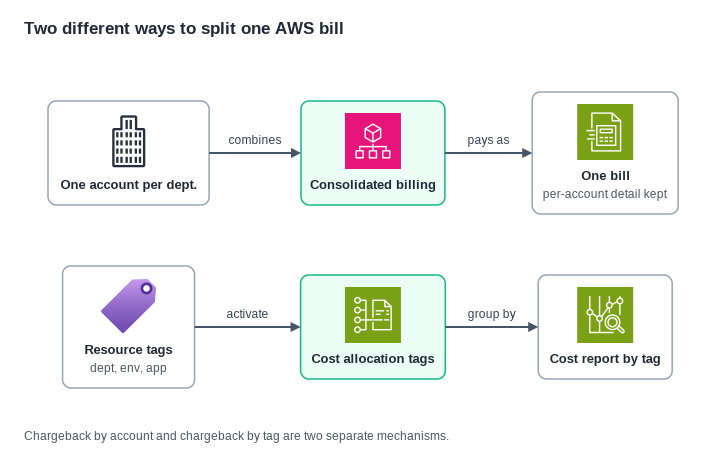
| Mechanism | How it isolates cost | When the exam wants it |
|---|---|---|
| Multiple AWS accounts + consolidated billing | One AWS account per department; AWS Organizations combines them into one bill, paid centrally, while volume/RI/Savings Plans discounts are shared and each account's usage stays visible | "Separate workloads for chargeback across departments," "finance wants one bill for all accounts" |
| Cost allocation tags | Tag resources (department, project, environment); activate the tags in Billing and Cost Management so AWS generates a cost report grouped by those tags | "Categorize and track cost by business category," "track costs at a detailed level by department/environment/application" |
Consolidated billing also comes with two memorizable facts of its own: it is offered at no additional cost, and it is the single service behind "one bill for multiple accounts" questions — never Trusted Advisor, Cost Explorer, or AWS Budgets, none of which touch multi-account billing.
AWS Marketplace: buying third-party software
When a scenario needs to buy third-party software, data, or services to run alongside an AWS workload, the answer is AWS Marketplace — a curated digital catalog to find, buy, deploy, and manage that software. It's distinct from AWS Resource Access Manager (shares your own AWS resources across accounts), AWS License Manager (tracks licenses you already own), and AWS Managed Services (operates infrastructure on your behalf).
Support plans: cheapest plan that still fits "production"
A "lowest-cost plan for a production workload" question has a trap built in: Developer Support is cheaper than Business Support, but AWS does not recommend Developer for production — it's positioned for testing and experimentation. That makes Business Support the correct "lowest-cost" answer whenever the scenario names a production workload, even though a cheaper plan technically exists on the price list. Enterprise On-Ramp and Enterprise cost more for extras (a Technical Account Manager, faster response) that a plain "production workload" requirement doesn't ask for.
Why the cloud is cost-effective, and how to optimize it further
Two of the "six advantages of cloud computing" are specifically the cost advantages (not the speed, agility, or elasticity ones also listed among the choices):
- Trade fixed expense for variable expense — no upfront capital expenditure; pay only for what's used.
- Benefit from massive economies of scale — AWS aggregates demand across millions of customers, which lowers its pay-as-you-go rates below what a single company could achieve alone.
Once workloads are running in AWS, the single Well-Architected Cost Optimization Pillar practice the exam points to for reducing the bill further is rightsizing: selecting the correct resource type, size, and number for the workload so you meet the technical requirement at the lowest possible cost. It's distinct from loose coupling, caching, and redundancy, which are reliability/performance practices rather than the cost-focused one.
Exam traps
- A short, recurring, or one-off workload — even if it happens "24/7" during a short window, or repeats every week/year — stays on On-Demand; only a workload that is continuous for the length of the term belongs on Reserved Instances or Savings Plans.
- When the choices only offer Partial Upfront and No Upfront Reserved Instances (no All Upfront), Partial Upfront is the more cost-effective of the two — a higher upfront payment always saves more.
- Pick the best pricing option actually offered in the choices — don't mark an RI question wrong because a Savings Plan "would also work" when it isn't a listed choice, and vice versa.
- Internet ingress is the only transfer direction that's always free — egress, cross-AZ, and cross-Region transfer can all be billed.
- IAM and AWS Organizations membership are always free; the resources and usage behind them are not.
- Free Tier usage that stayed within the limit is never billed retroactively — only usage beyond the limit, or after the Free Tier period ends, is charged at standard rates.
- Chargeback by account + consolidated billing and chargeback by cost allocation tags are two separate mechanisms for the same goal — match the scenario's wording ("separate accounts," "track by tag/category") to the right one.
- AWS Marketplace is for buying third-party software; AWS Resource Access Manager shares your own resources, and License Manager tracks licenses you already hold.
- Business Support, not Developer, is the "lowest-cost" answer for a production workload — Developer is cheaper in absolute terms but isn't recommended for production.
- Cloud cost-effectiveness = CapEx→OpEx (variable expense) + economies of scale; agility, global reach, and AWS patching the infrastructure are real benefits, but they are not the cost-effectiveness answer.
- Rightsizing = matching resource type/size/number to the workload — the Cost Optimization Pillar's core cost-reduction practice, distinct from reliability practices like redundancy or caching.
Docs
- Amazon EC2 billing and purchasing options
- Reserved Instances for Amazon EC2 overview
- How billing works with Reserved Instances
- Purchasing On-Demand Instances for Amazon EC2
- What are Savings Plans?
- Compute Savings Plans and Reserved Instances
- Understanding data transfer charges
- AWS Global Network FAQs
- What is IAM?
- Benefits of using multiple AWS accounts
- AWS Organizations concepts
- Consolidating billing for AWS Organizations
- Organizing and tracking costs using AWS cost allocation tags
- Avoiding unexpected charges after Free Tier
- What is AWS Marketplace?
- Compare AWS Support plans
- Managing your costs with AWS Budgets
- Select the correct resource type, size, and number — AWS Well-Architected Framework
- Six advantages of cloud computing