Exams / SC-900 / D4 Describe the capabilities of Microsoft compliance solutions
D4.3
Describe information protection, data lifecycle management, and data governance capabilities of Microsoft Purview
- Describe the data classification capabilities
- Describe the benefits of Content explorer and Activity explorer
- Describe sensitivity labels and sensitivity label policies
- Describe data loss prevention (DLP)
- Describe records management
- Describe retention policies, retention labels, and retention label policies
Data classification
| Type | What it does |
|---|---|
| Sensitive information types (SITs) | Match patterns such as credit card or bank account numbers; a pattern element can be a regular expression, a keyword list or a dictionary. |
| Exact data match (EDM) SITs | Match against a table of your own values (all EDM SITs are created from scratch). |
| Trainable classifiers | Machine-learning based. Pre-trained ones are ready to use (for example Resume); you can also train custom ones from samples. |
| Named entities | SITs using dictionaries and patterns for person names, addresses, medical terms. |
- Images can be scanned for SITs only if optional OCR scanning is enabled at tenant level.
- Content explorer views the items that were classified; Activity explorer gives a historical view (up to 30 days) of what is done with labeled content.
Sensitivity labels and policies
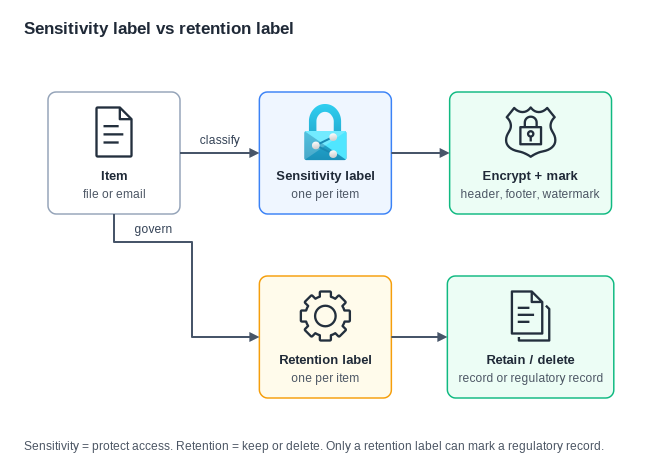
- Labels classify and protect: encryption (Azure Rights Management) and content marking (headers, footers, watermarks).
- Watermarks apply to documents (and Loop components), not to email or meeting invites. Headers and footers can go on email.
- One sensitivity label per item. A label can be applied manually, automatically (conditions) or by default, and it persists with the content.
- Labels are published with a sensitivity label policy to users or groups (retention labels are published to locations).
Data loss prevention (DLP)
- DLP policies are created in the Microsoft Purview portal (formerly the Microsoft 365 compliance center).
- Locations include Exchange Online email, SharePoint, OneDrive accounts, Teams chat and channel messages, devices (Endpoint DLP), on-premises file shares.
- Actions: policy tips that warn users, block sharing, alert.
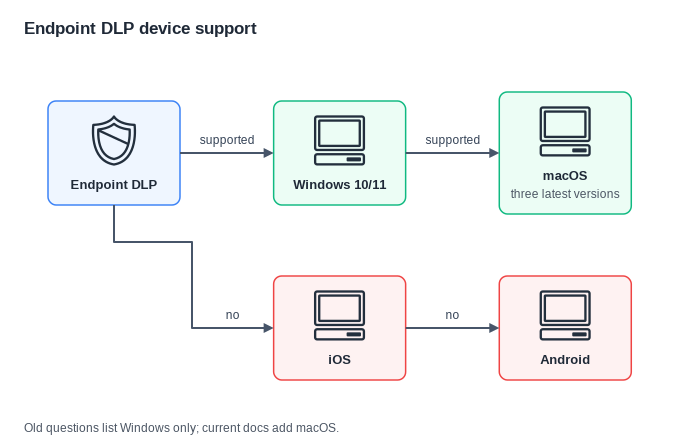
- Endpoint DLP: Windows 10/11 and macOS (three latest versions) — not iOS/Android.
Retention and records management
| Item | Scope | Notes |
|---|---|---|
| Retention policy | Whole location (site, mailbox) | Same settings for everything; a copy is kept in a secured location if users edit or delete. |
| Retention label | Individual item | Only one retention label at a time; can mark an item as a record or regulatory record. |
| Regulatory record | Retention label setting | Nobody, not even a global admin, can remove the label. |
Exam traps
- Sensitivity label = protect/mark; retention label = keep/delete. Don't swap them.
- Only one label of each kind per item.
- Watermarks: not on email.
- Endpoint DLP: macOS is supported today; older questions list Windows only.
- Purview is not limited to Azure; Sentinel is a SIEM, not data lifecycle management.
- The "Microsoft 365 compliance center" is now the Microsoft Purview portal.
Docs
- https://learn.microsoft.com/en-us/purview/sensitivity-labels
- https://learn.microsoft.com/en-us/purview/dlp-learn-about-dlp
- https://learn.microsoft.com/en-us/purview/endpoint-dlp-learn-about
- https://learn.microsoft.com/en-us/purview/retention
- https://learn.microsoft.com/en-us/purview/records-management
- https://learn.microsoft.com/en-us/purview/sensitive-information-type-learn-about
- https://learn.microsoft.com/en-us/purview/trainable-classifiers-definitions
- https://learn.microsoft.com/en-us/purview/ocr-learn-about