Exams / SC-900 / D2 Describe the capabilities of Microsoft Entra
D2.1
Describe function and identity types of Microsoft Entra ID
- Describe Microsoft Entra ID
- Describe types of identities, including workload identities
- Describe hybrid identity
Microsoft Entra ID
- A cloud-based identity and access management service (authentication, policy enforcement, protection for users, devices, apps, resources).
- Every Microsoft 365, Azure or Dynamics CRM Online tenant is automatically a Microsoft Entra tenant. Nothing is deployed on-premises; AD DS is the on-premises directory.
- Editions (Free, P1, P2) differ in features; for example dynamic membership groups need P1.
Identity types
| Identity | What it is | Notes |
|---|---|---|
| User | Person | Members or guests |
| Guest (B2B) | External partner as a guest user object |
B2B collaboration; sign in with their own identity |
| Device | Object in Entra ID | Registered / joined / hybrid joined |
| Service principal | Identity of an app in a tenant | Created with app registration |
| Managed identity | Service principal for an Azure resource | System-assigned or user-assigned |
Workload identities
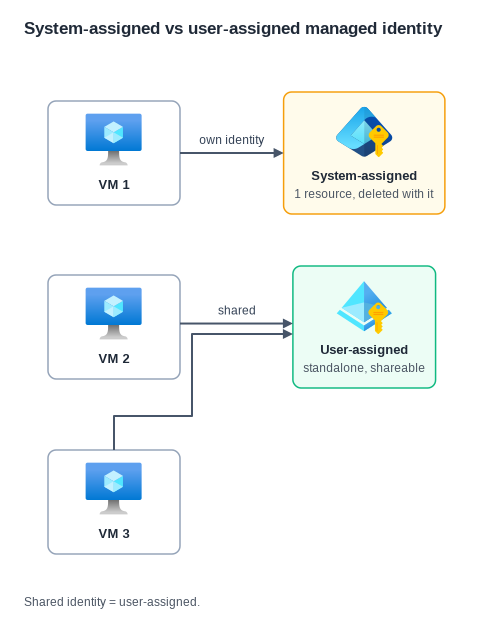
| System-assigned | User-assigned | |
|---|---|---|
| Scope | One resource | One or more resources |
| Lifecycle | Tied to the resource, deleted with it | Standalone, independent |
| Use | Single workload | Several VMs/apps sharing an identity |
External identities
- B2B: partners/suppliers appear as guests in your directory.
- Azure AD B2C: customer identities (social, enterprise, local) in a separate B2C tenant, with brandable pages.
Groups
- Microsoft 365 groups: members can only be users.
- Security groups: users, devices, service principals.
- Dynamic groups: membership by rules on user or device attributes (not both), automating access.
Hybrid identity
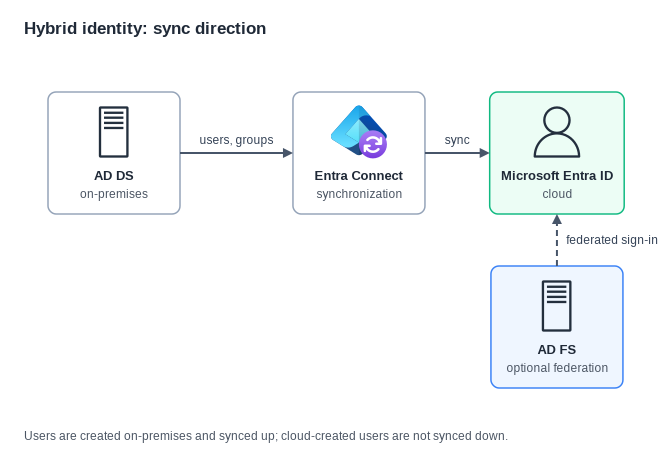
- Hybrid identity = provisioning + synchronization between on-premises AD DS and Entra ID, done with Microsoft Entra Connect (formerly Azure AD Connect).
- Sign-in: cloud authentication (password hash sync, pass-through) or federation (e.g. AD FS).
Exam traps
- "Same identity on several resources": user-assigned; "deleted with the resource" → system-assigned.
- Registering an app creates a service principal, not a managed identity.
- Microsoft 365 groups cannot contain devices or service principals.
- Partners = B2B; customers = B2C.
- Entra ID is not deployed on VMs or on-premises.
- Sync goes on-premises: cloud.
Docs
- https://learn.microsoft.com/en-us/entra/identity/managed-identities-azure-resources/overview
- https://learn.microsoft.com/en-us/entra/identity-platform/app-objects-and-service-principals
- https://learn.microsoft.com/en-us/entra/external-id/what-is-b2b
- https://learn.microsoft.com/en-us/azure/active-directory-b2c/overview
- https://learn.microsoft.com/en-us/entra/fundamentals/concept-learn-about-groups
- https://learn.microsoft.com/en-us/entra/identity/users/groups-dynamic-membership
- https://learn.microsoft.com/en-us/entra/identity/hybrid/connect/whatis-azure-ad-connect
- https://learn.microsoft.com/en-us/entra/identity/hybrid/connect/choose-ad-authn
- https://learn.microsoft.com/en-us/entra/fundamentals/whatis