Exams / SC-900 / D3 Describe the capabilities of Microsoft security solutions
Describe threat protection with Microsoft Defender XDR
- Describe Microsoft Defender XDR services
- Describe Microsoft Defender for Office 365
- Describe Microsoft Defender for Endpoint
- Describe Microsoft Defender for Cloud Apps
- Describe Microsoft Defender for Identity
- Describe Microsoft Defender Vulnerability Management
- Describe Microsoft Threat Intelligence
- Describe the Microsoft Defender portal
Microsoft Defender XDR
Defender XDR "provides query-based access to 30 days of historic raw signals and alert data from Defender for Endpoint, Defender for Office 365, Defender for Identity, and Defender for Cloud Apps." Related alerts are correlated into incidents.
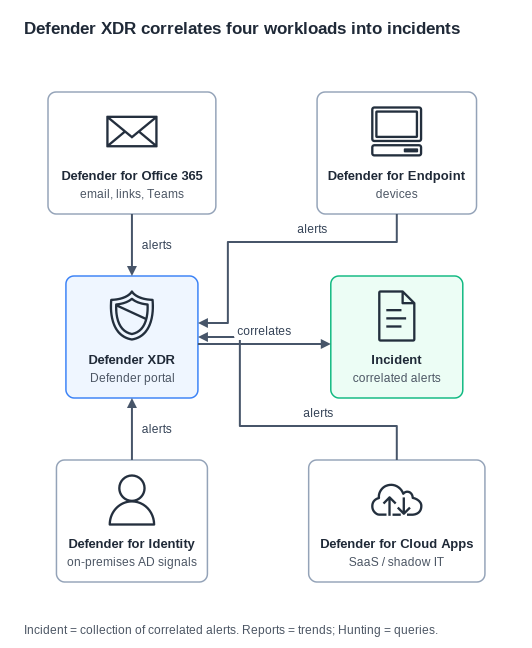
| Service | Protects | Key point |
|---|---|---|
| Defender for Office 365 | Email, links, collaboration (Teams, SharePoint, OneDrive) | Safe Links, Safe Attachments, anti-phishing |
| Defender for Endpoint | Devices (Windows, macOS, Linux, Android, iOS) | EDR, automated investigation and response, attack surface reduction |
| Defender for Identity | On-premises Active Directory identities | Uses on-premises AD signals |
| Defender for Cloud Apps | SaaS apps | CASB, shadow IT, DLP, SSPM |
Not part of the XDR core: Defender for Cloud (Servers, App Service, Storage, SQL) which is managed in the Azure portal.
Defender for Office 365
- Safe Attachments: "uses a virtual environment to check attachments in email messages for harmful attachments ... before they're delivered to recipients" (detonation). Also covers SharePoint, OneDrive and Teams files.
- Safe Links: "in email, Office clients, and Teams".
- Anti-phishing: includes user and domain impersonation protection.
- Plan 2 "adds phishing simulations, post-breach investigation, hunting, and response, and automation": Attack simulation training, Threat Explorer, Threat trackers, AIR.
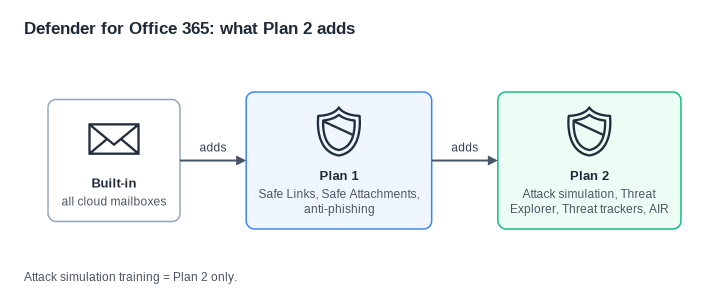
| Feature | Plan 1 | Plan 2 |
|---|---|---|
| Safe Links / Safe Attachments | Yes | Yes |
| Anti-phishing, impersonation | Yes | Yes |
| Real-time detections | Yes | Replaced by Threat Explorer |
| Attack simulation training | No | Yes |
| Threat trackers, AIR | No | Yes |
Defender for Endpoint
- Platforms: Windows, macOS, Linux, Android, iOS; also Windows 10/11 machines including Azure virtual desktop machines.
- Capabilities: EDR, automated investigation and remediation, attack surface reduction (ASR rules, network protection), vulnerability management.
- Network protection blocks connections to malicious or suspicious sites.
- It does not scan SharePoint Online content: that is Defender for Office 365.
Defender Vulnerability Management
Included in Defender for Endpoint Plan 2 and Defender XDR (also Defender for Servers). Microsoft Secure Score for devices reflects the security configuration state of your devices.
Defender for Cloud Apps
CASB: shadow IT discovery, app-based threat protection, DLP on sensitive data, and SSPM (SaaS security posture management). CSPM and CWPP belong to Defender for Cloud; AIR belongs to Endpoint/Office 365.
Defender for Identity
"A cloud-based security solution that uses your on-premises Active Directory signals to identify, detect, and investigate advanced threats, compromised identities, and malicious insider actions." Current docs also add Entra ID signals.
Threat intelligence
Defender Threat Intelligence provides threat articles (actors, vulnerabilities, tools) and, for vulnerability articles, a priority score. It is now part of the Defender portal.
Defender portal and Secure Score
| Item | Use |
|---|---|
| Incidents | Correlated alerts of one attack, affected assets |
| Hunting | Query-based, advanced hunting |
| Reports | Security trends, protection status |
| Secure score | Posture, improvement actions |
| Home cards | Users at risk, Devices at risk |
Secure Score: represents "the extent to which you are using security controls ... that can help offset the risk of being breached". You can compare with organizations like yours; actions marked "resolved through third party" earn their points. Regulatory assessment is Purview Compliance Manager, not Secure Score.
Exam traps
- Attack simulation training = Defender for Office 365 Plan 2 only.
- Links/attachments = Office 365; devices = Endpoint; on-premises AD = Identity; shadow IT = Cloud Apps.
- Incident = collection of correlated alerts; Reports = trends.
- SSPM = Cloud Apps; CSPM/CWPP = Defender for Cloud.
- Secure Score for devices = Defender for Endpoint / Vulnerability Management.
- Secure Score is not regulatory compliance (Compliance Manager).
Docs
- https://learn.microsoft.com/en-us/defender-xdr/microsoft-365-defender
- https://learn.microsoft.com/en-us/defender-office-365/mdo-about
- https://learn.microsoft.com/en-us/defender-office-365/safe-attachments-about
- https://learn.microsoft.com/en-us/defender-endpoint/microsoft-defender-endpoint
- https://learn.microsoft.com/en-us/defender-endpoint/overview-attack-surface-reduction
- https://learn.microsoft.com/en-us/defender-cloud-apps/what-is-defender-for-cloud-apps
- https://learn.microsoft.com/en-us/defender-for-identity/what-is
- https://learn.microsoft.com/en-us/defender-xdr/microsoft-secure-score
- https://learn.microsoft.com/en-us/defender-xdr/microsoft-secure-score-improvement-actions
- https://learn.microsoft.com/en-us/defender-vulnerability-management/tvm-microsoft-secure-score-devices
- https://learn.microsoft.com/en-us/defender-xdr/incidents-overview