Exams / SC-900 / D3 Describe the capabilities of Microsoft security solutions
D3.3
Describe capabilities of Microsoft Sentinel
- Define the concepts of security information and event management (SIEM) and security orchestration automated response (SOAR)
- Describe threat detection and mitigation capabilities in Microsoft Sentinel
SIEM and SOAR
| Concept | What it does | In Sentinel |
|---|---|---|
| SIEM | Collects security data from the whole estate, analyzes it (correlation, anomalies), raises alerts and incidents, delivers insights | "Microsoft Sentinel is a cloud-native SIEM solution that delivers scalable, cost-efficient security across multicloud and multiplatform environments." |
| SOAR | Orchestrates, automates and responds to threats | "Microsoft Sentinel, in addition to being a SIEM system, is also a platform for security orchestration, automation, and response (SOAR)." |
| XDR | Cross-domain detection and response (endpoints, email, identities, apps) | Microsoft Sentinel is available in the Defender portal, "delivering a unified SIEM and XDR experience" |
Sentinel building blocks
| Component | Role |
|---|---|
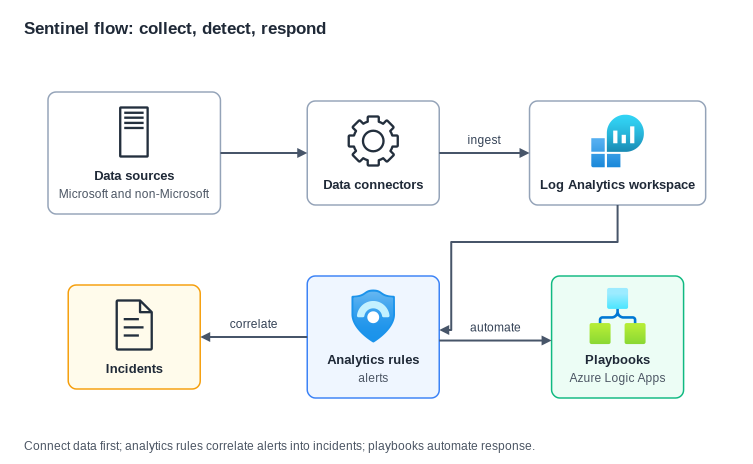
| Log Analytics workspace | Where Sentinel is enabled and data is stored |
| Data connectors | Ingest data; Microsoft and non-Microsoft sources (Syslog, CEF, REST API). First step after onboarding |
| Analytics rules | Detect threats and generate alerts; alerts are aggregated and correlated into incidents |
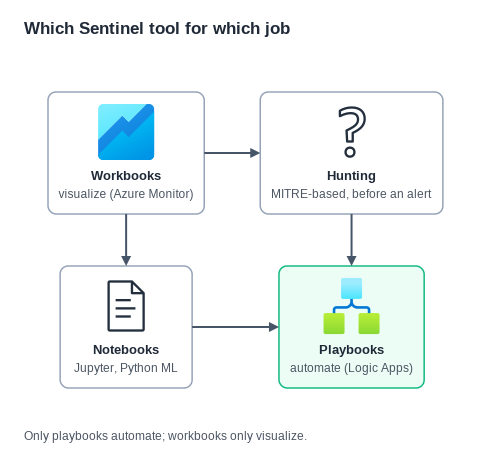
| Workbooks | Interactive visual reports, based on Azure Monitor workbooks; templates give quick insights |
| Hunting | Search-and-query tools based on the MITRE framework; find threats before an alert is triggered |
| Notebooks | Jupyter notebooks; Python machine learning and analytics not available out of the box |
| Playbooks | Automated workflows built on Azure Logic Apps (automate and orchestrate response) |
Exam traps
- Analytics rules (not workbooks, hunting, notebooks, playbooks) correlate alerts into incidents.
- Playbooks = automation (Logic Apps). Workbooks = visualization only.
- Connectors are not Microsoft-only.
- Onboarding: after the workspace exists, connect data sources first.
- XDR in Sentinel comes via Microsoft Defender (formerly Microsoft 365 Defender) integration; hunting is not the XDR feature.
- Logic Apps are the engine for playbooks, they don't "identify anomalies".
Docs
- https://learn.microsoft.com/en-us/azure/sentinel/overview
- https://learn.microsoft.com/en-us/azure/sentinel/automation/automation
- https://learn.microsoft.com/en-us/azure/sentinel/automation/logic-apps-playbooks
- https://learn.microsoft.com/en-us/azure/sentinel/threat-detection
- https://learn.microsoft.com/en-us/azure/sentinel/connect-data-sources
- https://learn.microsoft.com/en-us/azure/sentinel/quickstart-onboard
- https://learn.microsoft.com/en-us/azure/sentinel/monitor-your-data
- https://learn.microsoft.com/en-us/azure/sentinel/notebooks
- https://learn.microsoft.com/en-us/azure/sentinel/microsoft-sentinel-defender-portal