Exams / SC-900 / D2 Describe the capabilities of Microsoft Entra
D2.3
Describe access management capabilities of Microsoft Entra ID
- Describe Microsoft Entra Conditional Access
- Describe Microsoft Entra roles and role-based access control (RBAC)
Conditional Access
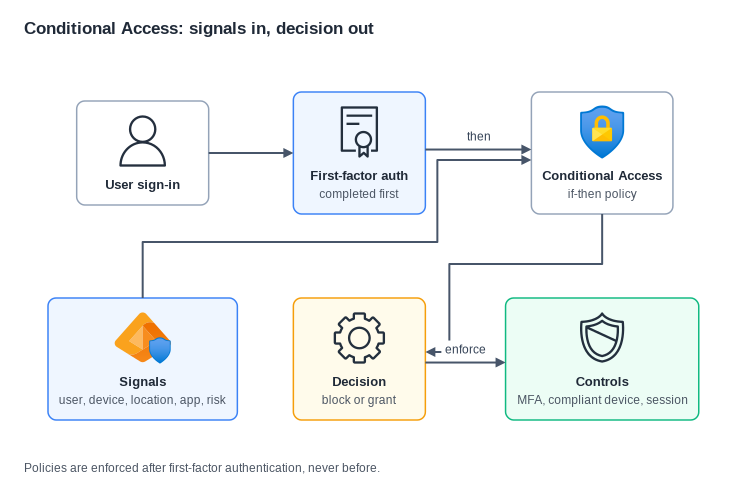
Conditional Access is Microsoft's Zero Trust policy engine: "Conditional Access policies at their simplest are if-then statements: if a user wants to access a resource, then they must complete an action."
| Part | Examples |
|---|---|
| Assignments (signals) | users, groups, directory roles, guests; cloud apps; device platform and state; location (countries/IP ranges); sign-in and user risk (from ID Protection) |
| Access controls: grant | Block access, Require MFA, Require device marked compliant (Intune), Require hybrid joined device |
| Access controls: session | Limited experiences in cloud apps (e.g. SharePoint/Exchange limited access when the device is not managed or compliant) |
- Enforced after first-factor authentication is completed.
- Policies can target groups (including Microsoft 365 groups) and directory roles such as Global Administrator. Exclusions override inclusions.
- MFA is only one possible control: a policy can also block, require a compliant device, etc.
- Device platform (Android, iOS...) and location are valid conditions; policies are not limited to Entra-joined devices.
- Risk signals come from ID Protection: user risk = the account is compromised; sign-in risk = the authentication request was not made by the account owner.
- Real-time session control of cloud apps = Conditional Access app control in Microsoft Defender for Cloud Apps (formerly Microsoft Cloud App Security).
Microsoft Entra roles and RBAC
| Concept | Key point |
|---|---|
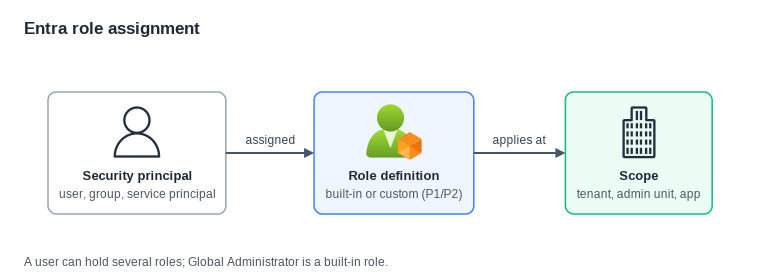
| Role definition | Built-in (e.g. Global Administrator) or custom; custom roles need a Microsoft Entra ID P1 or P2 license |
| Role assignment | Grants a security principal the permissions of a role at a scope |
| Security principal | user, group, service principal, managed identity |
| Scope | tenant-wide, administrative unit, app registration |
A user can have several role assignments (direct or through groups). Limit Global Administrators to fewer than 5; apply least privilege.
Exam traps
- "Before authentication" is false: Conditional Access runs after first-factor authentication.
- Global Administrators are NOT exempt from Conditional Access unless explicitly excluded.
- Conditional Access cannot assign roles (that is role management / PIM).
- MFA for a group of users = Conditional Access policy (not Azure Policy, PIM, RBAC, or a user risk policy).
- Session controls = limited experiences; MFA and compliant device are grant controls.
- Management groups and resource groups are Azure resource scopes, not Entra role assignees.
- An Entra user is not limited to one role.
Docs
- https://learn.microsoft.com/en-us/entra/identity/conditional-access/overview
- https://learn.microsoft.com/en-us/entra/identity/conditional-access/concept-conditional-access-policies
- https://learn.microsoft.com/en-us/entra/identity/conditional-access/concept-conditional-access-session
- https://learn.microsoft.com/en-us/entra/identity/conditional-access/concept-conditional-access-grant
- https://learn.microsoft.com/en-us/entra/identity/conditional-access/concept-conditional-access-users-groups
- https://learn.microsoft.com/en-us/entra/identity/conditional-access/policy-block-by-location
- https://learn.microsoft.com/en-us/entra/id-protection/concept-risk-detection-types
- https://learn.microsoft.com/en-us/entra/identity/role-based-access-control/custom-overview
- https://learn.microsoft.com/en-us/entra/identity/role-based-access-control/custom-create
- https://learn.microsoft.com/en-us/entra/identity/role-based-access-control/manage-roles-portal
- https://learn.microsoft.com/en-us/entra/identity/role-based-access-control/best-practices
- https://learn.microsoft.com/en-us/azure/role-based-access-control/overview
- https://learn.microsoft.com/en-us/defender-cloud-apps/proxy-intro-aad