Exams / CSCO-100-140 / D5 Documentation
D5.1
Documentation
- Exam domain: Documentation
Good ticket documentation
A ticket must be specific, factual and actionable so another technician can continue the work.
| Do | Don't |
|---|---|
| Detailed problem description (symptom, location, error code) | General or vague description |
| Name the devices and results of each step | "Restarted the internet boxes", "checked for updates" |
| Assign a category (and priority) | Leave it uncategorised |
| Record resolution: actions taken + outcome ("Reinstalled printer drivers, rebooted") | Opinions ("customer is happy"), blame, or "Ticket Complete" |
| Plain words | Shorthand |
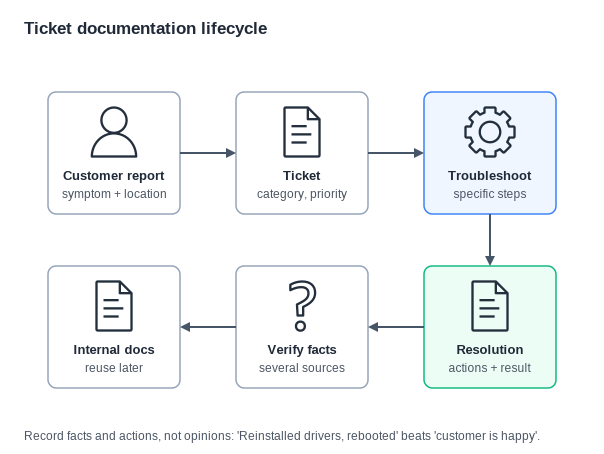
Documentation is the last step of the troubleshooting process: gather information, define the problem, probable cause, plan, implement, observe results, repeat if unresolved, then document.
Research and AI ethics
- Verify information using multiple sources before updating internal documentation.
- AI transparency = being open about how and why AI is used and how it decides; tell a customer when AI makes a decision that affects them. (Privacy, inclusiveness and reliability are separate principles.)
Help desk terms
| Term | Meaning |
|---|---|
| Ticketing system | Records each occurrence; check job status |
| Queue management | Handle requests by priority |
| Time management | Move to another job while waiting for resources |
| KPI | A metric, not a workflow |
| SLA | Contract: service, standards, compensation |
Windows tools
| Tool | Use |
|---|---|
| Task Manager | Performance, resource-hungry programs |
| System Information (msinfo32) | Hardware, components, software environment |
| ipconfig | Network settings |
| Event Viewer | Application and system logs |
| Device Manager | Drivers, device status |
| Disk Management | Format, drive letter |
| Display Settings | Multiple monitors |
Cables and ESD
DVI: large pin grid; HDMI: flat compact; Mini DisplayPort: small rectangular; RJ-45: 8-contact Ethernet; USB-A: flat rectangle. ESD: keep the PC plugged into a grounded outlet but powered off, touch the metal chassis, ground yourself before touching components.
Exam traps
- Closing notes: facts and actions, never "customer is happy" or blame.
- SLA (agreement with compensation) vs SLI/KPI (measurements).
- Transparency is disclosure, not privacy.
- Documentation comes last.
Docs
- https://learn.microsoft.com/en-us/windows-server/administration/windows-commands/msinfo32
- https://learn.microsoft.com/en-us/windows-server/administration/windows-commands/ipconfig
- https://learn.microsoft.com/en-us/windows-hardware/drivers/install/using-device-manager
- https://learn.microsoft.com/en-us/azure/machine-learning/concept-responsible-ai?view=azureml-api-2
- https://learn.microsoft.com/en-us/azure/well-architected/reliability/metrics