Exams / CSCO-100-140 / D4 Managing Computer Components
D4.1
Managing Computer Components
- Exam domain: Managing Computer Components
Inside the desktop
| Component | Installs in | Note |
|---|---|---|
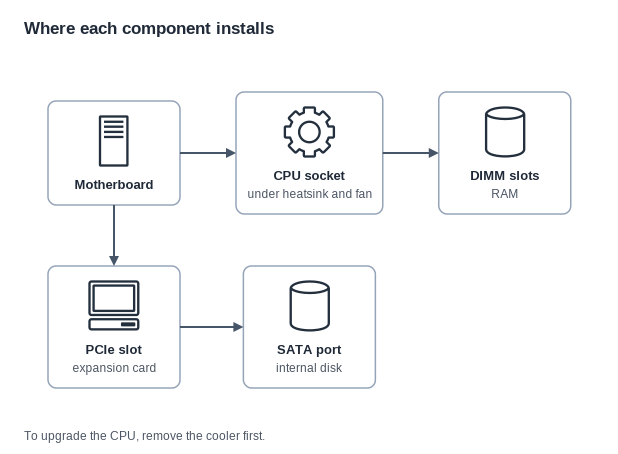
| CPU | Processor socket | Sits under the heatsink and fan; remove the cooler to reach it |
| RAM | DIMM slots | Modules sit beside the CPU |
| Expansion card (e.g. graphics) | PCIe slot | |
| Internal disk drive | SATA port, in a drive bay |
External interfaces
| Interface | How to recognize it |
|---|---|
| HDMI | Tapered trapezoid connector |
| DisplayPort | Rectangle with one beveled corner |
| USB-C | Small, reversible oval |
| LAN (Ethernet) | RJ-45 jack, wider than the others |
| DVI-I | Large multi-pin connector |
Virtualization
Azure Virtual Desktop is "a desktop and app virtualization service that runs on Azure." Desktop virtualization hosts user desktops on central servers in a data center and gives users remote access. Data, storage and network virtualization abstract other resources.
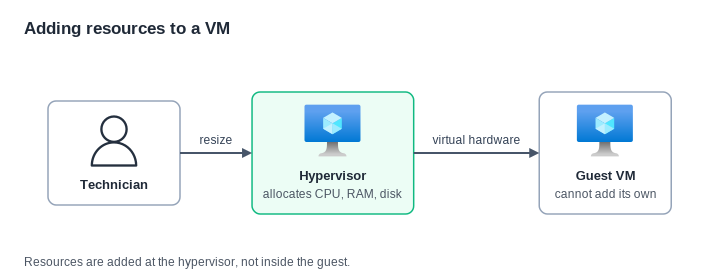
Hyper-V is a type-1 hypervisor: "Hyper-V runs directly on computing hardware, delivering near-native performance and robust isolation for virtualized workloads." The hypervisor controls the virtual hardware of each guest, so CPU, memory and disk are added at the hypervisor (in Azure, by resizing the VM), never from inside the guest.
Exam traps
- A slow VM: add resources at the hypervisor, not from within the guest OS.
- The CPU is hidden under the cooler, not under the RAM or the graphics card.
- Drag-drop port questions often include DVI-I as an unused distractor.
- Desktop virtualization = remote OS on a central server; do not confuse it with storage or network virtualization.
- Hardware layout and connector shapes are not covered by the vendor docs; they rest on standard IT-support knowledge.