Exams / CSCO-100-140 / D3 Troubleshooting
D3.1
Troubleshooting
- Exam domain: Troubleshooting
Problem-solving process
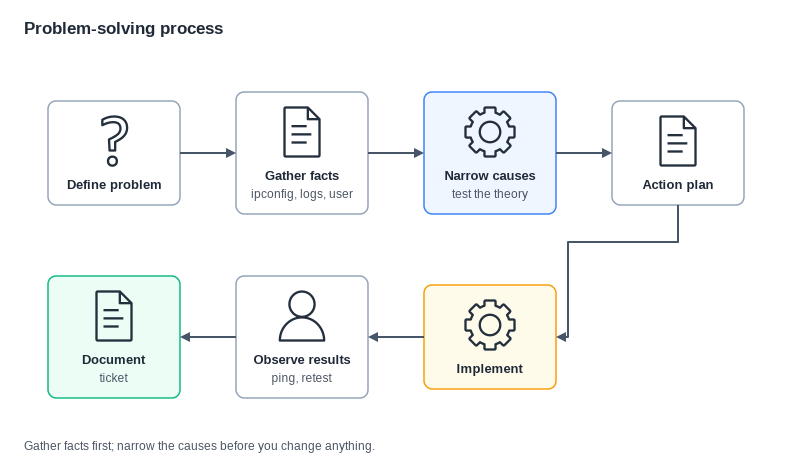
Work in order: define the problem, gather facts, narrow the possible causes, build an action plan, implement, observe the results, document. Test a suspected cause (for example, check whether other users are affected) before changing anything.
Command-line tools
| Tool | What it gives you |
|---|---|
ipconfig |
IPv4/IPv6 address, subnet mask, default gateway for all adapters |
ipconfig /all |
Full TCP/IP configuration (DNS servers, DHCP server, MAC) |
nslookup |
Diagnoses DNS infrastructure; queries DNS records |
ping |
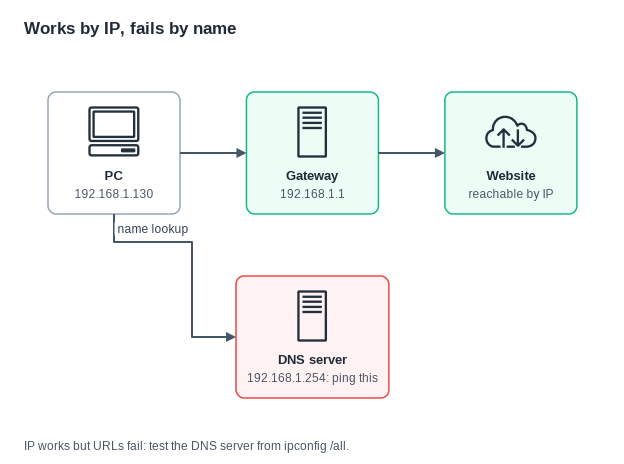
IP-level connectivity via ICMP echo; if the IP answers but the name does not, suspect name resolution |
tracert / traceroute |
Path (hops) to a destination |
netstat |
Active TCP connections, listening ports, statistics |
ipconfig does not show SSID, Wi-Fi encryption or firewall settings.
Windows tools
- Device Manager: a yellow triangle with an exclamation mark means the device has a problem code. A device under Other devices has no working driver: update the driver. Check USB under Universal Serial Bus controllers.
- Task Manager (Ctrl+Shift+Esc, or right-click Start/taskbar): terminate unresponsive programs; Performance tab shows CPU and memory usage. Measure under the real workload before recommending a RAM upgrade.
- Disk Management assigns drive letters to physical drives; Explorer maps network drives.
- Active Directory Users and Computers: after repeated failed sign-ins the account may be locked; unlock it, reset the password, or require a change at next logon. "Password never expires" does not fix a lockout.
Permissions
An explicit Deny ACE overrides Allow ACEs inherited through groups. Fix it by removing or changing the Deny entry. Moving a file inside the same NTFS volume keeps its permissions.
macOS and mobile
- Activity Monitor: Force Quit ends an unresponsive process immediately.
- macOS reads but cannot write NTFS; format cross-platform USB drives as exFAT.
- Phone Wi-Fi issues: check Airplane Mode first (least invasive); carrier network and Personal Hotspot are unrelated to joining a WLAN.
Printing and audio
- Printer back online but jobs stuck: clear the print queue. Pending job to a network printer: test its network connectivity. Driver failure: update the driver.
- Cannot be heard in a conference: unmuted mic, correct input device, input volume (not output volume).
Exam traps
- Gather information before any fix; test the theory before implementing.
- Manual IPs on a DHCP network risk duplicates and wrong settings.
- Site opens by IP but not by name: the DNS server, not the gateway.
- Formatting a drive is destructive; never a first step.
- Windows: "End task"; macOS: "Force Quit".
Docs
- https://learn.microsoft.com/en-us/windows-hardware/drivers/install/troubleshooting-device-and-driver-installations
- https://learn.microsoft.com/en-us/windows-server/administration/windows-commands/ipconfig
- https://learn.microsoft.com/en-us/windows-server/administration/windows-commands/ping
- https://learn.microsoft.com/en-us/windows-server/administration/windows-commands/nslookup
- https://learn.microsoft.com/en-us/windows/win32/secauthz/dacls-and-aces
- https://learn.microsoft.com/en-us/troubleshoot/windows-client/windows-security/permissions-on-copying-moving-files
- https://support.microsoft.com/en-us/windows/experience/system-configuration-tools-in-windows
- https://support.apple.com/en-ie/guide/activity-monitor/actmntr1002/mac
- https://support.apple.com/en-euro/101830