Exams / SN-CSA / D1 Self Service & Automation
D1.1
Self Service & Automation (part 1 of 3)
- Exam domain: Self Service & Automation
You are reading a free preview. The rest of the SN-CSA course unlocks with an Exam pass or All access.See plans
Service Catalog: what it contains
| Component | Purpose | Records created |
|---|---|---|
| Catalog item | Something that can be ordered by itself | Request, requested item (sc_req_item), catalog task (sc_task) |
| Order guide | Groups several catalog items into one request | One request, several requested items |
| Record producer | Catalog form that creates a task-based record (e.g. an incident) | The task record, not a requested item |
| Variable set | Reusable group of variables added to many items or order guides | None (form fields only) |
- A variable set is the answer when the same variables must appear on many items: define once, add to each item.
- Fulfilment of an ordered item is tracked by catalog tasks (
sc_task) linked to the requested item (sc_req_item).
Client-side behaviour: UI policies and client scripts
| Mechanism | Runs in | Notes |
|---|---|---|
| UI Policy | Browser | No-code: make fields mandatory, read-only or hidden |
| Client Script | Browser | onLoad, onChange, onSubmit, onCellEdit; onSubmit validates and can cancel by returning false |
| Business Rule, Script Include, ACL script | Server | Not browser scripts |
- Templates prefill the most-used fields of a table; form sections (one or two columns) change the layout in the form editor.
Flow Designer
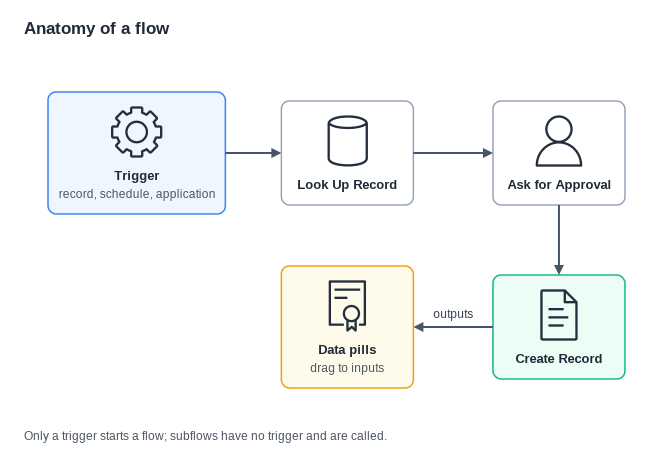
- A flow = one trigger + one or more actions. Trigger types: record-based (create/update), schedule-based, application-based.
- Common core actions: Create Record, Look Up Record, Ask for Approval, Wait For Condition.
- Data moves between steps as data pills (drag them into inputs).
- Benefits: low-code, reusable, less scripting, spokes/IntegrationHub for third-party systems.
Notifications, events, knowledge, analytics
| Topic | Remember |
|---|---|
| Notification | Define When to send, Who will receive, What it will contain |
| Dynamic recipient | Who will receive tab, users/groups in fields, dot-walk (Caller > Manager) |
| Events | Queued by business rules or workflows; registered events are consumed by notifications and script actions |
| Knowledge | Only Published articles are shown to end users |
| Performance Analytics | Time series, targets, trends and forecasts of indicators |
| Virtual Agent | Conversational (messaging) interface for users |
Update sets
- Track customizations (tables, fields, records flagged for tracking), not general operational data.
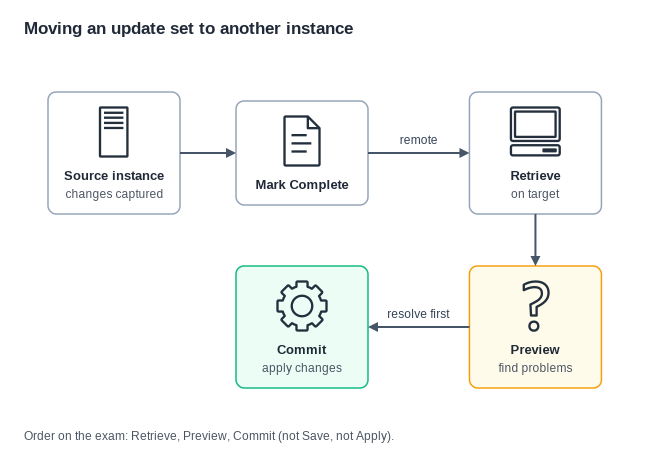
- Move to another instance: mark Complete, then on the target Retrieve, Preview (resolve all problems), Commit.
Exam traps
- Record producer creates an incident/task, not a requested item; an order creates
sc_req_itemandsc_task. - Update set order is Retrieve, Preview, Commit (not Save, not Apply).
- UI policies and client scripts are browser side; business rules, script includes and ACLs are server side.
- Only a trigger starts a flow; actions are steps.
- "Variable Set Template" and "onSubmission" do not exist.
- Events are queued by business rules (GlideSystem eventQueue) and by the workflow Create Event activity; the event is processed later, not fired at once.
- Templates are the answer for "populate the most-used fields of a table"; form layout is changed with form sections (one or two columns).
- Record triggers also cover deleted records; the exam wording is "created or updated".
Docs
- Create a variable set and add it to an item
- Client scripts
- Preview a remote update set
- Flow trigger types
- Create an email notification
- Record producer
- System events
- Create Event workflow activity
- Using form templates
- Customize your form layout
- Knowledge article states
- Workflow Studio architecture overview
- Performance Analytics forecasts