Exams / SN-CIS-VR / D1 Vulnerability Response operations and remediation
D1.1
Vulnerability Response operations and remediation
- Exam domain: Vulnerability Response operations and remediation
You are reading a free preview. The rest of the SN-CIS-VR course unlocks with an Exam pass or All access.See plans
Vulnerable items and how they are created
- A vulnerable item (VI) is created when an imported vulnerability matches a configuration item in the CMDB.
- By default a VI is a unique combination of CI, vulnerability and integration instance, so rescans update the existing VI. Enabling Include port creates one VI per port.
- Host data from scanners (e.g. Qualys) is matched to CIs by CI lookup rules; if no CI matches, the Identification and Reconciliation Engine can create one (update or insert, never delete/re-parent).
- NVD and CWE libraries enrich vulnerability data; CWE records come from the CWE database (MITRE) and can be refreshed on demand or by a scheduled job.
- Large imports: data is processed in pages; keep manual ingestion within the record limit to avoid performance issues.
Remediation tasks
| Way of grouping | Used by | Notes |
|---|---|---|
| Remediation Task Rules | automatic | group by vulnerability (default rule) or other VI fields; add VIs only to an Open task, otherwise a new Open task is created |
| Manual selection | manual task | pick VIs by hand |
| Condition (VI condition builder) | manual task | auto-refresh available |
| Filter Group | manual task | groups vulnerable items |
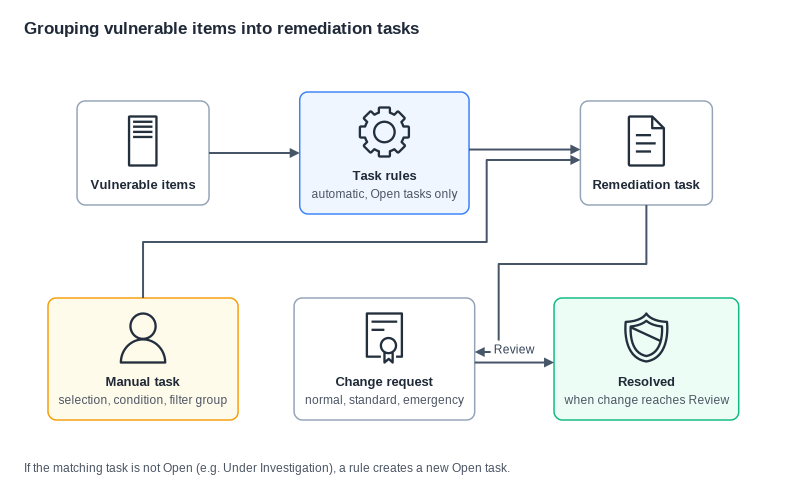
- Task states drive VI states in bulk (Open, Under Investigation, Awaiting Implementation, Deferred, Resolved, Closed).
- The rollup calculator weights maximum risk score (80), average risk score (5) and VI count (15) by default.
- Remediation is normally done through a Change request created from the task (normal, standard or emergency). With state synchronization, a change moved to Review resolves the task.
- Vulnerability Solution Management correlates findings with solutions from third-party sources.
- Container VR with Prisma Cloud Compute: Base Images, Vulnerabilities and Container Counts integrations.
Exceptions and false positives
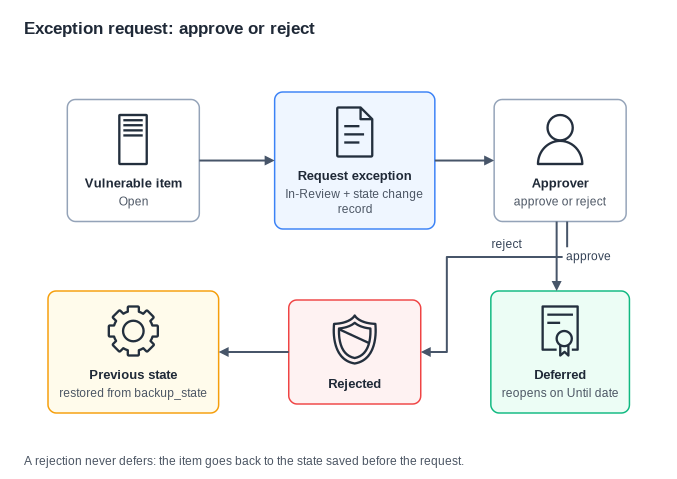
- Close/Defer starts the exception process; Request Exception opens the
request_exceptionUI page. - The request puts the item In-Review and creates a record in
sn_vul_change_approval; the previous state is kept inbackup_state. - Rejection restores the previous state; approval defers until the Until date, then a daily job reopens the item. A manual reopen is also possible.
- Exception management now uses Flow Designer (legacy workflow name: Vulnerable Item Exception Approval).
- False positives are distinct from exceptions; the approver sets the expiry (Until) date.
Exam traps
- Patching is one response, not the whole of Vulnerability Response.
- Accepted risk means Close/Defer with a reason, not scanner exclusions or deprioritising.
- Task rules never add to Under Investigation tasks; they create a new Open task.
- Rollup uses max, average and count; not minimum or mean.
- Exception rejection does not defer: previous state returns.
- Change types: normal, standard, emergency (no "Patching").
Docs
- https://raw.githubusercontent.com/ServiceNow/ServiceNowDocs/brazil/markdown/security-management/vulnerability-response/vulnerability-groups.md
- https://raw.githubusercontent.com/ServiceNow/ServiceNowDocs/brazil/markdown/security-management/vulnerability-response/create-vulnerability-group.md
- https://raw.githubusercontent.com/ServiceNow/ServiceNowDocs/brazil/markdown/security-management/vulnerability-response/approve-ex-request.md
- https://raw.githubusercontent.com/ServiceNow/ServiceNowDocs/brazil/markdown/security-management/vulnerability-response/defer-vul-item.md
- https://raw.githubusercontent.com/ServiceNow/ServiceNowDocs/brazil/markdown/security-management/vulnerability-response/vuln_change_mgmnt_state_synch.md
- https://raw.githubusercontent.com/ServiceNow/ServiceNowDocs/brazil/markdown/security-management/vulnerability-response/vuln-rollup-calculator.md
- https://raw.githubusercontent.com/ServiceNow/ServiceNowDocs/brazil/markdown/security-management/vulnerability-response/vr-configure-vi-key.md