Exams / SN-CIS-SPM / D1 Resource Management
D1.1
Resource Management (part 1 of 2)
- Exam domain: Resource Management
You are reading a free preview. The rest of the SN-CIS-SPM course unlocks with an Exam pass or All access.See plans
Who and what can be planned
| Item | Rule |
|---|---|
| Users and groups in resource plans | Only users with the PPS Resource (pps_resource) role are considered; a group must also carry pps_resource to be selected (resource plan or group resource assignment). |
resource_manager |
Reviews resource plans, confirms and allocates resources. |
resource_user |
Creates resource plans and requests resources (cannot change Confirmed/Allocated plans). |
it_project_manager |
Creates resource assignments in Project Workspace and heatmap work. |
| Resource roles | Defined under Resource > Resources > Resource Roles (role resource_manager), not under system security roles. |
| Release Management read access | Business stakeholder role (sn_release_read) reads any Release Management table for reports. |
Capacity, schedules and aggregates
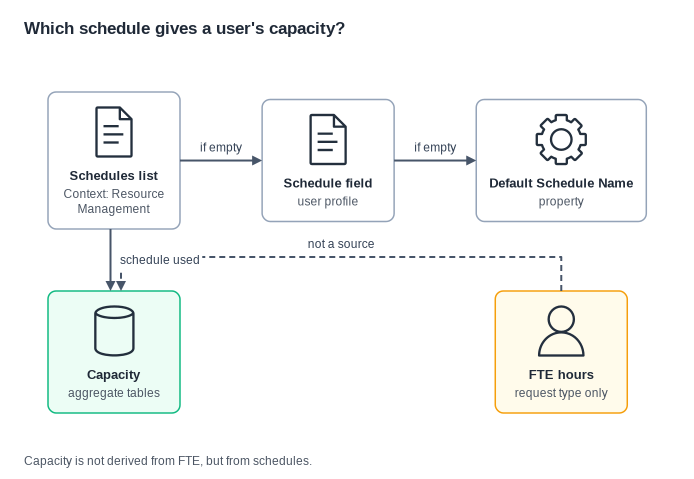
- Schedule resolution order: Schedules related list (Context = Resource Management) → Schedule field on the user → Default Schedule Name (
com.snc.resource_management.default_schedule) property. - Capacity comes from schedules, not FTE. FTE / Average Daily FTE hours only convert FTE or person-day requests into hours.
- Request types in a resource plan: Hourly, FTE, Person days (planned hours = person days × hours per person day).
- Tables:
resource_allocation_dailyholds actual hours per user per activity;resource_aggregate_daily/weekly/monthlyhold aggregated capacity, allocated, confirmed, actual hours and availability. Approved time cards update actuals in both. - Availability = capacity − allocation. Committed utilization = (allocated + confirmed hours) / capacity.
- A resource event is, per the docs, "a block of time that a resource spends on a task" (created when allocations become hard).
Resource plans and allocations
| Concept | Key facts |
|---|---|
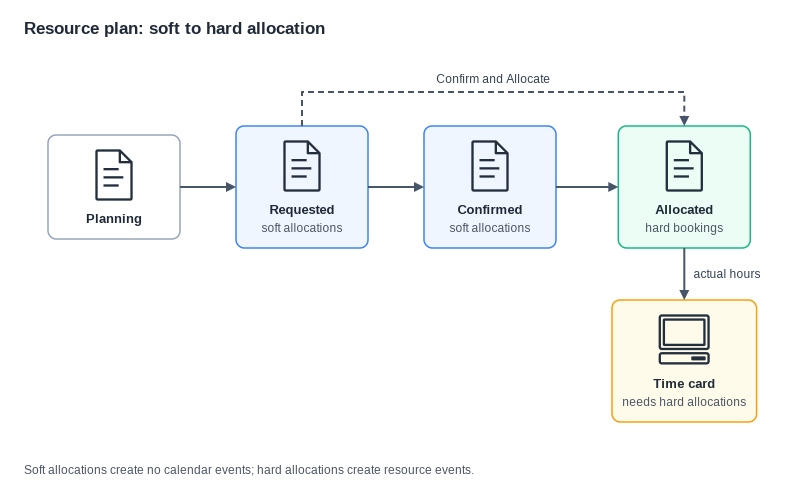
| States | Planning → Requested → Confirmed → Allocated (Confirm and Allocate goes straight from Requested). |
| Soft allocation | Temporary, no calendar events (Requested/Confirmed). |
| Hard allocation | Created at Allocated; resource not available for other plans; resource events created. |
| Allocation spread | Even splits hours evenly across working days; Front load fills all available slots from the start date. |
| Time card link | A resource plan can be associated with a time card only if it has hard allocations for the user. |
| Planned cost | Planned hours × hourly rate: rate override, else rate model on project/demand, else labor rate card. With a group request and a resource role, the role's hourly rate is used. |
Resource assignments (Project Workspace / Resource Management Workspace)
- Assignment for a user or group is created Pending; attribute-based assignments are created Unassigned.
- Splitting an assignment creates a second one for the same user, both in Approved state; split only at dates without actuals.
- Attribute-based assignments are created by
it_project_managerfor projects/tasks (demand managers do it for demands). - Operational resource assignments reserve team capacity for meetings, training, admin work; they reduce capacity shown in Capacity Planning.
- Capacity Planning: define resource criteria by selecting a primary attribute (group, skill, role).
- Labor costs for attribute-based assignments: Generate labor costs button in Project Workspace, or an activated scheduled job.
- Resource Management Workspace exports the resource portfolio as Excel or CSV.
Time cards and rates
- Rate types categorize work (Standard vs Overtime) and match a labor rate card.
- A user may pick a rate type only if the Time Sheet Policy has Allow multiple rate types selected.
- The Time Sheet dashboard needs the Performance Analytics – Content Pack – PPM Standard plugin (
com.snc.pa.pmo_dashboards).
Exam traps
- Capacity is not from FTE; it is from schedules.
- Group assignments need
pps_resourceon the group, notitilorit_project_user. - User/group assignment: Pending; attribute-based → Unassigned.
- Even is the equal-spread option; Front load is the non-equal one.
- Time card ↔ resource plan requires hard (not soft) allocations.
- Rate types are enabled in the Time Sheet Policy, not in the project record or preferences.
- Resource event: the docs define it as a block of time on a task, which differs from the bank's "non-scheduled activity" wording.
Docs
- https://raw.githubusercontent.com/ServiceNow/ServiceNowDocs/brazil/markdown/it-business-management/resource-management/r_UserResourcesAndGroupResources.md
- https://raw.githubusercontent.com/ServiceNow/ServiceNowDocs/brazil/markdown/it-business-management/resource-management/c_UsingResourceSchedules.md
- https://raw.githubusercontent.com/ServiceNow/ServiceNowDocs/brazil/markdown/it-business-management/resource-management/c_ResourcePlans.md
- https://raw.githubusercontent.com/ServiceNow/ServiceNowDocs/brazil/markdown/it-business-management/resource-management/r_AllocatingResources.md
- https://raw.githubusercontent.com/ServiceNow/ServiceNowDocs/brazil/markdown/it-business-management/resource-management/rsrc-plan-form-tabs.md
- https://raw.githubusercontent.com/ServiceNow/ServiceNowDocs/brazil/markdown/it-business-management/project-workspace/pw-resource-assignment-form.md
- https://raw.githubusercontent.com/ServiceNow/ServiceNowDocs/brazil/markdown/it-business-management/resource-management/split-resource-assignment-rmw.md
- https://raw.githubusercontent.com/ServiceNow/ServiceNowDocs/brazil/markdown/it-business-management/ppm-collaboration/table-installed-with-PPS-finance.md
- https://raw.githubusercontent.com/ServiceNow/ServiceNowDocs/brazil/markdown/it-business-management/cost-management/RateType.md