Exams / SN-CIS-SAM / D1 Practical Management of Software Compliance
D1.1
Practical Management of Software Compliance (part 1 of 2)
- Exam domain: Practical Management of Software Compliance
You are reading a free preview. The rest of the SN-CIS-SAM course unlocks with an Exam pass or All access.See plans
Practical Management is the blueprint tier about improving management controls and getting immediate benefits (a tier above "know what you have"). In ServiceNow SAM Professional it means reconciling entitlements with installs, reading the results, and acting on them (remediation, reclamation).
1. Reconciliation and its results
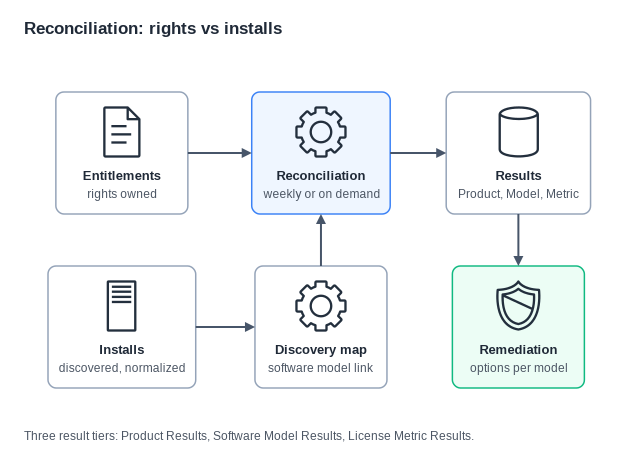
- Reconciliation is a scheduled job (default weekly, or on demand). It compares entitlements (rights owned) with discovered, normalized installs and lists the compliance status of software products.
- A software model is a profile of purchased software (publisher, version, discovery map). The discovery map ties the model to discovered software discovery models.
- Three tiers of results: Product Results, Software Model Results, License Metric Results.
- Do not modify the reconciliation scripts or business rules: use configuration (license metrics, rank priority, properties) instead.
| Term | Meaning |
|---|---|
| True-up cost | Estimated cost of remediating non-compliance, based on the lowest number of rights needed (lowest-cost Purchase Rights option) |
| Over-licensed amount | Cost of licenses owned but not being used |
| Software true-up cost accuracy | Set license cost or license plus maintenance cost on the software model; otherwise the average entitlement cost is used |
2. Remediation options
| Option | Notes |
|---|---|
| Purchase Rights | Raise a purchase order (Procurement plugin) |
| Create Allocations / Remove Allocations | Generated per license metric when allocations are needed / surplus |
| Remove Unallocated Installs | Not for Oracle database options |
| Remove Unlicensed Installs | Not for Oracle database options; a Cloud variant exists |
- Remediation option status values: New, In Progress, Complete, Void.
- Allocations are required for compliance only for Per Named User and Per Named Device metrics.
- Custom license metric: Reconciliation order uses a rank priority; the lower rank value takes precedence.
- Downgrade rights cannot be deleted once saved; they can be deactivated.
3. License Workbench and License usage view
- License Workbench tabs: All Publishers, Publishers Out of Compliance, Pinned Publishers (per-user list).
- Removal candidates reclaim software; justifications include Low Usage (default), Restricted Software, Unallocated, Unlicensed.
- Entitlements: guided walk-through playbook for step-by-step creation; bulk import with a template; errors reviewed via Review import errors. "Publisher Part Number not found" errors can be fixed with Create PPN (custom part number) when the entitlement is needed.
4. Reclamation
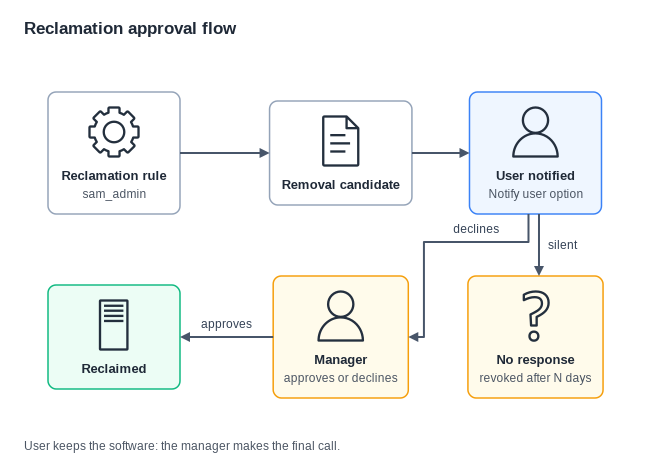
- Rules need role sam_admin and apply to Installed Software or Subscription Software.
- With Notify user, the user can respond; if the user wants to keep the install, the manager approves or declines the removal. No response after N days: the software is revoked.
5. Other points
- Change Management integration (License Change Projection): projects license cost when CI processor (CPU/core) resources change; needs plugin com.sn_samp_change.
- Client Software Distribution: today requires an Integration Hub subscription (formerly worded as Orchestration).
- Performance Analytics shows compliance trends; falling usage can signal over-licensing.
Exam traps
- Allocations: only Per Named User / Per Named Device, not Per User or Per Device.
- Workbench tabs are exactly three; "Publisher Compliance" and similar are not tabs.
- Downgrade rights: deactivate, never delete.
- True-up = cost of remediation; over-licensed = cost of unused licenses.
- User declines reclamation: the manager decides, the workflow does not stop.
- Lower reconciliation rank number wins.