Exams / SN-CIS-ITSM / D1 Knowledge Management
D1.1
Knowledge Management
- Exam domain: Knowledge Management
You are reading a free preview. The rest of the SN-CIS-ITSM course unlocks with an Exam pass or All access.See plans
Articles, templates and categories
| Concept | What to remember |
|---|---|
| Article template | Pre-defined fields in a specific order; standard, How To, What Is, FAQ and KCS templates. Inactive templates fall back to the standard template. Managed under Knowledge > Administration > Article Templates. |
| Category | Articles in a knowledge base are grouped by category; the picker also lets you select or add a subcategory. |
| Known error article | Created from a Problem (Related Links > Create Known Error Article), stored in a knowledge base and governed by that base's publishing workflow. A draft is not visible until published. |
| Valid to | Expiry date of the article, default = creation date + the knowledge base's Article Validity (blank = 1 Jan 2100). Expired articles do not appear in search. |
Publish and retire workflows
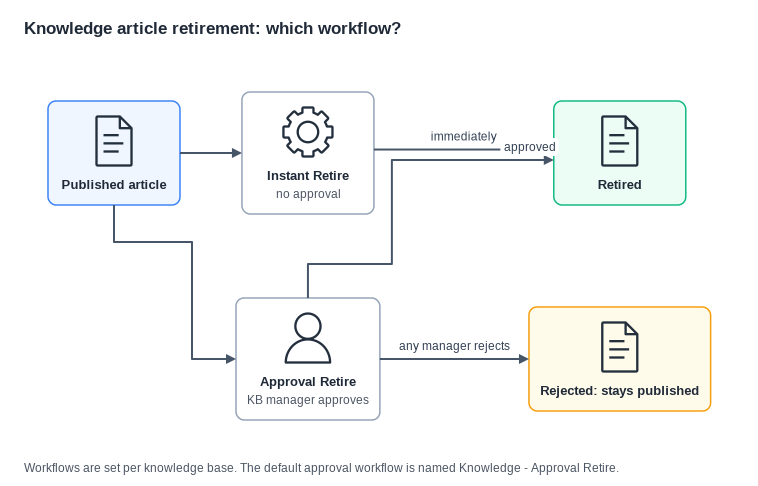
Publishing and retirement are controlled by workflows defined on the knowledge base.
| Workflow | Behaviour |
|---|---|
| Knowledge - Approval Publish | Requests approval from a knowledge base manager; article is In Review, then Published. |
| Knowledge - Instant Publish | Publishes a draft immediately, or on the scheduled date. |
| Knowledge - Approval Retire | Requests manager approval before retirement; if any manager rejects, the workflow is canceled and the article stays published. |
| Knowledge - Instant Retire | Retires a published article without approval. |
Feedback and search
| Topic | Fact |
|---|---|
| Feedback methods | Flag Article, mark helpful / not helpful, comments (add, reply), 1-5 star rating. |
| Where disabled | Fields on the Knowledge Base form (for example Disable rating, Disable mark as helpful), i.e. per knowledge base. |
| Search Log | Knowledge > Administration > Search Log, from the Knowledge Searches [ts_query_kb] table; Zing searches only, not AI Search. |
Agents: Agent Assist, contextual search, email client
- Agent Assist is a contextual side-panel tab, enabled per record table, that automatically searches for suggestions on the open record.
- Contextual Search can be set to Search as a user (for example the Incident Caller); a second tab then shows results for that user, limited to what both users can see.
- Email client template: per table, applied automatically by conditions and execution order on load. Quick message: predefined body text the user picks manually from a drop-down.
Service Catalog links to knowledge
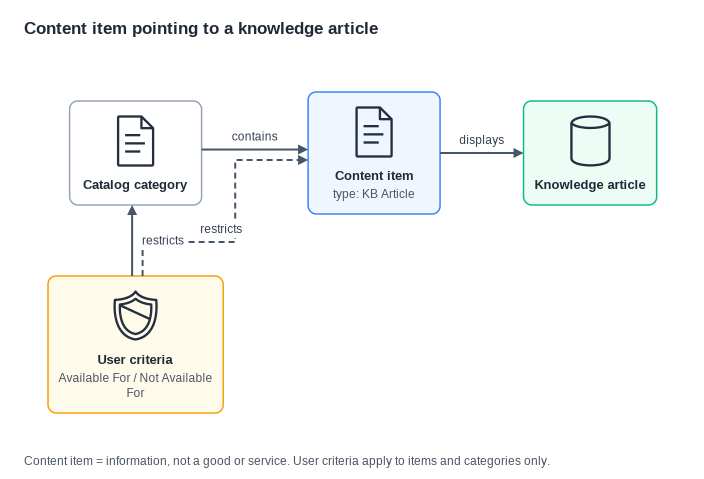
- A content item provides information rather than goods or services; its type KB Article displays a knowledge article.
- User criteria (Available For / Not Available For) apply to catalog items and categories. Category criteria do not cascade to the items inside it. Not Available For wins over Available For.
- Notification practice: reusable email templates keep notifications consistent.
Exam traps
- Approval Retire (manager approves) vs Instant Retire (no approval).
- Feedback is a 5-star scale, not 10; the setting lives on the knowledge base.
- Record producer / order guide / catalog item are not the way to show an article link: use a content item.
- User criteria: items and categories only, not variables, topics or taxonomy.
- Search Log does not capture AI Search queries.
- An invisible Known Error article is first a draft/unpublished problem.
- Q020 asks for five answers but the official key has four letters.
Docs
- Knowledge workflows
- Provide feedback on knowledge articles
- Search Log fields and description
- Knowledge article templates
- Validity of a knowledge article
- Apply user criteria to items and categories
- Define a content item
- Domain separation and Contextual Search
- Create an email client template
- Create a known error article