Exams / SN-CIS-HR / D1 Case Management
D1.1
Case Management
- Exam domain: Case Management
You are reading a free preview. The rest of the SN-CIS-HR course unlocks with an Exam pass or All access.See plans
HR case data model
| Concept | Point |
|---|---|
HR Case sn_hr_core_case |
Core table of all HR case records; extends Task task |
| COE (Center of Excellence) | Each COE is an extension of the HR Case table (e.g. Employee Relations sn_hr_er_case, Payroll sn_hr_core_case_payroll) |
HR Task sn_hr_core_task |
Work item under a case; not the core case table |
HR Profile sn_hr_core_profile |
Employee record; not a case table |
| HR service | Holds the HR case template, case options and the case creation service config |
| HR request | Creates an HR case for the appropriate HR service |
HR templates, services and case creation
- An HR template automatically populates fields on an HR case or task form. For an HR service it fires when a request for that service is made (on the case creation form: when the HR service is selected).
- The HR case template is referenced on the HR service record (also on HR catalog items, and HR service activities / lifecycle event activities for tasks).
- To show service-specific fields on the New Case creation page: HR Service Configuration → Case creation service config (left, right and bottom fields). Fields only in "Left task fields" also appear on the User segment groups form.
- Skip Auto Assign case option: the case is not auto-assigned by template or matching rules (templates and assignment rules still run).
- Response templates: tied to a table (extension of
taskorinteraction) plus a condition builder (for example a specific HR service). That table and those conditions decide where the template is available.
Assignment, matching and escalation
| Rule | Role |
|---|---|
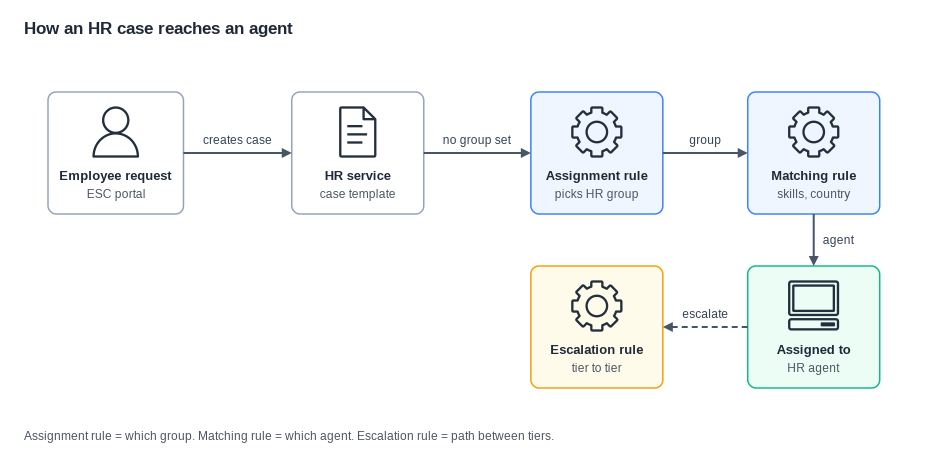
| Assignment rule | Assigns the HR group (and optionally user) when the catalog item/template did not; lower order runs first |
| Matching rule | Finds the agent: required skills, same country, workload |
| Escalation rule | Defines the path a case or HR task follows when escalated (Escalate from tier → Escalate to tier) |
| AWA | Alternative: assigns by availability, capacity and skills |
- Skills come from the platform Skill Management application and are attached through HR case templates.
- Base-platform order for a template with skills but no group: assignment rule → group, then matching rule → agent.
Documents on HR cases
- Document tasks are generated manually or automatically; automatic creation uses the HR service case options Automatically Create Draft Document and Automatically Initiates Document tasks.
- The HR agent working the case (the Assigned to person) previews, generates and sends the document. The attachment name carries the name of whoever generated it.
- Cancelling an HR case cancels its document tasks (business rules Initiate Cancel Document Tasks / Cancel Document Tasks do this; inactivate them to prevent it).
- Employee Document Management: legal holds go on a document type or an HR profile (several profiles at once is possible) and stop purging; max upload size is the property
sn_hr_ef.max_file_size(Employee Document Properties, default 30 MB).
Bulk cases
| Item | Point |
|---|---|
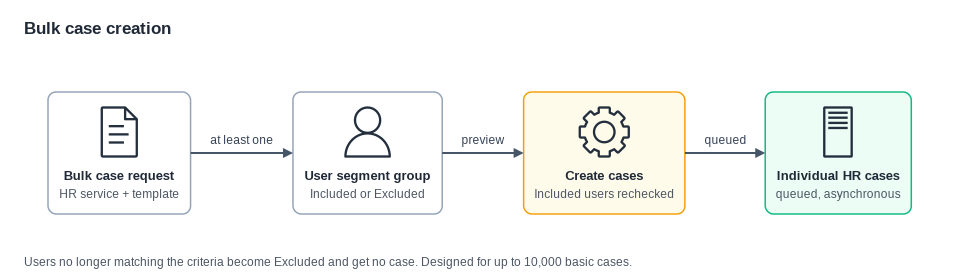
| Segment | At least one user segment group per bulk case request |
| Filter by | Upload file, User criteria, HR profiles, HR criteria |
| Status | Users matching are Included; users no longer matching the criteria are Excluded |
| Limit | Designed for 10,000 basic cases or 1,000 workflow (e.g. lifecycle event) cases |
| Processing | Queued and updated asynchronously; the old Bulk case creation scheduled job is deprecated |
Security and sensitive cases
| Feature | Point |
|---|---|
COE Security Policy sn_hr_core_coe_security_policy |
Grants specific groups read/write on a COE's case table (implemented as ACLs) |
| ER case restriction | Base config lets the HR Confidential group (sn_hr_er.confidential) access ER cases |
| Scoped ER | Allegations, interviews, evidence; case can be created without Opened for / Subject person (anonymous or external) |
| ACL changes | admin must elevate to security_admin from the user menu; lasts for the session |
| Granular Delegation | Delegate approvals/tasks by table, condition and date range |
| User criteria | Match all selected = user must meet all criteria; cleared = one or more |
Agent experience
- Knowledge results on the case form: Contextual Search (search context + table configuration) decides which knowledge bases are searched. A new knowledge base must be added there.
- Link Generator adds links to external systems (payroll, third-party HR apps) on the case form: Define Link → Define Link Parameters → Define Button.
- Sidebar discussions replace Connect Chat conversations in Next Experience / configurable workspaces.
- Dashboards (HR Dashboards & Reports): Overview, Manager Dashboard, HR Case Dashboard (plus SLA); customise with Add content and Change Layout.
- Predictive Intelligence auto-determines the HR service; disable
sn_hr_core.case_auto_categorizationto stop it.
Exam traps
- Assignment rule = group; matching rule = agent (skills/country); escalation rule = tier-to-tier path.
- Core case table is
sn_hr_core_case(extendstask), not HR Task or HR Profile. - The HR template lives on the HR service, not on the catalog item or record producer.
- Disable
case_auto_categorization, notrcaorcase_assignments. - Bulk statuses: Included / Excluded. The six-hour scheduled job answer is legacy.
- Who generates a document is worded inconsistently across question banks: Assigned to when case options exist, "any HR professional" when none are specified.
Docs
- https://raw.githubusercontent.com/ServiceNow/ServiceNowDocs/brazil/markdown/employee-service-management/hr-service-delivery/bulk-case.md
- https://raw.githubusercontent.com/ServiceNow/ServiceNowDocs/brazil/markdown/employee-service-management/hr-service-delivery/bulk-case-segment.md
- https://raw.githubusercontent.com/ServiceNow/ServiceNowDocs/brazil/markdown/employee-service-management/hr-service-delivery/t_CreatingAnAssignmentRule.md
- https://raw.githubusercontent.com/ServiceNow/ServiceNowDocs/brazil/markdown/employee-service-management/hr-service-delivery/t_CreateOrModifyEscalationRules.md
- https://raw.githubusercontent.com/ServiceNow/ServiceNowDocs/brazil/markdown/employee-service-management/hr-service-delivery/hr-coe-security-policies.md
- https://raw.githubusercontent.com/ServiceNow/ServiceNowDocs/brazil/markdown/employee-service-management/hr-service-delivery/DocumentGeneration.md
- https://raw.githubusercontent.com/ServiceNow/ServiceNowDocs/brazil/markdown/employee-service-management/hr-service-delivery/configure-hr-service.md
- https://raw.githubusercontent.com/ServiceNow/ServiceNowDocs/brazil/markdown/employee-service-management/hr-service-delivery/predict-hr-service.md
- https://raw.githubusercontent.com/ServiceNow/ServiceNowDocs/brazil/markdown/employee-service-management/hr-service-delivery/c_HRDashboardsReports.md
- https://raw.githubusercontent.com/ServiceNow/ServiceNowDocs/brazil/markdown/platform-security/t_ElevateToAPrivilegedRole.md