Exams / SN-CIS-DISC / D1 Discovery Configuration
D1.1
Discovery Configuration (part 1 of 2)
- Exam domain: Discovery Configuration
You are reading a free preview. The rest of the SN-CIS-DISC course unlocks with an Exam pass or All access.See plans
MID Server basics
| Topic | Fact |
|---|---|
| Instance user | Needs the mid_server role (cannot be combined with security_admin) |
| Windows service account | Needs the Log on as a service right; must not be a local system or administrator-level account |
| Name | Cannot begin with mid.server |
| Upgrade | Automatic; the host must reach install.service-now.com |
| Threads | Default threads.max is 25; each thread needs memory, so more threads may require more memory for the MID Server |
Schedules, ranges and Shazzam
The Shazzam batch size is the number of IP addresses each Shazzam probe scans (default 1000). A UI policy enforces a minimum of 256, and it cannot exceed the Shazzam max range size property.
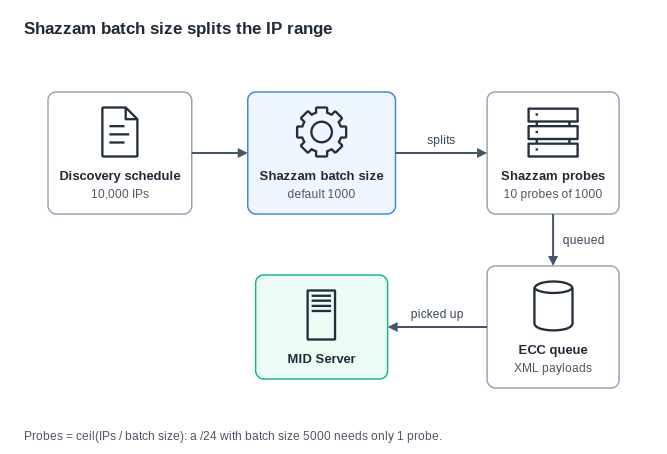
- 10,000 IPs with batch 1000 = 10 probes; with batch 5000 = 2 probes.
- A /24 (about 254 hosts) with batch 5000 = 1 probe.
- Quick ranges let you list several ranges in one comma-delimited string, so Range Sets are not the only way to scan several ranges; they simplify managing known networks.
Credentials
| Type | Key point |
|---|---|
| Windows | Domain user with local administrator access on the target hosts |
| SNMP | Community string only (no user name); a read-only string such as public is enough |
| Credential Affinity | Table dscy_credentials_affinity ties a device/IP to the credential that worked |
Patterns, ECC queue and logs
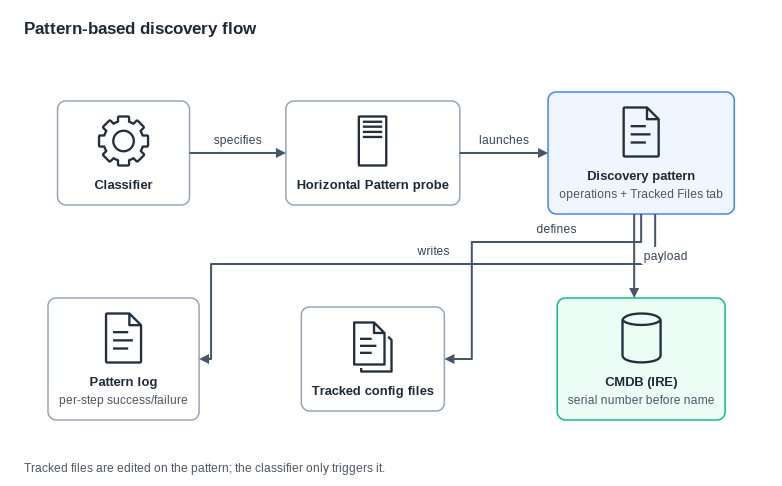
- The classifier names the Horizontal Pattern probe, which names the pattern.
- Tracked configuration files are defined on the pattern (CI type + file path).
- ECC queue: connected flow of probe and sensor activity plus the XML payload to/from the instance; records older than 7 days are deleted by default.
- Horizontal Discovery log (pattern log): results of every operation in the pattern, including per-step success or failure.
- In patterns,
$name_details[1].exec_infois a row index into a tabular variable; quotes mark a constant string; Transform Table maps a source table to a target table with field mappings. - File-based Discovery scans configured paths for known file signatures and matches files (name, size, version) to installed software.
Identification and reconciliation
- Identifier entries are tried by priority; a matching serial number identifies the existing CI, which is then updated (e.g. renamed) instead of creating a new one.
- Detected duplicates are grouped into a de-duplication task.
- Most Discovery properties start with
glide.discovery.
Exam traps
- Log on as a service, not Domain Admin or root, for the Windows MID service account.
- mid_server is the MID user role; not discovery_admin.
- Probes = ceil(IPs / batch size); do not answer 254 or 5000 for a /24.
- Tracked files are edited on the pattern, not the classifier or probe.
- Per-step success/failure is in the pattern log, payloads in the ECC queue.
- Names beginning
mid.serverare invalid.
Docs
- https://raw.githubusercontent.com/ServiceNow/ServiceNowDocs/brazil/markdown/servicenow-platform/mid-server/mid-server-install-prereqs.md
- https://raw.githubusercontent.com/ServiceNow/ServiceNowDocs/brazil/markdown/servicenow-platform/mid-server/t_SetupMIDServerRole.md
- https://raw.githubusercontent.com/ServiceNow/ServiceNowDocs/brazil/markdown/servicenow-platform/mid-server/c_UpgradeAndTestMIDServer.md
- https://raw.githubusercontent.com/ServiceNow/ServiceNowDocs/brazil/markdown/servicenow-platform/mid-server/t_SetMIDServerThreadUse.md
- https://raw.githubusercontent.com/ServiceNow/ServiceNowDocs/brazil/markdown/it-operations-management/discovery/discovery-schedule-form.md
- https://raw.githubusercontent.com/ServiceNow/ServiceNowDocs/brazil/markdown/it-operations-management/discovery/tracked-config-files.md
- https://raw.githubusercontent.com/ServiceNow/ServiceNowDocs/brazil/markdown/it-operations-management/discovery/r_DiscoveryStatusECCQueue.md
- https://raw.githubusercontent.com/ServiceNow/ServiceNowDocs/brazil/markdown/it-operations-management/discovery/r_DiscoveryLog.md
- https://raw.githubusercontent.com/ServiceNow/ServiceNowDocs/brazil/markdown/platform-security/connections-and-credentials/c_CredentialAffinity.md
- https://raw.githubusercontent.com/ServiceNow/ServiceNowDocs/brazil/markdown/servicenow-platform/configuration-management-database-cmdb/id-detect-dup-ci.md