Exams / SN-CAS-PA / D1 Configure Breakdowns and Breakdown Sources
D1.1
Configure Breakdowns and Breakdown Sources
- Exam domain: Configure Breakdowns and Breakdown Sources
You are reading a free preview. The rest of the SN-CAS-PA course unlocks with an Exam pass or All access.See plans
Building blocks
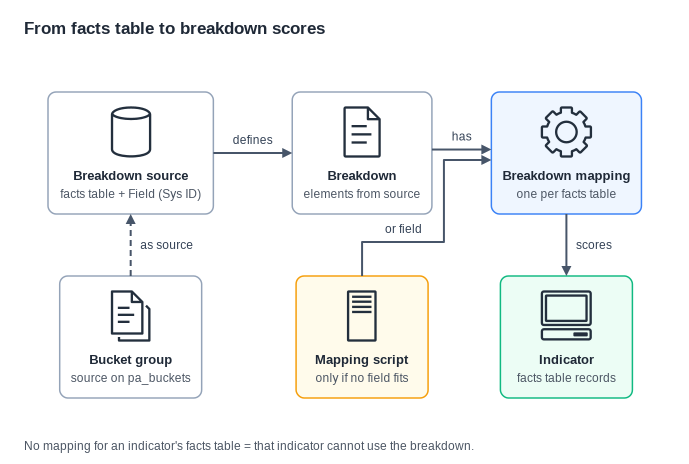
A breakdown source says which unique values (breakdown elements) a breakdown contains. A breakdown uses the source. A breakdown mapping links the facts table of an indicator to the breakdown, through a field or a script.
| Item | What to know |
|---|---|
| Facts table + Field | The Field must contain a unique value for every record, usually Sys ID. |
| Conditions | Filter out unneeded elements. For Choice [sys_choice] sources, put conditions on Table, Element and Language (e.g. Incident.Category, Close code). |
| Related list conditions | Include a relationship with another table in the filter (e.g. Incident -> Assignment group). |
| Label for unmatched | Label for values that match no element (default "Unmatched"). |
| Breakdowns tab | Lists breakdowns using the source; New creates one. |
| Mapping | One mapping per indicator facts table. Several mappings per breakdown let one breakdown serve several indicators. |
Mappings, scripts and bucket groups
- Field mapping: a field of the indicator facts table references the breakdown source.
- Scripted mapping: use when no suitable field exists (age from dates, hour of day). Docs say to use scripts mainly for Age-type indicators with date processing.
- Bucket group: a breakdown source whose facts table is Bucket [pa_buckets] with a condition naming the group. It groups either the values of a mapped field or the values a mapping script returns.
- Stored fields (priority, update count in sys_mod_count) need no script.
Breakdown matrix and relations
| Topic | Rule |
|---|---|
| Collect breakdown matrix | Collects two-breakdown combinations; element counts multiply. Cleared = single-level breakdowns only. |
| Matrix exclusions | Exclude meaningless combinations; individual breakdown scores are still collected. |
| Data snapshots | No matrix and no two-breakdown limit. |
| Breakdown relation | Navigation from an element of one breakdown to related elements (e.g. Assignment Group -> Assigned To). One-way; create two for both directions. |
| Historical jobs | Exclude breakdowns whose values change over time (State, Assignment Group in the provided incident job). |
Dashboards and security
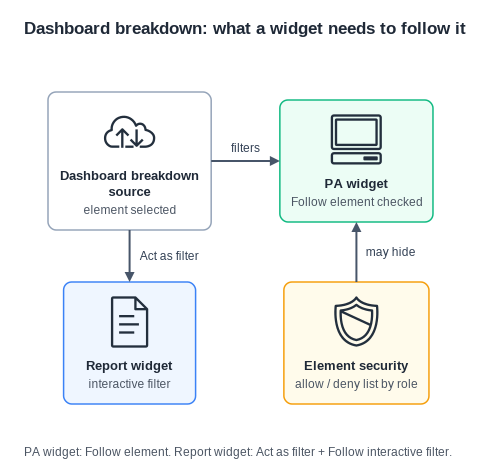
- PA widgets: enable Follow element; the indicator must have a breakdown based on the selected source.
- Report widgets: set Act as filter on the dashboard breakdown source to an interactive filter on the same table.
- Element security (Security tab): allow list includes elements for listed roles; deny list excludes them. Admins always see unfiltered scores; clear Show blank option to prevent unfiltered scores for others.
- Element filters: conditions or related list conditions that limit displayed elements.
Exam traps
- Breakdown mapping, not relation, connects a facts table to a breakdown.
- Follow element (PA widget) vs Follow interactive filter / Act as filter (report widgets).
- Deny list hides the listed elements; allow list shows only the listed ones.
- State changes over time: exclude it from historical collection.
- Clearing Collect breakdown matrix leaves a single level of breakdown.
- Exam wording Blacklist/Whitelist = docs wording deny list/allow list.
Docs
- Define a breakdown source
- Create a breakdown mapping on a breakdown record
- Bucket groups for breakdown sources
- Collect and manage a matrix of breakdowns
- Create a breakdown-to-breakdown relation
- Control ability to view breakdown elements
- Using breakdowns on responsive dashboards
- Configure widgets for breakdown dashboards
- Make a breakdown act as an interactive filter
- Element filters
- Collect historical data