Exams / SN-CAD / D1 Security and Restricting Access
D1.1
Security and Restricting Access (part 1 of 2)
- Exam domain: Security and Restricting Access
You are reading a free preview. The rest of the SN-CAD course unlocks with an Exam pass or All access.See plans
Access Controls (ACLs)
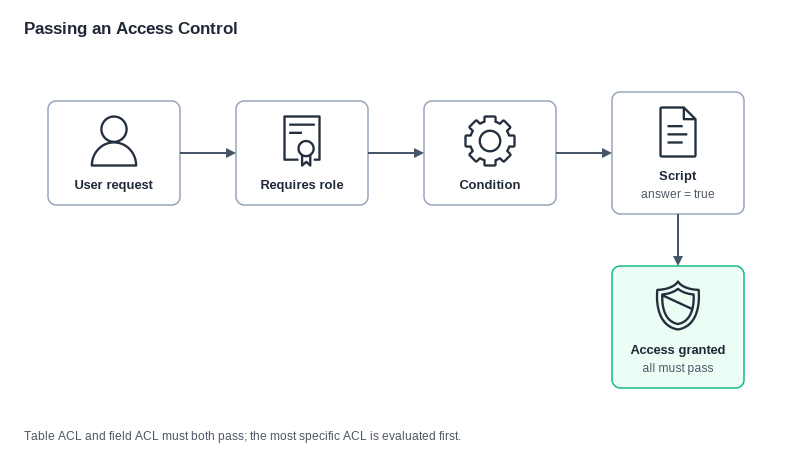
An ACL lists the conditions to access an object and operation: roles, a data condition, and/or a script. "To gain access to an object and operation, a user must pass all conditions listed in an access control." Conditions can be:
- "One or more user roles to the Requires role list."
- "A script that evaluates to true or false or sets the
answervariable to true or false."
| Point | Rule |
|---|---|
| Matching order | Most specific (table.field) before generic (table.*, wildcard) |
| Table + field | Both the table ACL and the field ACL must pass |
| Default ACLs on a new scoped table | Create, Read, Write, Delete |
| Business rule | Does not grant access |
Application Access (cross-scope)
| Setting | Controls |
|---|---|
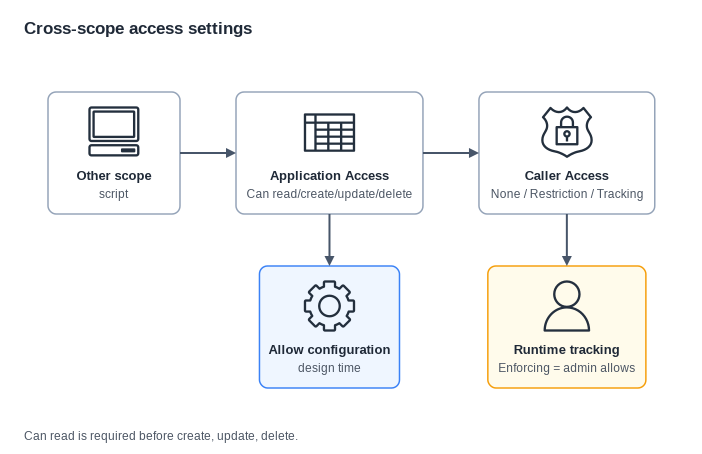
| Accessible from = This application scope only | Design-time: other scopes cannot create configuration records on the table |
| Allow configuration | Other scopes may create configuration records (business rules, client scripts...) |
| Can read / create / update / delete | Runtime access to data records; create/update/delete need Can read |
| Caller Access | None (uses Accessible from), Caller Restriction (denied, request logged), Caller Tracking (allowed, logged) |
| Runtime access tracking: Enforcing | Operation blocked until an admin sets the record to Allowed |
"Restricted caller access [sys_restricted_caller_access] records track cross-scope applications or scripts that request access to an application, application resource, or event."
Scripting security and roles
| Item | Fact |
|---|---|
g_user.hasRole() (client) |
"Returns true if the current user has the specified role or the admin role." |
gs.hasRole() |
Server side (business rules, script includes) |
| Client GlideRecord | Not available in scoped apps; use GlideAjax + Script Include |
| Display business rule | Has current, gs, g_scratchpad; no previous |
| Menus and modules | Governed by roles |
| Script Include Protection Policy | Applies after installation from the Store |
| Source control | Roles admin and source_control |
| ATF | Use "Create a User" step instead of impersonating an existing user |
| Delegated developers | Scoped apps only: Delete Application, Manage ACLs & Roles |
Exam traps
- Can create controls runtime data records, not configuration records (that is Accessible from / Allow configuration).
- Caller Access values: None, Caller Restriction, Caller Tracking — no "Caller Permission".
hasRolealso returns true for admin;hasRoleExactlydoes not.- Query cannot be restricted by Application Access.
Docs
- https://raw.githubusercontent.com/ServiceNow/ServiceNowDocs/brazil/markdown/platform-security/access-control/exploring-access-control-list.md
- https://raw.githubusercontent.com/ServiceNow/ServiceNowDocs/brazil/markdown/application-development/c_DesignTimeAccessToAppTables.md
- https://raw.githubusercontent.com/ServiceNow/ServiceNowDocs/brazil/markdown/application-development/r_TableApplicationAccessFields.md
- https://raw.githubusercontent.com/ServiceNow/ServiceNowDocs/brazil/markdown/application-development/set-RCA-level.md
- https://raw.githubusercontent.com/ServiceNow/ServiceNowDocs/brazil/markdown/application-development/c_RuntimeAccessTracking.md
- https://raw.githubusercontent.com/ServiceNow/ServiceNowDocs/brazil/markdown/api-reference/c_GlideUserAPI.md