Exams / SF-PDI / D1 User Interface
D1.1
User Interface (part 1 of 2)
- Exam domain: User Interface
You are reading a free preview. The rest of the SF-PDI course unlocks with an Exam pass or All access.See plans
Aura components as actions, overrides and page components
| Goal | What to implement |
|---|---|
| Custom (quick) action in Lightning Experience | force:lightningQuickAction (panel with standard controls such as Cancel); force:lightningQuickActionWithoutHeader for your own header and footer; the two cannot be combined |
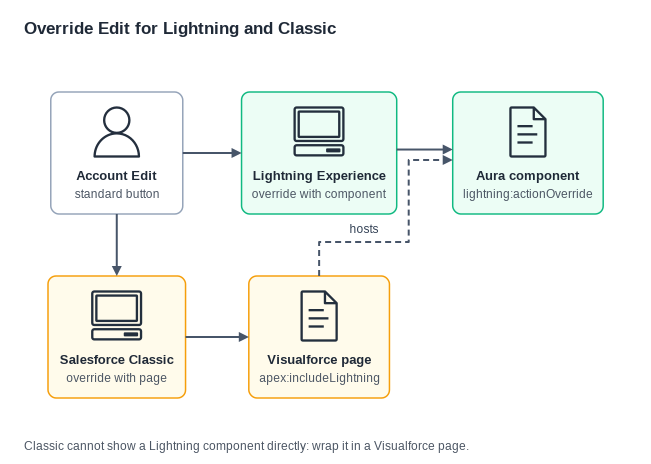
| Override View, New, Edit or Tab | lightning:actionOverride, then select it manually in Setup |
| Place on a Lightning App Builder page | flexipage:availableForAllPageTypes (or flexipage:availableForRecordHome for record pages only) |
| Know the current record Id / object | force:hasRecordId / force:hasSObjectName (sets sObjectName only in an explicit record context) |
- A custom action needs a default value for every required attribute.
- A design resource (
design:component,design:attribute,sfdc:objects) exposes properties to App Builder and can limit the component to some objects. - Classic cannot render a Lightning component: wrap it in a Visualforce page with
<apex:includeLightning/>(Lightning Components for Visualforce, based on Lightning Out).
Apex controllers for Aura
- Methods must be
publicorglobal,staticand annotated@AuraEnabled; non-static methods are not supported. - The class must be wired through the
controllerattribute ofaura:component; the client callscmp.get("c.methodName"). - A returned custom class serializes only its
@AuraEnabledinstance properties and methods. RemoteActionis the Visualforce equivalent, not used by Aura.
Visualforce messages and view state
| Component | Shows |
|---|---|
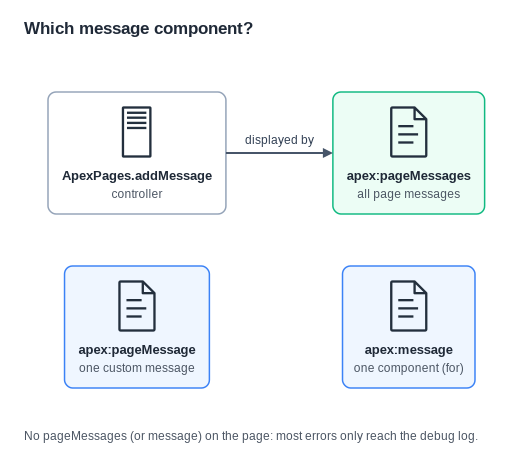
apex:pageMessages |
All messages of the page, including ApexPages.addMessage() ones |
apex:pageMessage |
One custom message with Salesforce styling and a severity |
apex:message |
A message for one component (for attribute) |
- GET request order: controller/extension constructors, then custom components (and their constructors), then view state if
apex:formexists, then the HTML response. transientandstaticvariables are not transmitted in the view state; public and private instance variables are.renderAs="pdf"renders a page as PDF: a classic reason to choose Visualforce.- Runtime field lists use Schema describe (
Schema.describeSObjects()), not Schema Builder or Metadata API.
Locale and internationalization
| Need | Tool |
|---|---|
| Date to locale String in Apex | Date.format() (Date.parse() is the reverse) |
| Locale-formatted values from a query | SOQL FORMAT() |
| Aura locale info | $Locale value provider |
| Multi-language text / multi-currency | Custom Labels, Translation Workbench, convertCurrency() |
Lightning Web Components
- Layout:
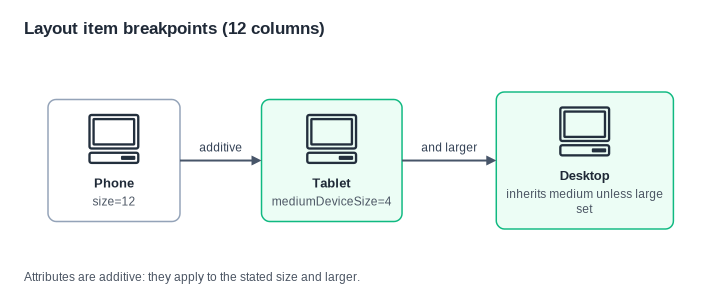
sizeis for small screens;medium-device-sizeapplies to tablets and larger; attributes are additive.
- Child to parent:
new CustomEvent('passthrough', { detail: this.passthrough }), thenthis.dispatchEvent(...); the parent readsevent.detail. - Quick action: target
lightning__RecordActionwith a matchingtargetConfig;actionType="ScreenAction"opens a modal (default),Actionis headless. lightning-record-edit-formshows errors withlightning-messagesplaced before or after thelightning-input-fieldelements.- Field-level errors in Aura:
ui:inputDefaultError(legacy, now deprecated).
Exam traps
pageMessages(plural) vspageMessagevsmessage: different scopes.- Aura Apex method forgotten as non-static or without
@AuraEnabled. - Overriding Edit for Classic users needs a Visualforce page, not the component itself.
- Layout:
largeDeviceSizealone leaves tablets at thesizevalue. - Static and transient are both outside view state.
- View state limit: bank answer 135 KB; recent docs state a larger limit (unverified here).
Docs
- https://developer.salesforce.com/docs/platform/lightning-component-reference/guide/force-lightning-quick-action.html
- https://developer.salesforce.com/docs/platform/lightning-component-reference/guide/aura-action-override.html
- https://developer.salesforce.com/docs/platform/lightning-component-reference/guide/flexipage-available-for-all-page-types.html
- https://developer.salesforce.com/docs/platform/lightning-component-reference/guide/force-has-sobject-name.html
- https://developer.salesforce.com/docs/platform/lightning-component-reference/guide/lightning-layout-item
- https://developer.salesforce.com/docs/platform/lightning-component-reference/guide/lightning-record-edit-form
- https://developer.salesforce.com/docs/atlas.en-us.lightning.meta/lightning/controllers_server_apex.htm
- https://developer.salesforce.com/docs/atlas.en-us.pages.meta/pages/pages_compref_pageMessages.htm
- https://developer.salesforce.com/docs/atlas.en-us.pages.meta/pages/pages_controller_get_request.htm
- https://developer.salesforce.com/docs/atlas.en-us.apexcode.meta/apexcode/apex_classes_keywords_transient.htm
- https://developer.salesforce.com/docs/atlas.en-us.soql_sosl.meta/soql_sosl/sforce_api_calls_soql_select_format.htm
- https://developer.salesforce.com/docs/platform/lwc/guide/events-create-dispatch
- https://developer.salesforce.com/docs/platform/lwc/guide/use-config-for-quick-actions.html
- https://developer.salesforce.com/docs/platform/lwc/guide/use-visualforce