Exams / SF-PD / D1 Process Automation and Logic
D1.1
Process Automation and Logic
- Exam domain: Process Automation and Logic
You are reading a free preview. The rest of the SF-PD course unlocks with an Exam pass or All access.See plans
Declarative first, code when needed
Salesforce prefers declarative tools: validation rules, formula fields, roll-up summary fields and flows. Apex triggers are the fallback.
| Need | Tool | Notes |
|---|---|---|
| Reject a bad save | Validation rule | Can test the profile and the new/old value |
| Set fields on the same record | Before-save record-triggered flow | Runs before the save and causes no extra DML |
| Create or update other records | After-save record-triggered flow | Also the answer for lookup "roll-ups" |
| Sum child records | Roll-up summary field | Master-detail only |
| Guided input from a user | Screen flow | Declarative multi-step UI |
| Complex or bulk logic | Apex trigger | Use addError() to block |
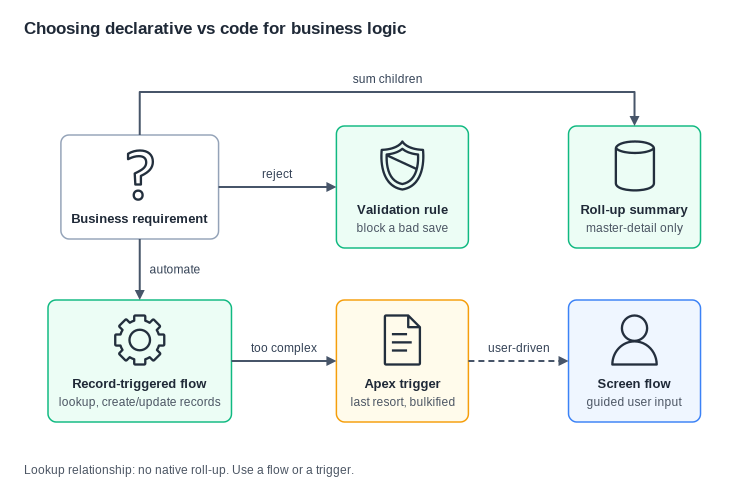
"Validation Rules is a fast and easy-to-use alternative to writing custom Visualforce pages and controllers or Apex Triggers."
"And if we want to have the sum of all order line totals on the order header, we can use a Roll-up Summary field, as long as there is a Master-Detail relationship between the order and the order lines object."
Triggers and the order of execution
- Before triggers can modify
Trigger.new; records can only be modified inbeforetriggers. addError()on a record or field blocks the DML operation.- Order of several triggers on one object and event is not guaranteed: use one trigger per object and a handler class.
- Before-save flows run before the save; validation rules run again after them.
- Roll-up summary recalculation updates the parent record, and updates from flows can cause triggers to fire again.
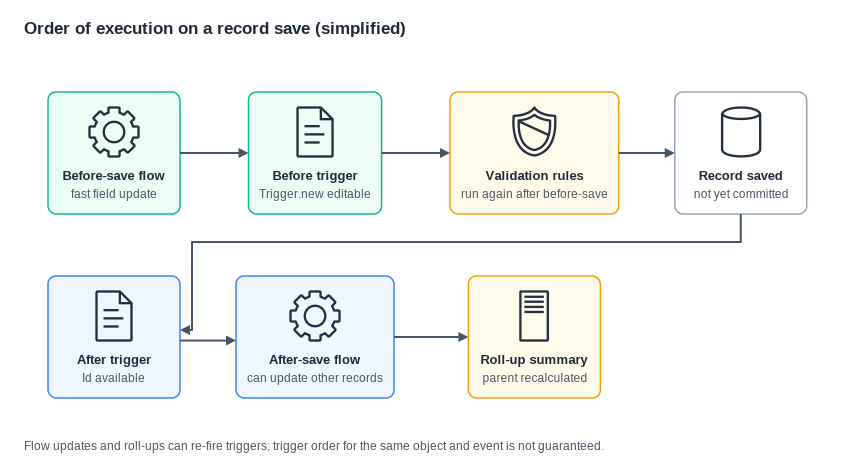
Operations that do not invoke triggers include cascading deletes, renaming or replacing picklist values, and changing a user's default division with transfer division checked.
Bulkification and governor limits
| Limit (synchronous) | Value |
|---|---|
| SOQL queries per transaction | 100 |
| DML statements per transaction | 150 |
| Records processed by DML | 10,000 |
| CPU time | 10,000 ms |
- Never run SOQL or DML inside a loop. Collect IDs in a set, query once with
IN, and add records to a list for one DML. - Data Loader / Bulk API loads fire triggers in chunks of 200, so a trigger that works for one record can fail on a bulk load.
- Use the
Limitsclass to monitor consumption andDatabase.setSavepoint/ rollback to restore the database after a failure.
DML statements
| Goal | Syntax |
|---|---|
| Partial success | Database.insert(records, false) (returns SaveResult[]) |
| All or none (default) | insert records; or Database.insert(records, true) |
| Insert or update by external ID | upsert orders Order_Number__c; |
allOrNone defaults to true.
Apex control flow and loops
- Loop over a list with
for, branch withif / elseinside it;switchmatches values, not ranges. - A
do-whileloop runs its body once before checking the condition.
Asynchronous Apex and monitoring
- Monitor batch and future jobs from Setup > Apex Jobs (and by querying
AsyncApexJobin Developer Console). - Batch jobs can be held in the Apex Flex Queue with status
Holding(up to 100 jobs). - A future method is the way to run a callout from a trigger; a user-initiated button should instead be a quick action.
Client-side caching for Lightning
| Use | Requirement |
|---|---|
@wire Apex method |
@AuraEnabled(cacheable=true), static, public or global |
| Client-side cache | cacheable=true; the method may only read data |
Exam traps
- A lookup relationship has no native roll-up summary: use a flow or trigger on the child.
- Required on the field definition applies everywhere; Required on the page layout is UI-only.
insert (records, false)is not valid Apex; thefalsebelongs toDatabase.insert.- Trigger order for the same event is never guaranteed.
- Some questions say "choose two" but list one or three answers (SF-PD-114, SF-PD-119): the item has drifted from current features.
- Before trigger to block creation, not after insert.