Exams / SF-MCD / D1 Scripting and Automation
D1.1
Scripting and Automation (part 1 of 3)
- Exam domain: Scripting and Automation
You are reading a free preview. The rest of the SF-MCD course unlocks with an Exam pass or All access.See plans
AMPscript basics
| Function | What it does | Exam point |
|---|---|---|
Output(fn()) |
Returns the result of an AMPscript function and includes it in the rendered content | Only produces output when the value is a function call; a string literal gives an error |
Mod(a, b) |
Remainder of a / b | Odd/even test for alternating rows: Mod(@n, 2) = 1 |
Add(a, b) |
Sum of exactly two numbers | Nest calls for more than two values |
DateAdd(date, n, unit) |
Date arithmetic; units Y, M, D, H, MI |
DateAdd(d, -1, 'H') moves back one hour |
RaiseError(msg, skipCurrentOnly, ...) |
Logs the error and skips the current subscriber (or stops the job) | For error handling, not segmentation |
CreateSmsConversation() |
Starts a MobileConnect SMS conversation from AMPscript (e.g. CloudPage) | Not usable with Double Opt-In / Info Capture templates |
Order of operations
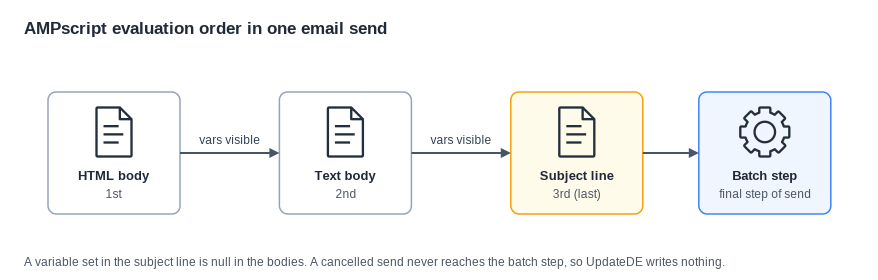
- AMPscript is processed as a batch, the final step of the send, not line by line.
- Order: HTML body, text body, subject line. A variable set in the HTML body keeps its value in the text body and subject; a variable set in the subject line is null in the bodies.
- Multiple
SETs of one variable: the last one processed wins (subject line beats HTML and text). - Cancelling a send before the batch completes means
UpdateDEwrites no rows.
SSJS and AMPscript
Variable.GetValue("@subKey") reads an AMPscript variable; SSJS adds the @ prefix if you omit it.
SOAP API
| Object | Role |
|---|---|
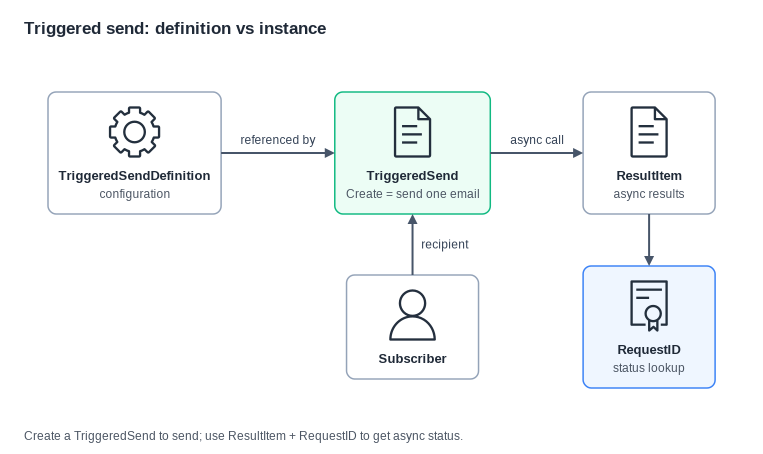
TriggeredSendDefinition |
Configuration of a triggered send |
TriggeredSend |
One instance of a triggered email: Create it to send |
ResultItem + RequestID |
Status of an asynchronous call |
DataExtension |
Definition (Create method creates a data extension with any name) |
DataExtensionObject |
Rows: real-time inserts/updates |
SentEvent |
Tracking object, read-only (no POST/Create) |
REST API
| Need | Call |
|---|---|
| Authenticate calls | Authorization: Bearer YOUR_ACCESS_TOKEN header |
| Inject a contact into a journey | POST /interaction/v1/events (ContactKey, EventDefinitionKey, Data) |
Verify a messageDefinitionSends send (202 only means accepted) |
GET /messaging/v1/messageDefinitionSends/key:{key}/deliveryRecords |
Automation Studio
| Need | Use |
|---|---|
| File arrives at unpredictable time, unique filenames | File Drop Automation |
| File name of triggering file in Import/Data Copy | %%FILENAME_FROM_TRIGGER%% |
| Extract tracking data to FTP | Data Extract activity + File Transfer |
| Exclusion Script on a send | Automation Studio Send Email activity |
| Contact Builder batch delete | Up to 1 million contacts per batch |
(The last four rows come from Salesforce Help pages and the question explanations; they could not be quoted from the allowed doc sites.)
Exam traps
TriggeredSendDefinition+ Create sends nothing; create aTriggeredSend.Add()takes two arguments only.His the hour unit ofDateAdd, notHH;FormatDatedoes not shift time.- A 202 from REST means "accepted", not "delivered".
- Subject line is processed last, so its
SETwins. %%FILENAME_FROM_TRIGGER%%, not%%FILENAME%%, is the file-drop substitution string.
Docs
- https://developer.salesforce.com/docs/marketing/marketing-cloud-ampscript/guide/mc-ampscript-guide-language-basics-order-of-operations.html
- https://developer.salesforce.com/docs/marketing/marketing-cloud-ampscript/references/mc-ampscript-utilities/mc-ampscript-reference-utilities-raise-error.html
- https://developer.salesforce.com/docs/marketing/marketing-cloud-ampscript/references/mc-ampscript-utilities/mc-ampscript-reference-utilities-output.html
- https://developer.salesforce.com/docs/marketing/marketing-cloud/guide/triggeredsend
- https://developer.salesforce.com/docs/marketing/marketing-cloud/guide/resultitem.html
- https://developer.salesforce.com/docs/marketing/marketing-cloud/references/mc_rest_interaction/postEvent.html
- https://developer.salesforce.com/docs/marketing/marketing-cloud/references/mc_rest_messaging/messageDefinitionSendsDeliveryRecords.html