Exams / SCS-C03 / D1 Infrastructure Security
Infrastructure Security
- Exam domain: Infrastructure Security
Keeping traffic off the public internet: VPC endpoints
A VPC endpoint lets resources in a VPC reach an AWS service without an internet gateway, NAT device, VPN, or Direct Connect connection. There are two kinds, and the exam expects you to know which service gets which:
| Endpoint type | Services | How it works | Cost |
|---|---|---|---|
| Gateway endpoint | Amazon S3, DynamoDB only | A target in the VPC route table | No charge |
| Interface endpoint (AWS PrivateLink) | Almost everything else: KMS, SNS, SSM, Secrets Manager... | An ENI with a private IP in your subnet; optional private DNS makes the normal hostname resolve to it | Billed hourly + per GB |
"you can access Amazon S3 from your VPC, without requiring an internet gateway or NAT device for" — Gateway endpoints for Amazon S3
"A gateway endpoint is available only in the Region where you created it." — Gateway endpoints for Amazon S3
"AWS KMS supports Amazon Virtual Private Cloud (Amazon VPC) endpoints powered by AWS PrivateLink." — Connect to AWS KMS through a VPC endpoint
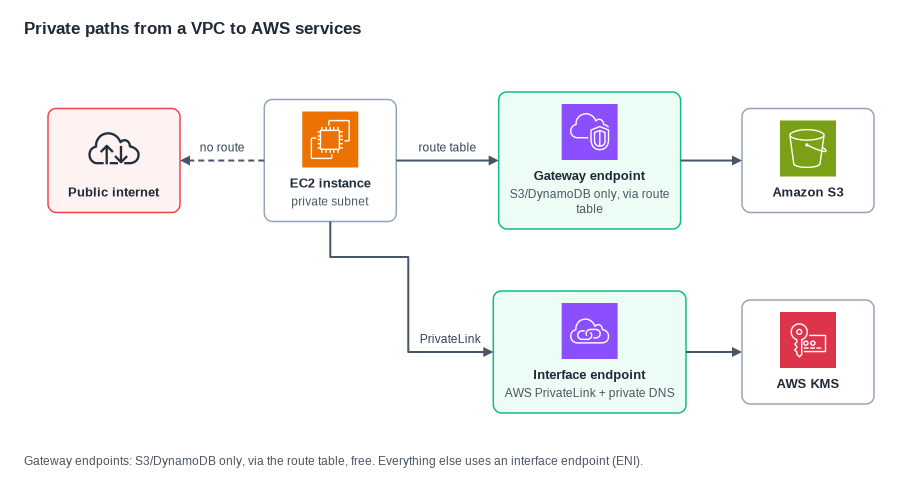
To force all traffic to a service through its private endpoint (never the public endpoint), combine the endpoint with a key/resource policy condition: aws:sourceVpce (or aws:SourceVpc) on the target resource's policy restricts access to requests that arrived through that specific endpoint. This is the standard pattern for "KMS/S3 access must never leave the AWS network."
Cross-account, same-Region access to a managed service such as S3 does not need VPC peering, a transit gateway, or a VPN between the two accounts' VPCs — S3 lives outside any VPC, so a gateway endpoint in the consuming account's VPC is enough; the bucket owner's permissions (bucket policy / IAM) still govern the access.
Security groups: reference groups, not CIDR ranges
Security groups are stateful (return traffic is automatically allowed) and can use another security group — including one in a different account — as the allowed source, instead of an IP range:
"You can reference a security group in the inbound rule of another security group if any" — Security group rules
This is the key exam pattern for "only the instances that need access should get it, even as instances are created and terminated": attach the client-side security group to the right instances, and have the server-side group's inbound rule name that client-side group as its source. No inbound rule is needed on the client-side group itself to make this work.
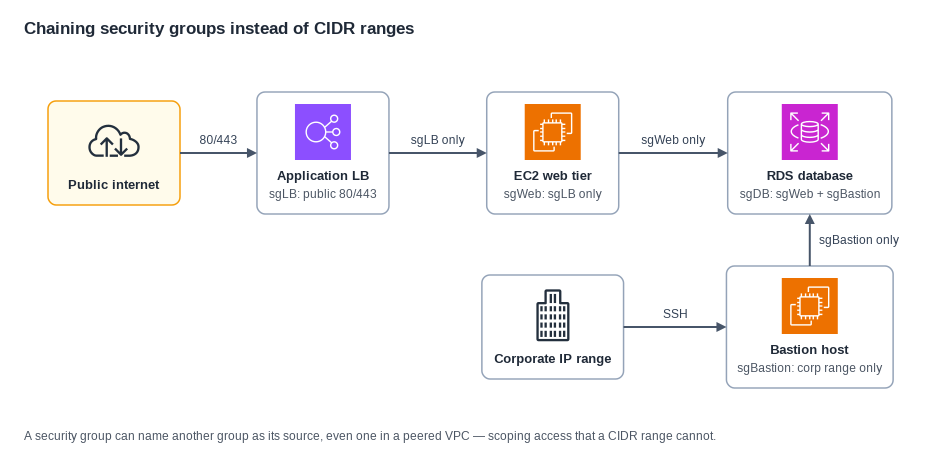
Across a VPC peering connection (same Region, same or different account), a security group can also be referenced as a source:
"To reference a security group that is in another AWS account but the same Region," — Update your security groups to reference peer security groups
A peer VPC's security group cannot be referenced across Regions — use the peer VPC's CIDR block instead in that case.
Network ACLs are stateless — order matters
Network ACLs (subnet-level) do not track connection state: return traffic for a connection an instance initiated must be explicitly allowed inbound, typically on the ephemeral port range (1024–65535) the client chose. Rules are evaluated by lowest rule number first, and the first matching rule wins — there is no "more specific wins."
"The client that initiates the request chooses the ephemeral port range." — Custom network ACLs for your VPC
Exam trap: if you must deny a specific port (say, 3306) that falls inside a broader port range you also need to allow (1024–65535, for ephemeral return traffic), the deny rule must have a lower number than the allow rule — otherwise the broad allow is matched first and the narrower deny is never reached.
Inline network appliances: disable source/destination check
An EC2 instance acting as an inline firewall, proxy, or router forwards traffic that is not addressed to or from itself. By default, EC2 blocks this:
"You can enable or disable source/destination checks, which ensure that the" — Elastic network interfaces
"Source/destination checks are enabled by default." — Elastic network interfaces
Disabling the source/destination check on the appliance's ENI is required for it to route traffic for other hosts; security groups and network ACLs keep working independently of this setting.
Isolating a resource from the internet without breaking others
A private subnet reaches the internet only if its own route table has a default route to a NAT gateway (or, for a public subnet, to an internet gateway). Each subnet has its own route table (or shares one explicitly), so removing the default route from one subnet's table does not touch another subnet that happens to share the same NAT gateway:
"All other traffic is sent to the NAT gateway." — AWS VPC routing to a NAT device
"Each subnet in your VPC must be associated with a route table," — AWS VPC subnet route tables
Exam trap: "a database must never reach the internet, without disrupting other instances that share the same NAT gateway" → remove the default route from the DB subnet's own route table. A network ACL deny cannot target a security group ID (ACLs filter by CIDR/protocol/port, not by group), and the NAT gateway itself has no route table to edit for this purpose.
Dedicated and encrypted connectivity to on-premises
| Need | Use |
|---|---|
| Dedicated, low-latency, consistent-performance link to on-premises | AWS Direct Connect — not encrypted by default |
| IPsec encryption | AWS Site-to-Site VPN |
| Low latency and IPsec encryption | Direct Connect + Site-to-Site VPN together |
| Hub-and-spoke VPN among several sites | AWS VPN CloudHub |
| Certificate-based auth for on-premises workloads reaching AWS, no bastion, no long-term credentials | IAM Roles Anywhere (X.509 certs → temporary role credentials) |
"AWS Direct Connect does not encrypt your traffic that is in transit by default." — Encryption in AWS Direct Connect
"This solution combines the benefits of the end-to-end secure IPsec connection with" — AWS Direct Connect + AWS Site-to-Site VPN
"X.509 certificates from your certificate authority (CA) to authenticate identities and" — Access for non-AWS workloads
"The signing certificate MUST have a valid trust chain to a Certificate Authority (CA) certificate configured in the customer account." — IAM Roles Anywhere authentication process
Retiring a bastion host for certificate-based access to DynamoDB/S3 from on-premises is the textbook IAM Roles Anywhere scenario; a VPN or Direct Connect connection only changes network transport, it doesn't authenticate the caller.
Edge protection: AWS WAF, CloudFront, and Firewall Manager
AWS WAF rule statements inspect requests and can block matching ones; it attaches to ALBs, API Gateway, AppSync, CloudFront, and more.
"An SQL injection rule statement inspects for malicious SQL code." — SQL injection attack rule statement
For a known, exploitable vulnerability on an unpatched app with least effort and no downtime: put an ALB (or existing one) in front of the targets, attach a web ACL with the relevant managed/custom rules, test, cut traffic over, then lock the targets' security group to accept only the ALB — far faster than patching unsupported source code.
Rate-based rules must be tuned before they block anything:
"Count – AWS WAF counts the request, applies any" — Applying rate limiting to requests in AWS WAF
"any rule action except Allow." — Rate-based rule high-level settings
Exam trap: a rate-based rule cannot use Allow; to find a safe threshold without blocking legitimate traffic, start with Count, observe, then switch to Block. "Monitor" is not an AWS WAF action.
AWS Firewall Manager centrally creates and manages WAF (and other) policies across every account and Region in an organization, including resources created later — this is the "least operational overhead, org-wide, present and future" answer whenever a per-resource or custom detect-and-remediate pipeline (AWS Config + Lambda, EventBridge + Lambda, StackSets) is also on offer:
"When you apply the policy, Firewall Manager begins managing web ACLs for in-scope resources, using the specified rule groups and other policy configurations." — Using AWS WAF policies with Firewall Manager
"The SQL database rule group contains rules to block request patterns" — Use-case specific rule groups
A service control policy sets maximum permissions only — it cannot insert a rule group into a web ACL. AWS Config / Security Hub CSPM only detect missing protection; they don't apply it.
Forcing traffic through CloudFront, and only through CloudFront
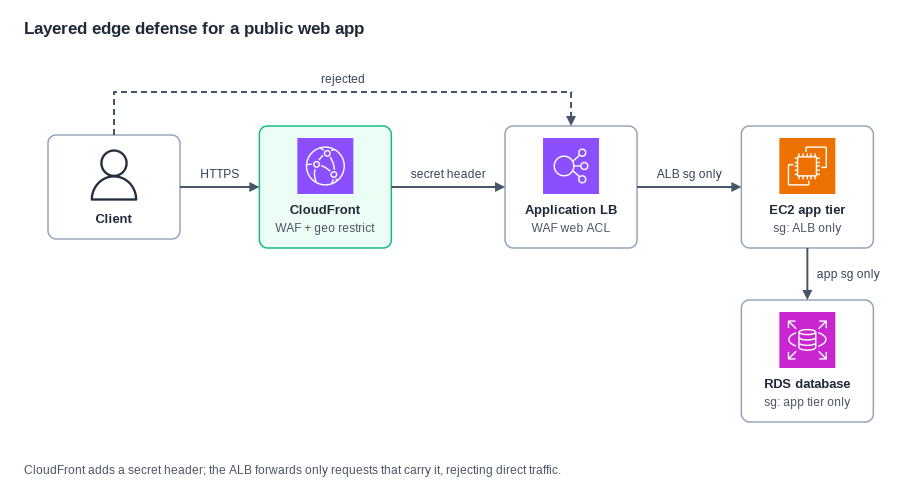
Placing CloudFront in front of an ALB (for DDoS absorption, caching, geo restriction) does nothing by itself to stop someone from hitting the ALB's own DNS name directly. The fix is a secret custom header:
"You can configure CloudFront to add custom headers to the requests that it sends to your origin." — Add custom headers to origin requests
"your origin to respond to requests only when they include a custom header" — Add custom headers to origin requests
CloudFront adds the header on every origin request; an ALB listener rule forwards a request only if that header (and its secret value) is present, and otherwise returns an error. X-Forwarded-For and a shared ACM certificate do not work for this — both can be present on a direct request too.
Protecting S3-via-CloudFront content by country combines two controls: a CloudFront geo restriction deny list, and an S3 bucket policy that trusts only the CloudFront origin access control (OAC) — otherwise a direct S3 URL bypasses the geo restriction entirely.
"your content, you can use CloudFront geographic restrictions to block the request." — Restrict the geographic distribution of your content
"CloudFront provides two ways to send authenticated requests to an Amazon S3 origin: origin access control (OAC) and origin access identity (OAI)." — Restrict access to an Amazon S3 origin
A Lambda@Edge function on the origin-response event can inject HTTP security headers into every response without any application-code change — the standard "fix a failed security audit, keep low latency, zero app changes" combo is CloudFront (for caching/latency) + Lambda@Edge (for headers).
Preventing vs. detecting: SCPs, tag policies, and AWS Config
| Mechanism | Can it block the API call itself? |
|---|---|
| Service control policy (SCP) | Yes — sets maximum permissions, can explicitly deny an action (e.g. ec2:RunInstances without required tags, or an ingress rule matching 0.0.0.0/0:22) |
| Organizations tag policy | Constrains allowed tag values, enforced together with an SCP |
AWS Config managed rule (e.g. required-tags) |
No — detects noncompliance after the resource already exists; remediation runs afterward |
| CloudTrail + CloudWatch alarm, EventBridge + Lambda, Security Hub finding | No — all react after the fact |
"SCPs offer central control over the maximum" ... "SCPs do not grant permissions to the IAM users and IAM roles in your organization." — Service control policies (SCPs)
"However, this rule does not prevent you from creating resources with incorrect tags." — required-tags
Whenever a question says "prevent the creation" (not "detect" or "remediate"), the answer is an SCP (or, for tag values, a tag policy paired with an SCP) — attached at the organization root to cover accounts that don't exist yet.
First troubleshooting step when the same template/role works in one OU but fails with an IAM error only in another OU that has different SCPs attached: check AWS CloudTrail for the exact failed API call and its authorization error before changing any policy — an SCP can deny an action even when the caller's own IAM policy allows it.
"specify the maximum available permissions for the IAM users and IAM roles in your organization." — Service control policies (SCPs)
Governed self-service: AWS Service Catalog
Service Catalog lets administrators publish approved products (e.g. a CloudFormation template for a hardened S3 bucket, or an EC2 AMI with approved software) into a portfolio, and grant end users access only to that portfolio:
"With Service Catalog, you can create a customized portfolio for each type of user" — Overview of Service Catalog
"By using a launch role, you can instead limit the end users' permissions to the" — AWS Service Catalog Launch Constraints
"You can select the Root node to share the portfolio with your entire organization, a" — Sharing a Portfolio
A portfolio can be shared with an entire AWS Organization, so this is the answer whenever end users across many accounts need self-service, org-wide access to a standardized, approved template — AWS RAM shares existing resources between accounts, it does not turn a template into a self-service deployable product.
Exam trap: restricting developers to Service Catalog permissions (instead of direct ec2:RunInstances) structurally prevents unapproved-software launches; reacting to a RunInstances event afterward (EventBridge + Run Command) does not, since the unapproved software already ran.
Key management: KMS, PrivateLink, and CloudHSM custom key stores
A KMS key in a custom key store backed by AWS CloudHSM generates and uses its key material inside your own CloudHSM cluster:
"When you create an AWS KMS key in a custom key store, AWS KMS generates and" — AWS CloudHSM key stores
A CloudHSM custom key store supports only symmetric encryption KMS keys — it cannot hold asymmetric KMS keys, and it does not support GenerateDataKeyPair/GenerateDataKeyPairWithoutPlaintext (generating asymmetric data key pairs). Keep this in mind if a scenario mentions asymmetric data key pairs "used locally" alongside a CloudHSM custom key store: that part would need a separate, non-custom-store KMS key.
Auditing KMS key usage for compliance is always AWS CloudTrail, which logs KMS API activity including key lifecycle events and cryptographic operations:
"CloudTrail logs all AWS KMS operations, including read-only operations, such as ListAliases and GetKeyRotationStatus, operations that manage KMS keys, such as CreateKey and PutKeyPolicy, and cryptographic" — Logging AWS KMS API calls with AWS CloudTrail
For immutable, auditor-ready evidence, deliver that CloudTrail log to an S3 bucket with Object Lock enabled (write-once-read-many) and turn on log file integrity validation, which adds signed digest files so tampering can be detected:
"When you enable log file integrity validation, CloudTrail creates a hash for every log file" — Validating CloudTrail log file integrity
Launching from an encrypted AMI: a KMS, not an EC2, permission
Launching an instance from a KMS-encrypted, EBS-backed AMI restores the encrypted snapshot into the new volumes, which requires the launching principal to be authorized by the KMS key policy (kms:Decrypt, typically via a grant):
"Amazon EC2 calls AWS KMS to decrypt the data key (Decrypt)." — Amazon EC2 example two
Exam trap: an instance that launches and then immediately terminates, for a principal that can already describe and launch the AMI, points to a missing grant in the KMS key policy — not a missing ec2:StartInstances/ec2:DescribeImages IAM permission, and not kms:DescribeKey (which only reads metadata, not decrypt access).
Fixing a CloudTrail log file prefix change
Changing a trail's log file prefix can fail with a bucket-policy error because the bucket policy's s3:PutObject resource path still names the old prefix. Update the bucket policy's resource path to the new prefix first, then set the same new prefix on the trail:
"In the bucket policy, under the s3:PutObject action, edit the" ... "console to specify the same prefix for the bucket in the trail." — Amazon S3 bucket policy for CloudTrail
Multi-Region CloudTrail with least overhead
An existing single-Region trail can simply be converted to multi-Region (--is-multi-region-trail on update-trail) rather than creating a second trail — one trail configuration keeps delivering to the same S3 bucket from every enabled Region:
"When you create a multi-Region trail, CloudTrail logs events from all Regions enabled in your account." — Receiving CloudTrail log files from multiple Regions
AWS IoT Core: client ID vs. thing name in policies
An IoT Core policy that authorizes iot:Connect (or topic access) using the raw ${iot:ClientId} trusts a value the client itself supplies — an attacker can craft a client ID (including MQTT wildcards) to widen what it matches. Binding the policy resource to ${iot:Connection.Thing.ThingName} instead ties the permission to the registered, authenticated thing, and the legitimate app should use that same thing name as its MQTT client ID:
"iot:Connection.Thing.ThingName is a useful thing policy variable to" — Security best practices in AWS IoT Core
Resilience testing: AWS Fault Injection Service
AWS FIS runs controlled fault-injection experiments against real (ideally pre-production first) workloads — simulating failures to find weaknesses, then re-running after a fix to validate it. Experiments can target tagged resources, be scheduled, and be stopped manually at any time, plus CloudWatch-alarm stop conditions can halt them automatically:
"complete a planning phase and run the experiments in a pre-production environment." — What is AWS Fault Injection Service?
"You can stop a running experiment at any time." — Stop an experiment
This is the answer whenever a question asks to prove resilience to disruption with evidence (PDF reports) or to run a stoppable, realistic DR test in the live environment — not the Well-Architected Tool (a static questionnaire), Audit Manager (compliance evidence, not fault testing), or Amazon Inspector (vulnerability scanning).
Architecture review against security best practices
The AWS Well-Architected Tool lets you define a workload and answer the Security pillar questionnaire, surfacing high/medium risks and an improvement plan:
"This tutorial describes using AWS Well-Architected Tool to document and measure a workload." — Tutorial: Document an AWS Well-Architected Tool workload
"Each lens has its own set of questions," — Using lenses in AWS Well-Architected Tool
Trusted Advisor checks individual resources; Macie classifies PII; Inspector scans for vulnerabilities — none of them is a framework-level architecture review against best practices the way the Well-Architected Tool is.
CloudFormation template validation at scale
AWS CloudFormation Guard (cfn-guard) is a policy-as-code tool that validates templates in a pipeline and can block noncompliant ones; its rulegen command auto-generates rules from a set of known-compliant templates, so a security team doesn't have to hand-write the first rule set:
"AWS CloudFormation Guard (cfn-guard) is a policy-as-code tool." — Validate templates with Guard
"Takes a JSON- or YAML-formatted AWS CloudFormation template file and autogenerates a set of" — rulegen
Penetration testing on AWS
AWS permits security assessments — including port scanning and injection testing such as SQL injection — against your own owned AWS assets (including Amazon RDS) without prior approval:
"AWS customers are welcome to carry out security assessments or penetration tests of their AWS infrastructure without prior approval for the services listed in the next section under "Permitted Services."" — AWS Customer Support Policy for Penetration Testing
Explicitly prohibited, regardless of consent: DNS zone walking via Route 53 hosted zones, and denial-of-service techniques (e.g. packet flooding):
"DNS zone walking via Amazon Route 53 Hosted Zones" — AWS Customer Support Policy for Penetration Testing
Brute-forcing the global S3 bucket namespace is not a listed permitted activity either (it risks probing other customers' resources).
Exam traps
- Gateway endpoint = S3/DynamoDB only, via route table, free; everything else = interface endpoint (PrivateLink, ENI, billed). "Must never leave the AWS network" on top of an endpoint: add
aws:sourceVpceto the resource policy. - Reaching S3/DynamoDB from another account's VPC in the same Region needs only a gateway endpoint in your VPC — not peering, a transit gateway, or a VPN.
- Scoping access to "only instances with this role, even as they churn": reference the client's security group as the source on the server's security group, not a CIDR range. Works across a same-Region peering connection too, even cross-account.
- Network ACLs are stateless and evaluated lowest-rule-number-first: a narrower deny needs a lower number than a broader allow it would otherwise be swallowed by (classic case: deny 3306 before allowing the 1024-65535 ephemeral range).
- An inline network/security appliance on EC2 needs Source/Destination Check disabled on its ENI to forward others' traffic.
- "DB must never reach the internet, without disrupting app servers on the same NAT gateway": remove the default route from just the DB subnet's own route table.
- Dedicated + low-latency = Direct Connect; IPsec encryption = Site-to-Site VPN; need both = combine them (Direct Connect alone is unencrypted).
- Removing a bastion, certificate-based auth, on-premises workload: IAM Roles Anywhere, not a VPN/Direct Connect (transport ≠ authentication) and not an IAM user assuming a role (still a long-term credential).
- Rate-based WAF rule: Count to tune safely, Block only once validated; Allow is invalid on a rate-based rule, "Monitor" isn't a WAF action.
- Org-wide WAF enforcement, present and future resources, least overhead: AWS Firewall Manager WAF policy, not per-resource automation (Config+Lambda, Service Catalog+Config, Security Hub+Lambda) and not an SCP (permissions only).
- CloudFront in front of an ALB doesn't block direct ALB access by itself: add a secret custom header on CloudFront's origin requests and an ALB listener rule that only forwards requests carrying it.
- Country-restricted CloudFront content needs both the geo restriction and an S3 bucket policy trusting only the CloudFront OAC, or a direct S3 URL bypasses the restriction.
- "Prevent the creation" (not detect/remediate) of a noncompliant resource/rule across an organization: a service control policy (plus a tag policy for allowed tag values); AWS Config managed rules are detective only.
- Same template fails with an IAM error only in one OU with different SCPs: check CloudTrail for the exact denied call first, before touching any policy.
- Approved-software-only EC2 launches, scoped to one account: Service Catalog portfolio + launch constraint, with users granted portfolio access instead of direct
ec2:RunInstances. - CloudHSM custom key store: symmetric KMS keys only, no asymmetric KMS keys, and no
GenerateDataKeyPair/GenerateDataKeyPairWithoutPlaintext. - Auditing KMS key usage = AWS CloudTrail; for immutable evidence, deliver to an S3 Object Lock bucket and enable log file integrity validation.
- An encrypted-AMI instance that launches then immediately terminates, for a principal that can already describe/launch it: missing KMS key-policy grant (decrypt), not an EC2 IAM permission.
- A CloudTrail log-file-prefix change failing on the bucket policy: update the bucket policy's
s3:PutObjectresource path to the new prefix first, then the trail. - Converting an existing single-Region CloudTrail trail to multi-Region is less overhead than creating a second trail.
- IoT Core: authorize by
${iot:Connection.Thing.ThingName}, never by the attacker-controllable${iot:ClientId}. - "Realistic, stoppable DR test in the live environment, with evidence": AWS FIS experiments, not the Well-Architected Tool, Audit Manager, or a vulnerability scanner.
- Architecture-wide security best-practices review with an improvement plan: AWS Well-Architected Tool, Security pillar.
- Bootstrapping CloudFormation validation rules without writing them by hand:
cfn-guard rulegenfrom known-compliant templates. - Pen testing: your own RDS/EC2/web app (port scans, SQLi) is permitted; DNS zone walking via Route 53 and DoS/packet flooding are explicitly prohibited; S3 bucket-namespace brute forcing is not authorized.
Docs
- Security with Amazon Aurora MySQL
- Gateway endpoints for Amazon S3
- Connect to AWS KMS through a VPC endpoint
- Create a VPC endpoint for AWS KMS
- Security group rules
- Update your security groups to reference peer security groups
- Determining who can connect to your Amazon RDS DB instance
- Network ACL rules
- Custom network ACLs for your VPC
- Elastic network interfaces
- AWS VPC routing to a NAT device
- AWS VPC subnet route tables
- Encryption in AWS Direct Connect
- AWS Direct Connect + AWS Site-to-Site VPN
- Access for non-AWS workloads — AWS IAM User Guide
- IAM Roles Anywhere authentication process
- SQL injection attack rule statement - AWS WAF
- Associating or disassociating protection with an AWS resource - AWS WAF
- Applying rate limiting to requests in AWS WAF
- Rate-based rule high-level settings in AWS WAF
- Using AWS WAF policies with Firewall Manager
- Use-case specific rule groups
- Add custom headers to origin requests — Amazon CloudFront
- Application Load Balancer integrations — Elastic Load Balancing
- Restrict the geographic distribution of your content - Amazon CloudFront
- Restrict access to an Amazon S3 origin - Amazon CloudFront
- How CloudFront delivers content
- Use various origins with CloudFront distributions
- Service control policies (SCPs)
- Best practices for using tag policies - AWS Organizations
- required-tags - AWS Config
- Troubleshoot access denied error messages - AWS IAM
- Overview of AWS Service Catalog
- AWS Service Catalog Launch Constraints
- Sharing a Portfolio in AWS Service Catalog
- AWS CloudHSM key stores — AWS Key Management Service
- KMS keys in a CloudHSM key store — AWS Key Management Service
- Logging AWS KMS API calls with AWS CloudTrail
- Validating CloudTrail log file integrity
- Amazon EC2 example two
- Use encryption with EBS-backed AMIs
- Amazon S3 bucket policy for CloudTrail
- Receiving CloudTrail log files from multiple Regions
- Using the update-trail command to update a trail
- Basic AWS IoT Core policy variables
- Security best practices in AWS IoT Core
- What is AWS Fault Injection Service?
- Planning your AWS FIS experiments
- Stop an experiment - AWS Fault Injection Service
- Tutorial: Document an AWS Well-Architected Tool workload
- Using lenses in AWS Well-Architected Tool
- rulegen - AWS CloudFormation Guard
- Validate templates with Guard - AWS CloudFormation
- AWS Customer Support Policy for Penetration Testing