Exams / SAA-C03 / D1 Design Cost-Optimized Architectures
Design Cost-Optimized Architectures
- Exam domain: Design Cost-Optimized Architectures
Storage: pick the tier by access pattern, not by habit
| Storage class | Access pattern | AZ resiliency | Notes |
|---|---|---|---|
| S3 Standard | Frequent, unpredictable | Multi-AZ | Default; no monitoring fee |
| S3 Intelligent-Tiering | Changing / unknown | Multi-AZ | Small monitoring fee, no retrieval fee, auto-moves between tiers |
| S3 Standard-IA | Infrequent but predictable, needs millisecond access | Multi-AZ | Cheaper storage, per-GB retrieval fee |
| S3 One Zone-IA | Infrequent, re-creatable data | Single AZ | Cheapest IA tier, but "not resilient to the physical loss of the Availability Zone" |
| S3 Glacier Flexible Retrieval | Rare, minutes-to-hours access acceptable | Multi-AZ | Needs an explicit restore before the object is readable |
| S3 Glacier Deep Archive | Rare, 12h+ access acceptable | Multi-AZ | Cheapest archive tier |
Two exam traps hide in this table:
- "Immediate / always-available access" rules out every Glacier tier, no matter how fast the advertised retrieval window sounds. Expedited retrieval's 1–5 minute window is for smaller objects; for multi-gigabyte objects, AWS documents restore as a throughput rate (up to 1–2 PB/day for Standard, up to 300 MB/s for Expedited) rather than a guaranteed time, which is a bad fit against a hard delivery deadline.
- "Critical / hard to reproduce" rules out One Zone-IA. It is cheaper only because it drops multi-AZ resiliency; AWS states One Zone-IA data "is not resilient to the physical loss of the Availability Zone."
- "Changing or unknown access pattern" → Intelligent-Tiering, not Standard-IA. Standard-IA assumes you already know the object will be infrequently (but predictably) accessed.
An S3 Lifecycle configuration both transitions and expires objects: a transition rule moves current objects between classes, and a separate expiration rule deletes them. On a versioned bucket, expiring the current version never deletes noncurrent versions — object count (and cost) keeps climbing even after new uploads stop, unless the Lifecycle rule also expires noncurrent versions.
For parallel multipart uploads, the parts of an upload that is never completed keep billing storage indefinitely. A Lifecycle rule that aborts incomplete multipart uploads after N days is a standard, no-cost cleanup.
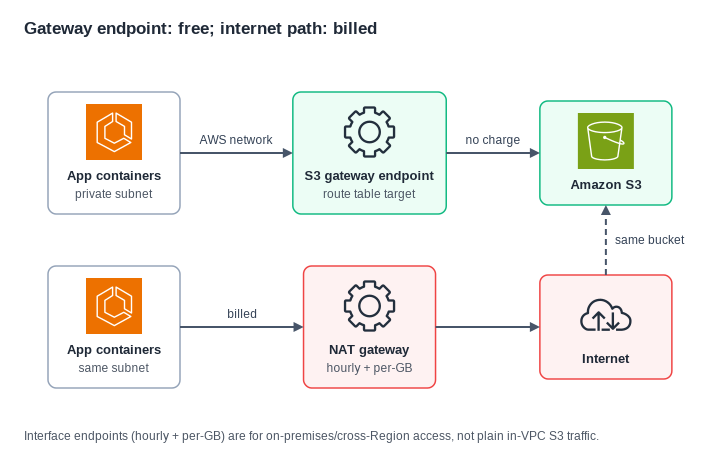
A gateway VPC endpoint for S3/DynamoDB is a route table entry, not a billed resource — AWS states "there is no additional charge for using gateway endpoints." An interface endpoint (PrivateLink, billed hourly + per GB) is for different scenarios: on-premises access, cross-Region access, or services that don't support gateway endpoints. Don't reach for the interface endpoint just because a question mentions a VPC and S3 together.
Requester Pays flips who is billed for an S3 request and its data download — the requester, not the bucket owner — which is how you keep your own transfer costs down when sharing large datasets with other accounts. The bucket owner still pays for storage.
S3 Object Lock in compliance mode is the only retention mechanism nobody can override, "including the root user in your AWS account" — governance mode can be bypassed by authorized users. To bring objects that already exist into compliance at scale, use S3 Batch Operations rather than recopying every object by hand.
Compute: match the pricing model to the workload's flexibility
| Pricing model | Best for | Key limit |
|---|---|---|
| On-Demand | Unpredictable, must-not-interrupt workloads | Highest per-hour price |
| Reserved Instances / Savings Plans | Steady, predictable, long-term usage | Commitment length |
| Spot Instances | Stateless, fault-tolerant, flexible timing | Can be reclaimed with a 2-minute warning |
| Dedicated Hosts | BYOL software licensed per socket/core | Needs host-level visibility; Dedicated Instances only partially support BYOL |
| Lambda | Short, event-driven, bursty invocations | 15-minute max per invocation (standard) |
AWS documents Spot Instances as "recommended for stateless, fault-tolerant, flexible applications" — exactly a batch job that "can be started and stopped at any time with no negative impact." A cluster placement group (single AZ, tightly packed) is the AWS-recommended design when a workload needs "low network latency, high network throughput, or both" — e.g., an in-memory database doing 100k+ TPM — and as a side effect it avoids cross-AZ data-transfer charges, since "a cluster placement group can't span multiple Availability Zones."
For Auto Scaling, know the difference between reacting to load and anticipating it:
- Target tracking (e.g., on
ASGAverageCPUUtilization) scales continuously toward a target value — the right tool for unpredictable spikes on top of a low baseline. - Scheduled scaling sets desired capacity at a known time — the right tool when the spike's timing is predictable (a nightly batch job that always starts at 1 AM), so capacity is ready before demand arrives instead of ramping up reactively.
- Creating an Auto Scaling group with only min/max/desired capacity and no scaling policy never adjusts capacity automatically — it just enforces static bounds.
- Existing EC2 instances can be attached to an Auto Scaling group (and to its load balancer target group) instead of being replaced, which matters whenever a question describes instances that already exist.
For event-driven, short-lived processing (image processing on upload, infrequent document extraction), the standard low-cost pattern is S3 event notification → SQS → Lambda: Lambda runs (and is billed) only per invocation, and 15 minutes of maximum execution time comfortably covers jobs measured in minutes. For a persistent service that must keep large state (such as a loaded ML model) resident in memory across many bursty requests, prefer SQS queue depth driving ECS service auto scaling over Lambda, which would reload that state on every cold invocation.
Databases: scale capacity, don't just scale instance size
Aurora Serverless v2 automatically scales compute and memory to match demand and scales back down afterward — AWS's own framing is "you pay only for the capacity your application consumes." Two distinct cost levers come up repeatedly in exam scenarios:
- Variable or unpredictable load (ecommerce sales spikes, "usage expected to grow but is hard to predict") → Aurora Serverless v2's capacity auto-scaling avoids provisioning for a worst case that may not happen.
- Usage that is brief and periodic ("only 2 hours a week") → Aurora Serverless v2's auto-pause feature scales to 0 ACUs when idle; AWS states "you aren't charged for instance capacity while an instance is in the paused state." A Reserved Instance or EC2-hosted database still costs money while idle; only auto-pause genuinely stops the meter.
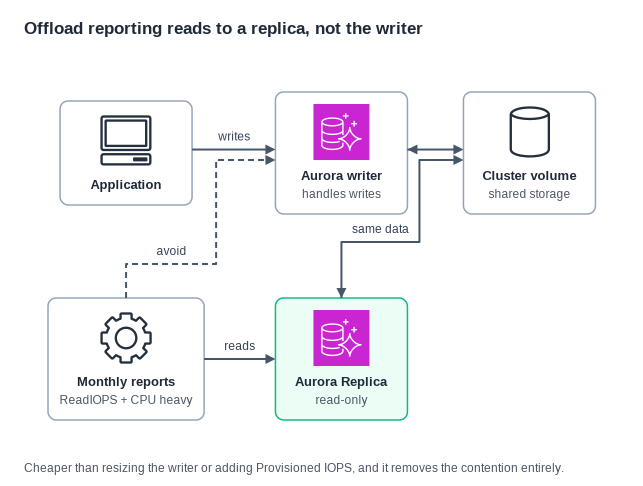
When ReadIOPS and CPUUtilization spike because of a read-heavy job (monthly reports) running against the same instance that serves live traffic, redirect that job to an Aurora Replica. Replicas "read from the same cluster volume as the writer DB instance," so they see the same data without copying it, and moving the report there is far cheaper than resizing the writer or raising Provisioned IOPS (which doesn't touch the CPU bottleneck anyway).
For backups, remember the retention is split into two independent lifecycles: RDS automated backups follow the backup retention period setting (0–35 days) you configure directly on the instance/cluster — no AWS Backup needed just to get that behavior. Manual snapshots are kept forever until someone explicitly deletes them. A "retain existing backups under 30 days old, enforce 30 days going forward" requirement is just: set the retention period to 30, then delete old manual snapshots by hand.
Networking: pick the cheapest topology that still fits
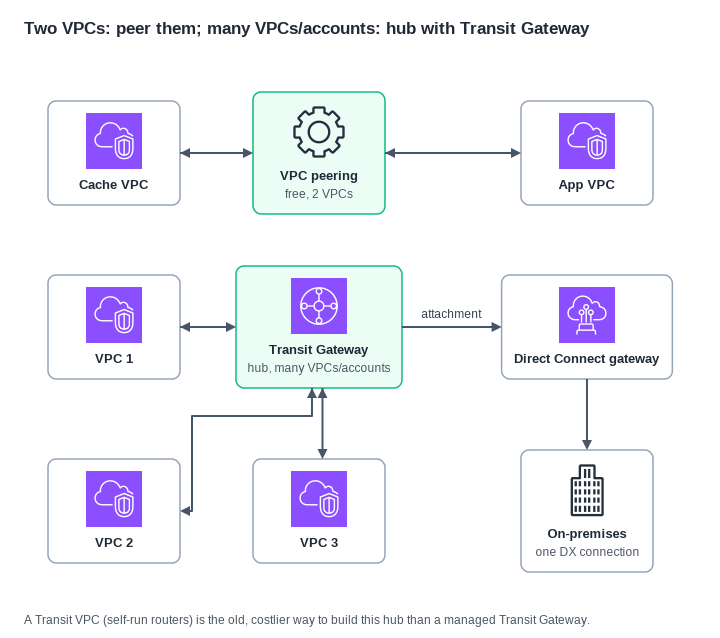
- Two VPCs, same Region needing to reach each other (e.g., an app VPC and a Cache VPC) → VPC peering: add a route in each VPC, then allow the traffic on the destination resource's security group (not on the peering connection itself, which has no security group of its own).
- Many VPCs, many accounts, or an on-premises network via Direct Connect → AWS Transit Gateway as a hub, optionally shared across accounts via AWS RAM. Associating a Direct Connect gateway with a Transit Gateway through a transit virtual interface lets many VPCs reuse one Direct Connect connection instead of provisioning a new connection per account.
- A legacy Transit VPC (self-run router instances) does the same hub job as a Transit Gateway but costs more to run and manage — never the cheapest choice once a managed Transit Gateway is an option.
For global users hitting a dynamic, non-cacheable API (not static content), prefer AWS Global Accelerator over CloudFront: it routes client traffic onto the AWS global network close to the client rather than over the public internet, and standard accelerators support EC2 instances directly as endpoints. CloudFront's caching model is the right tool only when the response is actually cacheable; provisioning a dedicated Direct Connect connection or VPN per customer location is never the cost-effective choice for a public, internet-facing API serving many customers.
For SSL/TLS on CloudFront with a custom domain, the certificate must be a public ACM certificate requested in us-east-1 specifically — a private certificate or any other Region will not attach. ACM certificates used with integrated services such as CloudFront, ELB, and API Gateway are free.
Cost visibility and governance
A tag the company itself creates and applies (not one of AWS's own predefined tags) is a user-defined cost allocation tag. In an AWS Organizations setup, these must be activated from the Billing and Cost Management console of the management account before Cost Explorer can group costs by that tag across every member account from one report.
AWS Trusted Advisor's cost checks are resource- and service-specific — match the check name to what the question actually describes:
- RDS Reserved Instance (purchase recommendations / optimization) — long-running, active On-Demand instances that are candidates to switch to Reserved pricing.
- RDS Idle DB Instances — instances that aren't being used at all; wrong check for an active, high-performance workload.
- Checks are generally run from, and reflect the usage of, the account that owns the resource; organizational view aggregates check status across member accounts from the management account, but a member account's own available checks still depend on that account's own support plan.
Exam traps
- "Immediate access always required" eliminates every Glacier tier, regardless of how fast its advertised retrieval window sounds for small objects — large objects restore at a throughput rate, not a fixed time.
- "Critical / hard to reproduce" eliminates One Zone-IA — it trades away multi-AZ resiliency for a lower price.
- A versioned bucket expiring only current objects still accumulates noncurrent versions — the Lifecycle rule must expire noncurrent versions too, or storage cost keeps climbing after uploads stop.
- Incomplete multipart uploads keep billing storage forever unless a Lifecycle rule aborts them.
- Gateway VPC endpoints are free; interface endpoints are billed — don't swap one for the other just because both "keep traffic off the internet."
- A VPC peering connection has no security group — the inbound rule belongs on the destination resource's (e.g., the cache cluster's) security group.
- EBS Elastic Volumes can only grow a volume, never shrink it — rising EBS cost with flat usage is almost always snapshot sprawl, not volume size; fix it with Amazon Data Lifecycle Manager.
- Scheduled scaling for known-time demand, target tracking for unpredictable demand — don't reach for a bigger min/max or a louder scaling step when the real fix is timing.
- Spot Instances need the workload to tolerate a 2-minute interruption warning — never the right choice for a system with an uptime requirement.
- Aurora Serverless v2 auto-pause scales to 0 ACUs and stops the instance-capacity charge entirely — a Reserved Instance or a stopped-but-reserved EC2 database still isn't free while idle.
- A tag the company defines is "user-defined," not "AWS-defined," and must be activated from the Organizations management account for organization-wide Cost Explorer reporting.
Docs
- Hosting a static website using Amazon S3
- Use various origins with CloudFront distributions
- Gateway endpoints - Amazon Virtual Private Cloud
- Troubleshooting versioning - Amazon S3
- Understanding and managing Amazon S3 storage classes
- Transitioning objects using Amazon S3 Lifecycle
- Understanding archive retrieval options - Amazon S3
- Configuring a lifecycle configuration to delete incomplete multipart uploads
- Using Requester Pays general purpose buckets
- Locking objects with Object Lock - Amazon S3
- Managing S3 Object Lock using S3 Batch Operations
- Best practices for Amazon EC2 Spot
- Select the best pricing model - Cost Optimization Pillar
- Placement strategies for your placement groups - Amazon EC2
- Bring your own software licenses to Amazon EC2 Dedicated Hosts
- Amazon EC2 Dedicated Hosts
- Target tracking scaling policies for Amazon EC2 Auto Scaling
- Scheduled scaling for Amazon EC2 Auto Scaling
- Detach or attach instances from your Auto Scaling group
- Process Amazon S3 event notifications with Lambda
- Configure Lambda function timeout
- Scale Amazon ECS services based on an SQS queue
- Using Aurora Serverless v2
- Scaling to Zero ACUs with automatic pause and resume
- Replication with Amazon Aurora PostgreSQL
- Amazon RDS Read Replicas
- Backup retention period - Amazon RDS
- Access Patterns for Accessing an ElastiCache Cache in an Amazon VPC
- Accessing your ElastiCache cluster or replication group
- Transit gateway attachments to a Direct Connect gateway
- Direct Connect gateways
- What is AWS Global Accelerator?
- Requirements for using SSL/TLS certificates with CloudFront
- AWS Certificate Manager FAQs
- Using user-defined cost allocation tags
- Activating user-defined cost allocation tags
- Organizational view for AWS Trusted Advisor
- AWS Trusted Advisor cost optimization checks
- Modify an Amazon EBS volume using Elastic Volumes operations
- Delete an Amazon EBS snapshot