Exams / GCP-PCOSA / D1 Configure ChromeOS policies and settings
D1.1
Configure ChromeOS policies and settings (part 1 of 3)
- Exam domain: Configure ChromeOS policies and settings
You are reading a free preview. The rest of the GCP-PCOSA course unlocks with an Exam pass or All access.See plans
Where each setting lives
| Need | Settings group |
|---|---|
| Bluetooth on/off, allowed Bluetooth services | Device |
| Sleep/shutdown idle behavior at the sign-in screen | Device > Power management |
| Scheduled reboot (weekly, day, time) | Device (per OU) |
| Sign-in screen wallpaper | Device |
| Desktop wallpaper | User & browser |
| Maximum user session length, proxy mode | User & browser |
- Device settings: "Turns on or off Bluetooth on ChromeOS devices." and "Lists the Bluetooth services that ChromeOS devices are allowed to connect to."
- Scheduled reboots: "By default, Disable scheduled reboots is selected."
- Wallpaper: "Customizes the sign-in screen by replacing the default wallpaper with a custom one." (device) versus user wallpaper shown on the desktop.
Organizational units
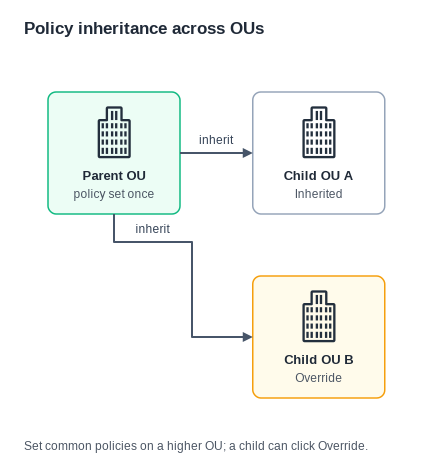
Policies are set per OU and inherited by child OUs ("You see Inherited if a setting is inherited from a parent."; a child can "click Override"). To apply one set of policies to many OUs, set it on a common parent.
SAML SSO sign-in
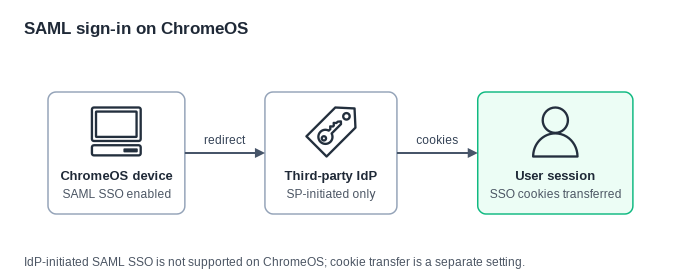
- Requires a domain configured for SAML SSO; use SP-initiated flows only ("IdP-initiated SAML SSO is not supported on ChromeOS.").
- Enable "SAML-based single sign-on for Chrome devices", then Single sign-on cookie behavior > "Enable transfer of SAML SSO cookies into user session during sign-in" for seamless access to sites on the same IdP.
- Super admins bypass third-party SSO by default (SSO for them is only supported with a legacy option).
- Domain verification is needed to unlock user management features (create user accounts, manage profiles).
Updates
| Option | Use |
|---|---|
| Blackout windows | Block auto-updates during chosen hours |
| LTS channel | Feature updates every 6 months, security fixes continue |
| Trusted Tester | Test unreleased features |
Network and proxy
- Proxy mode "Always use the proxy specified below": format
IP address:port. - "Always use the proxy auto-config specified below" takes the URL of a
.pacfile. - TLS inspection: hostname allowlist + CA certificate + verification. "Transparent, or in-line, proxies are not supported."
- Android VPN apps: configure app settings through Managed configuration JSON.
- Wi-Fi profile: set it to Automatically connect.
- Verify applied policies with
chrome://policy.
Exam traps
chrome://policy, notpolicy://chrome.- Device wallpaper = sign-in screen; desktop wallpaper = User & browser.
- Allow shutdown is manual power-off only; idle behavior is Power management.
- Fixed proxy takes IP:port; PAC takes a URL.
- IdP-initiated SAML is unsupported on ChromeOS.
- Blackout windows block updates, so you black out the hours outside the allowed window.
Docs
- https://support.google.com/chrome/a/answer/1375678
- https://support.google.com/chrome/a/answer/6060880
- https://support.google.com/chrome/a/answer/2657289
- https://support.google.com/chrome/a/answer/3168106
- https://support.google.com/chrome/a/answer/3504942
- https://support.google.com/chrome/a/answer/11333726
- https://support.google.com/chrome/a/answer/7131624
- https://support.google.com/chrome/a/answer/9122284