Exams / GCP-PCEA / D1 Manage user and device settings
D1.1
Manage user and device settings
- Manage user and device settings
You are reading a free preview. The rest of the GCP-PCEA course unlocks with an Exam pass or All access.See plans
Enrollment and tokens
| Token | Created by | Purpose |
|---|---|---|
| Enrollment token | Admin, per OU, in the Admin console | Enrolls browsers directly into that OU. Pushed by MDM, GPO or registry as CloudManagementEnrollmentToken. |
| Device (management) token | Server, after enrollment | Identifies the enrolled browser. Becomes invalid if the browser is deleted. |
- One enrollment token can be deployed to many browsers through an MDM tool.
- If enrollment fails (token invalid or revoked), Chrome starts unmanaged.
- Multiple Chrome installations on one device show up as a single managed browser.
Inactive browsers
- Browsers not seen for 540 days are inactive by default and their data is deleted; profiles use 90 days.
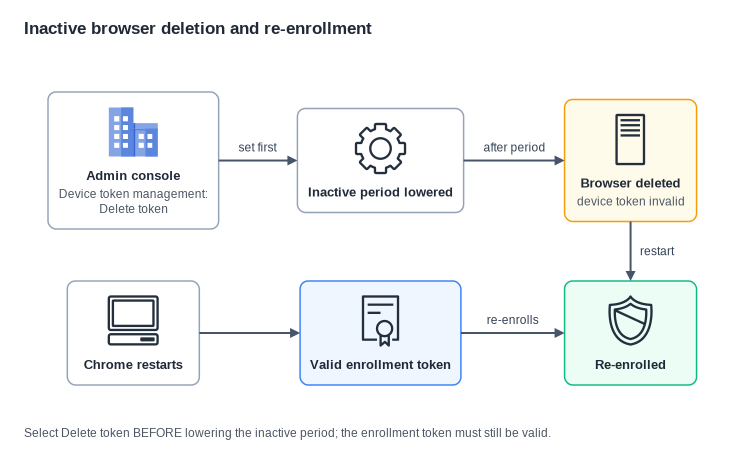
- To let deleted browsers re-enroll automatically, select Delete token in Device token management BEFORE lowering the inactive period. The enrollment token must still be valid.
- Re-enrolling an unmanaged browser: delete the device token, keep the enrollment token, restart Chrome.
OUs and inheritance
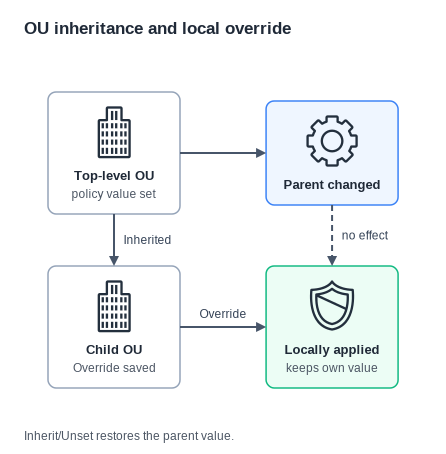
- A setting shows Inherited or Locally applied (overridden for the child).
- Override at the child to shield it from parent changes; Inherit restores the parent value.
- Enrolled browsers go to the OU of the token; managed profiles follow the signed-in user's OU. A separate Managed Browsers OU under the top-level OU keeps the two apart.
Viewing browsers and profiles
- Managed browsers list: click a browser for its detail page, including installed profiles (name, signed-in email, path).
- Managed profiles list shows each profile's OU and last report/sync times.
Exam traps
- Invalidate token blocks re-enrollment; Delete token allows it.
- Do not delete the enrollment token to re-enroll.
- Local policy at the parent does not protect the child; override at the child.
- Per-device registration keys or bulk token sets do not exist for CEC.