Exams / GCP-PCDOE / D1 Optimizing performance and cost
Optimizing performance and cost
- Exam domain: Optimizing performance and cost
1. Compute pricing models
| Need | Choice | Why |
|---|---|---|
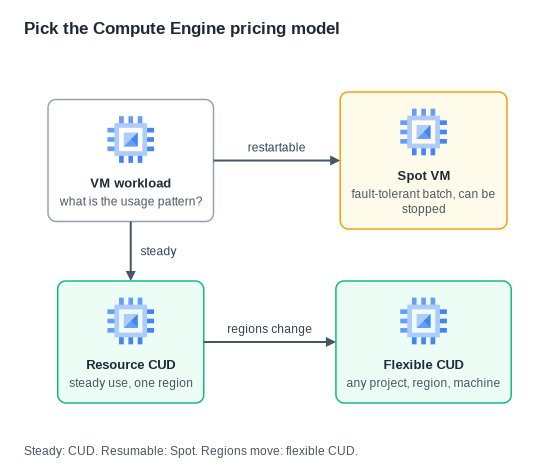
| Fault-tolerant batch, restartable, no time SLO | Spot VM (preemptible is the older form) | "Use Spot VMs to reduce costs for fault-tolerant workloads" |
| Steady, predictable usage | Committed use discount (CUD) | CUDs "are ideal for predictable and steady-state resource usage." |
| Steady usage but regions/projects/machine shapes change | Compute flexible CUD | Not restricted to "single project, region, or machine configuration." |
Resource-based commitments are tied to a region and project; flexible CUDs are spend-based. Reservations give capacity, not a discount.
2. Rightsizing and network bandwidth
- The VM rightsizing recommender (
google.compute.instance.MachineTypeRecommender) uses historical utilization; read it with the Recommender API orgcloud recommender recommendations list. - Egress bandwidth is limited per VM by machine type; to raise throughput, resize the VM (n2-standard-2 -> n2-standard-8). Extra NICs, Cloud NAT and agents do not raise the cap.
3. Autoscaling and capacity planning
| Layer | Tool | Notes |
|---|---|---|
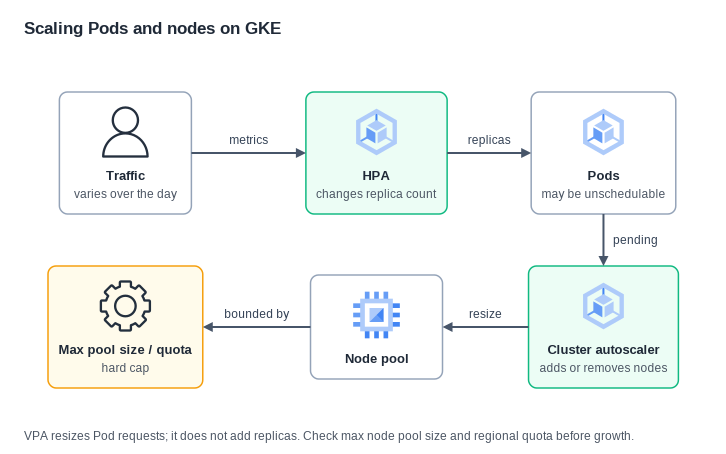
| Pod replicas | Horizontal Pod Autoscaler | Stateless, variable traffic |
| Pod size | Vertical Pod Autoscaler | Changes requests, not replica count |
| Nodes | GKE cluster autoscaler | Bounded by min/max node pool size |
| VMs | MIG autoscaler | Adds/deletes instances based on signals |
| App Engine | min idle instances | Warm instances avoid cold-start latency |
| Cloud Run | max instances | Capped by regional CPU/memory quota / instance size |
VM quotas are regional ("CPU quota is a regional quota"), so validate each region before a multi-region MIG. Before a busy season, load test first, then size and automate.
4. Network tiers and load balancers
A regional external Application Load Balancer uses only the Standard Tier, which has lower egress charges: right for a single-region audience. GKE Ingress for external Application Load Balancers does not support Standard Tier. Container-native load balancing is the recommended way to load balance through Ingress.
5. Logging and billing cost control
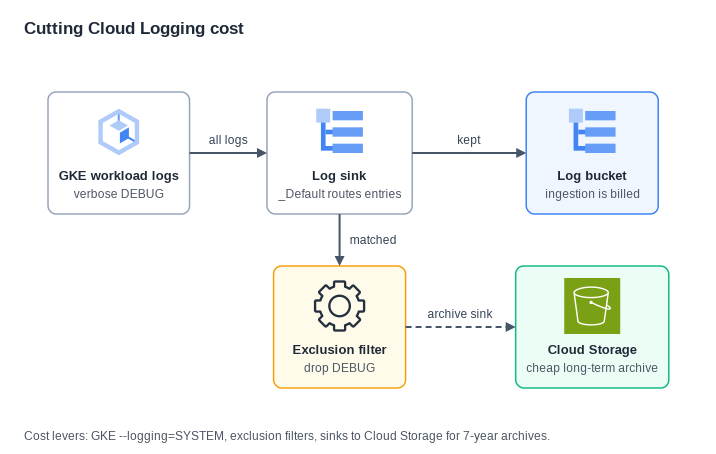
- GKE
--logging=SYSTEMstops application logs reaching Cloud Logging;kubectl logsstill works. - Exclusion filters on sinks stop matching entries from being routed.
- Long-term archive: sink to a Cloud Storage bucket.
- Budgets can be scoped to folders; use labels plus BigQuery billing export for per-system cost.
6. Other cost levers
-
Cloud Build: cache previous build results in Cloud Storage (or
--cache-fromfor Docker). -
Cloud Workstations:
idleTimeoutstops idle workstations;runningTimeoutstops them regardless of activity. -
GKE multi-tenancy: shared cluster per environment, namespace per team, RBAC RoleBindings.
-
Cloud Profiler: wall time longer than CPU time means waiting; similar times mean CPU-bound code.
-
Availability math: 99.9% to 99.99% gains 0.09% of revenue (on $1M: $900/year).
-
Cloud Run utilization: watch the container CPU and memory utilization metrics in Cloud Monitoring; "If CPU utilization is consistently low under peak load, consider reducing vCPU".
-
Container images: Container Registry is shut down; gcr.io URLs are served by Artifact Registry gcr.io repositories tied to a multi-region, so keep images near the cluster.
Exam traps
- Preemptible/Spot for public sites, caches or databases is wrong.
- Autoscalers stop at max node pool size and quota.
- runningTimeout can kill active work; idleTimeout cannot.
- Container Registry is retired; gcr.io now runs on Artifact Registry.
- Standard Tier with GKE Ingress is not supported.
Docs
- https://docs.cloud.google.com/compute/docs/instances/spot
- https://docs.cloud.google.com/compute/docs/instances/committed-use-discounts-overview
- https://docs.cloud.google.com/compute/docs/instances/apply-machine-type-recommendations-for-instances
- https://cloud.google.com/kubernetes-engine/docs/concepts/cluster-autoscaler
- https://docs.cloud.google.com/kubernetes-engine/docs/concepts/horizontalpodautoscaler
- https://docs.cloud.google.com/run/docs/configuring/max-instances-limits
- https://cloud.google.com/load-balancing/pricing
- https://docs.cloud.google.com/build/docs/optimize-builds/speeding-up-builds
- https://docs.cloud.google.com/profiler/docs/concepts-profiling