Exams / GCP-PCD / D1 Deploying applications
D1.1
Deploying applications (part 1 of 3)
- Exam domain: Deploying applications
You are reading a free preview. The rest of the GCP-PCD course unlocks with an Exam pass or All access.See plans
Choosing where to run a container
| Need | Choice | Why |
|---|---|---|
| Container, least operations | Cloud Run | "a fully managed application platform for running your code" |
| gRPC API, managed | Cloud Run | supports HTTP/2 and gRPC end-to-end |
| HTTP(S) load balancer in front of GKE | Ingress resource | Service type: LoadBalancer is L4 |
| Windows/.NET legacy, no containers | Custom VM image (image baking) | one immutable image promoted through environments |
| Java source to container | Jib (Maven/Gradle plugin) | no Dockerfile or Docker daemon needed |
Build and CI/CD with Cloud Build
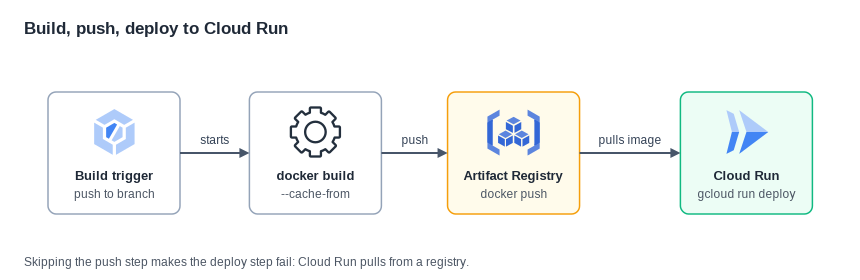
A build trigger starts a build on events such as a push to a branch. The usual pipeline is build, push to Artifact Registry, then gcloud run deploy: Cloud Run pulls the image from the registry, so omitting the push makes the deploy step fail.
- Slow Docker builds: add
--cache-fromwith a previously built image (Docker builds only). - Cloud Deploy publishes notifications to the
clouddeploy-operationsPub/Sub topic; a function can call the API to promote a release automatically.cloud-buildsis Cloud Build's topic. - Scanning: enabling the Container Scanning API scans each image pushed to Artifact Registry. Block bad images by checking findings programmatically, signing an attestation, and requiring it with a Binary Authorization policy.
Rollout strategies
| Goal | Technique |
|---|---|
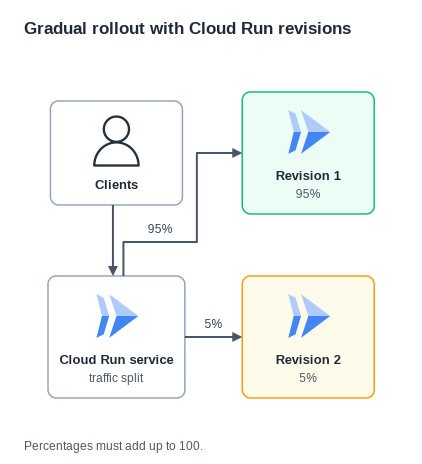
| Gradual rollout on Cloud Run | Deploy without "Serve this revision immediately", split traffic by percentage between revisions |
| Ship code before a dependency is ready | Feature flag (release decoupled from deployment) |
| Test with full production load, no user impact | Traffic mirroring on the load balancer |
| MIG update without extra instances | Rolling update with maxSurge 0 and maxUnavailable ≥ 1; health check gates progress |
Compute Engine details
- Unique config per MIG on a shared image: custom metadata on each instance template.
- VM does not boot: check for a full boot disk and an invalid or corrupted file system.
- Persistent Disk: SSD for lower latency and more IOPS; standard uses HDD.
Security, identity and access
- Terraform as a service account from a laptop: impersonation (
roles/iam.serviceAccountTokenCreator,gcloud config set auth/impersonate_service_account); service account keys are discouraged. - Event-driven function accessing Bigtable: attach the service account to the function, no key.
- IAP gives authentication/authorization in front of an app with no code change and no VPN; combine with HTTPS load balancing and Google-managed certificates.
- Cloud Shell: browser-based, free, with Git and an editor; nothing is stored on the local computer.
Locations and limits
- Cloud Run resources and their customer data live in the selected region; for per-country residency deploy a regional bucket and service per country. The ASIA multi-region excludes Hong Kong and Indonesia.
- App Engine standard caps request and response size at 32 MB: use signed URLs for uploads straight to Cloud Storage.
- Path routing to several functions: HTTPS load balancer, URL map, serverless NEGs (one backend service per function).
- Apigee multi-region: pick the TargetServer with
system.region.name. - Hadoop: Dataproc plus the Cloud Storage connector instead of HDFS.
Exam traps
- A Cloud Build pipeline without
docker pushcannot deploy to Cloud Run. type: LoadBalancerbelongs to a Service, not an Ingress.- Web Security Scanner crawls web apps; it does not scan container images.
- Canary, blue/green and rolling updates expose real users; only mirroring tests at full load without that.
- Cloud Debugger (Logpoints/Snapshots) is shut down; Container Registry is shut down in favor of Artifact Registry.
maxHealthy/maxUnhealthyare not rolling update options.
Docs
- https://cloud.google.com/kubernetes-engine/docs/concepts/ingress
- https://docs.cloud.google.com/run/docs/overview/what-is-cloud-run
- https://docs.cloud.google.com/artifact-analysis/docs/container-scanning-overview
- https://cloud.google.com/build/docs/optimize-builds/speeding-up-builds
- https://docs.cloud.google.com/build/docs/automating-builds/create-manage-triggers
- https://docs.cloud.google.com/deploy/docs/integrating
- https://cloud.google.com/run/docs/rollouts-rollbacks-traffic-migration
- https://docs.cloud.google.com/compute/docs/instance-groups/rolling-out-updates-to-managed-instance-groups
- https://docs.cloud.google.com/docs/authentication/use-service-account-impersonation
- https://cloud.google.com/run/docs/locations
- https://cloud.google.com/storage/docs/bucket-locations
- https://cloud.google.com/debugger/docs