Exams / GCP-AGWA / D1 Monitoring and troubleshooting common issues
Monitoring and troubleshooting common issues
- Exam domain: Monitoring and troubleshooting common issues
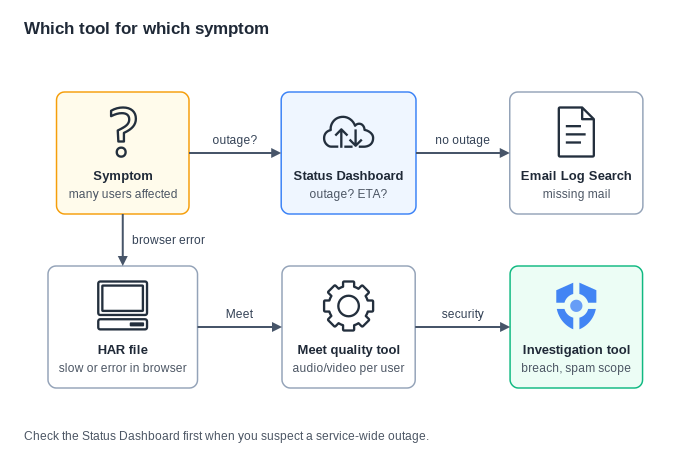
Pick the right tool
| Symptom | First tool |
|---|---|
| Suspected outage, many users, Voice/Chrome/Gmail | Google Workspace Status Dashboard |
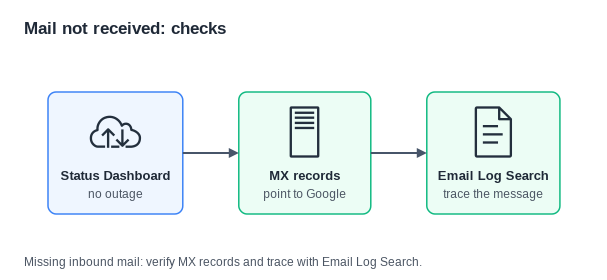
| Missing inbound mail | MX records + Email Log Search (ELS) |
| Delayed or undelivered email or invitation | Message header (Admin Toolbox Messageheader) |
| Intermittent browser errors or slowness | HAR file |
| Meet audio/video problems | Meet quality tool |
| Breach, spam scope, device activity | Security investigation tool |
| Licensed user without access | Service on/off in Admin console |
Status Dashboard
It shows current and past service status and recent outages or disruptions. Check it first for a suspected service-wide issue.
Mail delivery
MX records must point to Google mail servers. ELS finds expected messages, including those sent to spam or routed incorrectly. Calendar invitations are emails, so header analysis applies; a guest can also opt out of notifications.
Trusted external senders in spam: use an approved senders address list. A high-volume false-positive pattern: contact support.
HAR files
A HAR records browser network traffic. It contains downloaded page content, so remove sensitive data before sending, and share only with the support representative.
Meet and security tools
The Meet quality tool needs the Admin quality dashboard access privilege. The security investigation tool is in the security center; super admins have access and other admins can get specific security center privileges through a custom role.
Exam traps
- Per-user intermittent problem: HAR, not Status Dashboard.
- Do not disable spam filtering or give super admin for convenience.
- Vault is for retention and eDiscovery; use the investigation tool to scope incidents.
Docs
- https://support.google.com/a/answer/139569?hl=en
- https://support.google.com/a/answer/11112228?hl=en
- https://support.google.com/a/answer/7513679?hl=en
- https://support.google.com/chrome/a/answer/9293135?hl=en-GB
- https://support.google.com/a/answer/9204857
- https://support.google.com/a/answer/7532105?hl=en
- https://support.google.com/a/answer/11482175?hl=en
- https://support.google.com/a/answer/60752?hl=en