Exams / GCP-ACE / D1 Ensuring the successful operation of a cloud solution
D1.1
Ensuring the successful operation of a cloud solution (part 1 of 3)
- Exam domain: Ensuring the successful operation of a cloud solution
You are reading a free preview. The rest of the GCP-ACE course unlocks with an Exam pass or All access.See plans
Audit logs and log routing
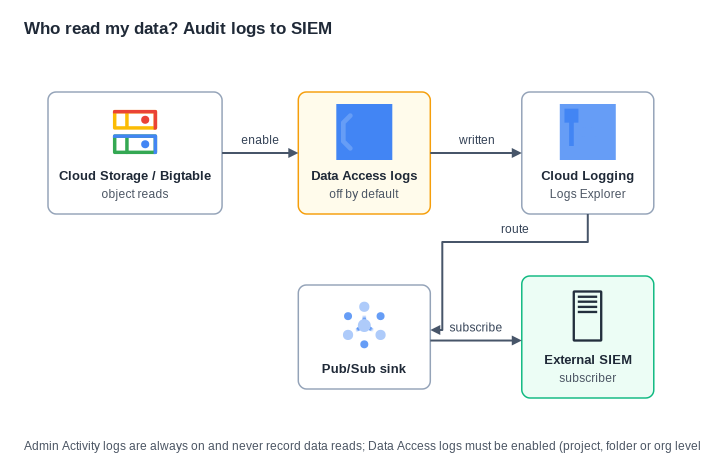
| Log type | Records | On by default? |
|---|---|---|
| Admin Activity | Config/metadata changes (e.g. CreateServiceAccount) |
Always on |
Data Access (ADMIN_READ, DATA_READ, DATA_WRITE) |
Reads/writes of data and metadata | No, you must enable them |
"DATA_READ audit logs are disabled by default and must be enabled." Enable them per service at project, folder or organization level; reading them needs the Private Logs Viewer role (roles/logging.privateLogViewer). To feed an external SIEM, route logs with a sink to Pub/Sub: "We recommend using Pub/Sub for integrating" with external tools.
Other logging facts:
- Log views give a user access to a subset of a log bucket; grant
roles/logging.viewAccessoron the view (least privilege, no data duplication). - Log Analytics (now called Observability Analytics) runs SQL and charts on a log bucket; a linked BigQuery dataset lets BigQuery query the same logs without copying them.
- Use the Ops Agent to ship VM application logs to Cloud Logging.
- Cloud Storage change events: use Pub/Sub notifications, not versioning.
Monitoring, alerting and diagnostics
| Need | Tool |
|---|---|
| CPU > 90% for 15 min, email | Cloud Monitoring alerting policy + email notification channel |
| Stuck Dataflow job | Alert on the data freshness metric |
| Pending GKE pod | kubectl describe pod, read Events |
| Broken BigQuery-fed report | Check the BigQuery job |
| BigQuery query cost (on demand) | Dry run gives bytes read, then Pricing Calculator |
Cloud Debugger was shut down; do not choose it.
Networking: IPs and subnets
- A specific private IP: reserve it as a static internal IP. An ephemeral internal IP can be promoted to static.
- Fixed IP only used inside the VPC: static internal (external costs money).
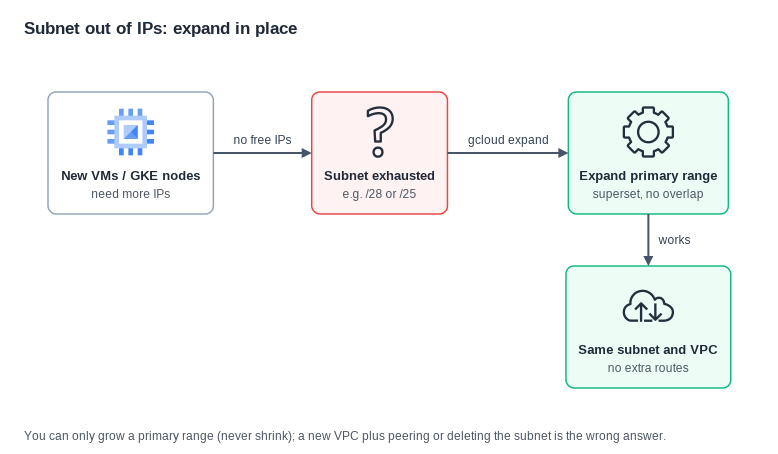
- Subnet exhausted (VMs or GKE nodes): expand the primary range (grow only, new range must contain the old one and not overlap). Secondary ranges are for pods and services.
- Fixed egress IPs for an allowlist: private nodes plus Cloud NAT with manual static IPs.
- Hostname for an on-prem host: Cloud DNS private zone.
- SSH without public IPs: IAP TCP forwarding,
gcloud compute ssh --tunnel-through-iap, allow35.235.240.0/20on port 22.
GKE and Cloud Run operations
| Goal | Answer |
|---|---|
| Right-size container CPU/memory | Vertical Pod Autoscaler |
| More replicas | Horizontal Pod Autoscaler |
| More nodes | Cluster autoscaler |
| Stay on supported version | Node auto-upgrade (auto-repair only fixes unhealthy nodes) |
| L4 GPUs for one team | New GPU node pool + cloud.google.com/gke-accelerator nodeSelector ("You can't add GPUs to existing node pools.") |
| Cloud Run canary | New revision + traffic percentages |
| Cloud Run slow first request | Minimum instances |
Storage and backups
| Need | Answer |
|---|---|
| Regular disk backup with cleanup | Snapshot schedule with retention |
| Versions accessed about monthly | Nearline (Coldline has a 90-day minimum, for quarterly access) |
| 3-year month-end Cloud SQL copy | Scheduled export to an Archive bucket (backups can't be written to your bucket) |
Exam traps
- Admin Activity logs never show data reads.
- Data Access logs are off by default (except BigQuery).
- Bytes returned or row counts do not determine BigQuery cost; bytes read do.
- Subnets can only grow; do not delete or recreate them.
- Dynamic Cloud NAT IPs are unsuitable for allowlists.
- Container logs do not exist for a Pending pod.
Docs
- https://docs.cloud.google.com/logging/docs/audit/configure-data-access
- https://docs.cloud.google.com/logging/docs/logs-views
- https://docs.cloud.google.com/logging/docs/export/pubsub
- https://docs.cloud.google.com/logging/docs/analyze/query-and-view
- https://docs.cloud.google.com/monitoring/alerts
- https://cloud.google.com/vpc/docs/reserve-static-internal-ip-address
- https://docs.cloud.google.com/vpc/docs/create-modify-vpc-networks
- https://docs.cloud.google.com/nat/docs/ports-and-addresses
- https://cloud.google.com/iap/docs/using-tcp-forwarding
- https://cloud.google.com/kubernetes-engine/docs/how-to/gpus
- https://docs.cloud.google.com/run/docs/configuring/min-instances
- https://cloud.google.com/storage/docs/storage-classes