Exams / DVA-C02 / D1 Deployment
Deployment (part 1 of 6)
- Exam domain: Deployment
This chapter covers the deployment mechanics the exam tests most: running several environments off the same API Gateway/Lambda setup, how CDK and CloudFormation actually deploy (bootstrapping, capabilities, mappings, stack policies, StackSets), controlled rollout strategies (CodeDeploy canary/linear, ECS blue/green), Lambda packaging limits, and the supporting services (DynamoDB, RDS Proxy, CloudFront, EventBridge, X-Ray, AppConfig, S3 Glacier) that a deployment pipeline typically has to wire together.
Environments: stages, aliases, and canaries
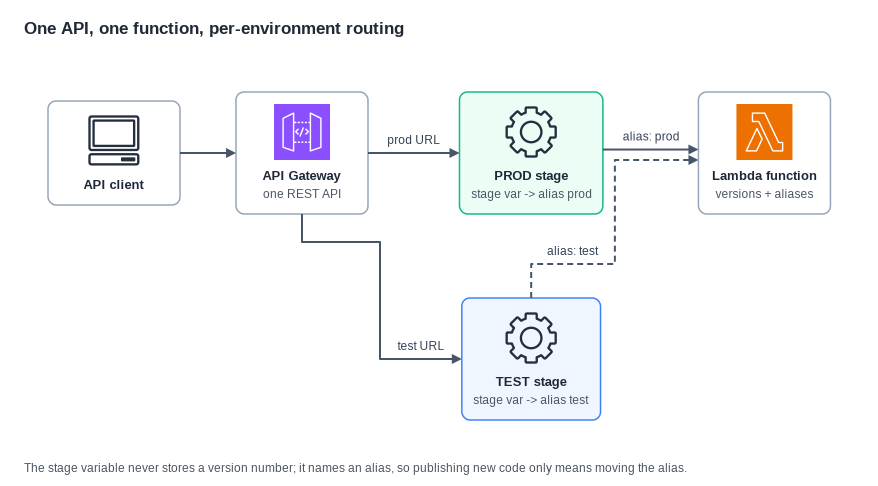
API Gateway and Lambda isolate environments without duplicating infrastructure, by stacking three independent indirections:
| Layer | What it is | What it points to |
|---|---|---|
| API Gateway stage | A named deployment of an API (e.g. prod, test), each with its own invoke URL |
A set of stage variables |
| Stage variable | A key-value pair scoped to one stage | A Lambda function name/ARN, or an alias name |
| Lambda alias | A named, updatable pointer to one function version (or split between two) | A specific immutable Lambda version, e.g. $LATEST or 12 |
Because the stage variable names an alias, not a version, publishing new code is just "move the alias" — the API Gateway integration itself never has to change. This is why a question that asks for the least ongoing maintenance, or for testing/running multiple versions side by side, keeps landing on stage variables + aliases, and treats pointing the integration straight at a numbered version as the wrong answer (every release would then require re-pointing the integration).
Building on that base pattern:
- Running N environments with the fewest resources: one API Gateway (N stages) + one Lambda function (N aliases) — not N APIs and N functions.
- Testing new code without touching production: add a new stage (its own URL) with a stage variable pointing at the updated function/alias; production's stage and URL are untouched.
- Testing in production on a slice of real traffic, same URL: keep the integration pointed at a stable alias, then put a canary release on the existing production stage with a traffic percentage — this is the one case where the production stage's own canary settings (not a second stage) are the right tool, because the requirement is "same URL, partial traffic" rather than "separate environment."
- A Lambda authorizer handles authentication, a gateway response customizes API Gateway's own error payloads, and an API Gateway resource policy controls who/what may call the API at all (by VPC, IP, or AWS account) — none of them route a request to a different backend version, so none of them substitute for a stage variable.
For Lambda code deployments themselves (not just API Gateway routing), AWS CodeDeploy manages the traffic shift between the old and new version using one of three deployment-type families:
| Type | Behavior | Example predefined config |
|---|---|---|
| All-at-once / in-place, immediate | 100% of traffic moves to the new version at once | — |
| Linear | Traffic moves in equal increments, on a fixed interval, until 100% | LambdaLinear10PercentEvery1Minute (10 min total) |
| Canary | A small percentage shifts immediately, the rest shifts once after one validation window | LambdaCanary10Percent5Minutes (5 min total) |
A canary configuration both limits the blast radius of a bad deploy (only 10% of traffic sees it before the window ends) and finishes faster than the equivalent linear rollout, because canary only has one wait, not N of them — that combination ("least exposure" and "least time") is what a canary predefined configuration is built for.
How CloudFormation and CDK actually deploy
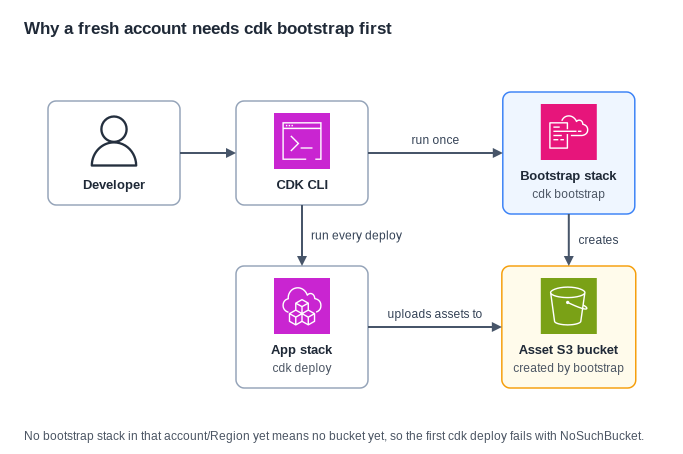
CDK bootstrapping. cdk deploy doesn't just submit a CloudFormation template — when a stack uses the CDK construct libraries' assets (e.g. Lambda function code), the CLI first uploads those assets to an S3 bucket that belongs to a one-time bootstrap stack in that specific AWS account + Region. A brand-new account/Region pair has no bootstrap stack yet, so the asset upload fails with NoSuchBucket — the fix is cdk bootstrap, run once per account/Region before the first deploy there, not cdk synth (renders the template locally, no AWS calls), cdk init (scaffolds a new project), or cdk destroy (tears a stack down).
IAM capabilities. CloudFormation refuses to create IAM resources unless the caller explicitly acknowledges it, via a Capabilities flag on the stack operation:
| Capability | Required when |
|---|---|
CAPABILITY_IAM |
The template creates IAM resources, but lets CloudFormation auto-generate their names |
CAPABILITY_NAMED_IAM |
The template gives any IAM resource an explicit, custom name |
CAPABILITY_AUTO_EXPAND |
The template uses macros or nested Transforms (unrelated to IAM) |
An InsufficientCapabilities error on a template with custom-named IAM resources always means swap CAPABILITY_IAM for CAPABILITY_NAMED_IAM — a more privileged deploying role does not substitute for the flag.
Reading your own template data — Fn::FindInMap. A Mappings section is a static, two-level lookup table baked into the template; !FindInMap [MapName, TopLevelKey, SecondLevelKey] reads one value out of it, e.g. picking a Lambda Timeout by environment:
Mappings:
  EnvironmentData:
    dev:  { Timeout: 30 }
    test: { Timeout: 60 }
    prod: { Timeout: 90 }
Resources:
  MyFunction:
    Properties:
      Timeout: !FindInMap [EnvironmentData, !Ref Environment, Timeout]
Fn::GetAtt reads an attribute of a resource (e.g. an ARN), not a Mappings entry; Fn::Select picks an item from a list by index, not a two-key map lookup.
Passing one resource's value to another at deploy time — DefinitionSubstitutions. When a Step Functions state machine needs a value only known once another resource in the same template is created (e.g. an API Gateway endpoint), the AWS::StepFunctions::StateMachine resource's DefinitionSubstitutions property substitutes placeholders into the state machine's JSON/YAML definition at deploy time — free, built in, no extra resource. Step Functions has no "environment variable" feature the way Lambda does.
Protecting live, out-of-band state — stack policies. A stack policy is a JSON document, separate from the template, that is checked on every UpdateStack call; once set, every resource is protected by default unless explicitly allowed. It is the tool for "don't let the next template update reset this resource's current value" — e.g. a Parameter Store parameter the running application itself updates. A resource's DeletionPolicy is a different control entirely: it only governs what happens when that resource is deleted or replaced, not what happens to it during a normal in-place update, so DeletionPolicy: Retain does not stop a routine update from overwriting a parameter's value.
One template, many Regions/accounts — StackSets. CloudFormation StackSets deploys, updates, and deletes the same stack across multiple Regions and/or accounts from a single operation, with self-managed permissions that work even without AWS Organizations — the standard answer whenever a pipeline must test or deploy a template to more than one Region/account without hand-rolling a per-Region pipeline action.
Gradual ECS deployments from CloudFormation. Canary/linear blue-green rollouts for an ECS service managed by CodeDeploy are declared in CloudFormation with a Transform section plus the AWS::CodeDeploy::BlueGreen hook — a plain stack update (no hook) does an ordinary rolling update instead, and a nested stack adds no traffic-shifting behavior by itself.
Lambda packaging limits
| Package type | Max size | Notes |
|---|---|---|
.zip deployment package |
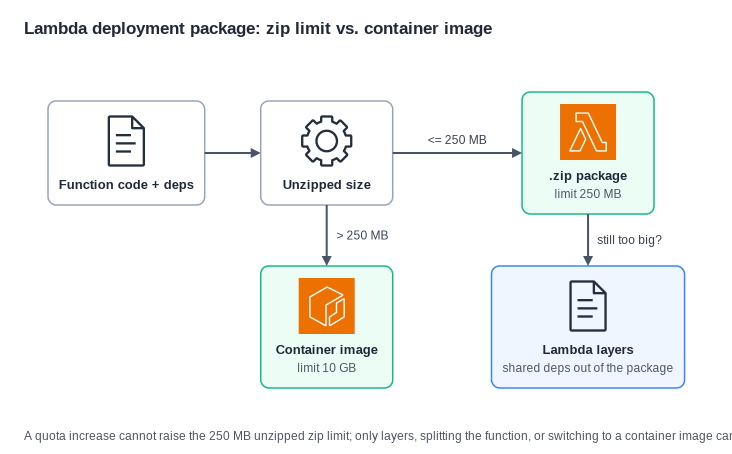
250 MB unzipped (code + layers + custom runtime) | A fixed limit — AWS Support cannot raise it as a quota |
| Container image | 10 GB | Push to Amazon ECR; Lambda runs it as the function |
/tmp ephemeral storage |
512 MB – 10,240 MB, configurable | Per-invocation, encrypted at rest, cleared between executions |
When a .zip package is too big: move shared/rarely-changed dependencies into Lambda layers (shrinks the function's own package, and the layer is reusable across functions), or split one oversized function into several smaller ones. If the code plus dependencies genuinely cannot fit in 250 MB even after that, the only remaining option is a container image deployment, up to 10 GB. Double-zipping a package changes nothing, because Lambda measures the limit against the unzipped contents.
Short-lived scratch files that a single invocation creates, rewrites, and discards belong in /tmp (fast, local, no per-operation cost) — not EFS (adds network latency for something genuinely temporary), not S3 (per-request cost and latency), and never EBS (cannot be attached to Lambda at all).
Supporting pieces a deployment pipeline wires together
Lambda reaching a private database under bursty load. Amazon RDS Proxy pools and multiplexes database connections in front of Aurora/RDS, so a burst of concurrent Lambda invocations doesn't translate into a connection storm on the database. The proxy itself always lives inside a VPC (it can never be made publicly accessible, even if the database is), and a Lambda function must be in that same VPC to reach it — connecting a function to a database through the Lambda console's guided database/proxy workflow sets up that VPC attachment as part of adding the proxy. Giving the function VPC access with an empty security group does not fix connectivity on its own: a security group must explicitly allow the outbound/inbound traffic on the database's port, or nothing gets through regardless of VPC placement.
DynamoDB keys and indexes for new access patterns.
| Need | Use | Why |
|---|---|---|
| Low-latency point/range lookups by two attributes (e.g. device ID + timestamp) | Composite primary key (partition key + sort key) on the base table | Items with the same partition key are stored together, sorted by the sort key |
| A brand-new query pattern whose partition key differs from the table's | Global secondary index (GSI) | A GSI's partition key and sort key can be completely different from the base table's |
| A new query pattern that still uses the table's existing partition key, just a different sort key | Local secondary index (LSI) | An LSI must keep the base table's partition key — it only varies the sort key |
| React to every data change, including TTL-driven deletions | DynamoDB Streams → Lambda | TTL expirations appear as delete events on the stream; a Lambda consumer can archive them (e.g. to S3) with no polling |
Scheduling and deployment notifications.
- Run something once a day at a fixed time → an EventBridge rule on a cron/rate schedule invoking the target directly; billed only for that one invocation. (AWS now points new designs at the newer EventBridge Scheduler, but the classic scheduled rule still works the same way.)
- Notify a team about deployments to one specific CloudFormation stack, out of several sharing a template → CloudFormation publishes stack/resource status-change events to the default EventBridge event bus; a rule filtered on the CloudFormation service and that one stack's ARN invokes a notifying Lambda. A stack's own
NotificationARNs/SNS topic fires on every event with no per-stack filtering built in, and CloudWatch alarms are for metric thresholds, not discrete per-event status changes. - Distributed tracing across multiple AWS accounts → AWS X-Ray cross-account observability (link source accounts to one or more monitoring accounts); CloudWatch handles metrics/logs but the trace map and trace visualization are X-Ray's job.
Delivering and localizing content.
- End-to-end HTTPS through CloudFront to a custom origin (e.g. an ALB) = Viewer Protocol Policy Redirect HTTP to HTTPS (forces every viewer onto HTTPS) combined with Origin Protocol Policy Match Viewer (so the CloudFront → origin leg inherits that HTTPS too).
- Serving per-country/per-language content reliably and with low latency = forward the
CloudFront-Viewer-Countryheader (CloudFront fills it in from geolocation) and the standardAccept-Languageheader to the origin, so one application behind one distribution can branch on both.
Dynamic runtime configuration. AWS AppConfig manages freeform configuration data (not just feature flags) and deploys changes to running applications — via the AppConfig Agent sidecar on ECS/EKS, or the Lambda extension — using a gradual deployment strategy (e.g. a canary rolling out over several minutes with automatic rollback on alarm), so limits like max connections or max TPS can change with zero redeploy and zero downtime.
Cost-effective storage tiering by access pattern. For data that needs instant (millisecond) access for a known period and can tolerate long retrieval afterward: S3 Glacier Instant Retrieval (minimum storage duration 90 days, millisecond retrieval, cheaper than S3 Standard-IA) for the active window, then an S3 Lifecycle transition to S3 Glacier Flexible Retrieval (retrieval in minutes to hours) once instant access is no longer required. S3 Glacier Deep Archive's hours-to-retrieve profile disqualifies it for any window that must still be "instant."
Migrating a shared-storage Kubernetes workload to AWS. A cluster where every pod mounts the same NFS share maps to Amazon EKS (managed Kubernetes, highly available control plane) running pods that mount an Amazon EFS file system (via the EFS CSI driver) — EFS, like NFS, can be mounted read/write by many nodes at once. EBS cannot be mounted concurrently by multiple nodes, so it cannot replace a share used by many pods simultaneously, and ECS is a different (non-Kubernetes) orchestrator that wouldn't run the existing Kubernetes manifests as-is.
Turning on Lambda Insights from SAM. Enhanced per-function metrics (CloudWatch Lambda Insights) need two things added to each function: the AWS-managed Lambda Insights extension layer, and the CloudWatchLambdaInsightsExecutionRolePolicy managed policy on the execution role. This is distinct from setting Tracing: Active, which turns on X-Ray tracing instead.
Exam traps
- "Configure a NAT gateway for a Lambda function" / "attach a security group with no rules and call it done" — neither is real or sufficient: a NAT gateway helps VPC-internal resources reach the internet, not the reverse, and an empty security group blocks the traffic it needs to allow.
- DeletionPolicy vs. stack policy — DeletionPolicy only fires on delete/replace; only a stack policy stops a routine update from touching a resource.
- CAPABILITY_IAM vs. CAPABILITY_NAMED_IAM — the named variant is required the instant any IAM resource gets an explicit custom name; a more privileged deploying role never substitutes for the capability flag.
- LSI vs. GSI — if the new access pattern needs a different partition key, it's a GSI; an LSI can never have a different partition key than the base table.
- "Quota increase" as a fix for the 250 MB Lambda zip limit — it's a hard architectural ceiling, not a raisable per-account quota.
- Canary beats linear on both axes here — a canary configuration with one short validation window can finish faster than a linear rollout with many small steps, while still limiting exposure; don't assume "more gradual" always means "slower is required."
- Stage variable → alias → version, never stage variable: version directly, when the goal is to minimize future maintenance as code is republished.
Docs
- Use stage variables for a REST API in API Gateway
- Create an alias for a Lambda function
- Set up an API Gateway canary release deployment
- Working with deployment configurations in CodeDeploy
- AWS::CodeDeploy::BlueGreen hook syntax
- AWS CDK bootstrapping
- Control CloudFormation access with AWS IAM (capabilities)
- Fn::FindInMap
- AWS::StepFunctions::StateMachine (DefinitionSubstitutions)
- Prevent updates to stack resources (stack policies)
- Managing stacks across accounts and Regions with StackSets
- AWS Lambda quotas (deployment package size)
- Configure ephemeral storage for Lambda functions
- Using Amazon RDS Proxy with AWS Lambda
- Using AWS Lambda with Amazon RDS
- Core components of Amazon DynamoDB
- Using global secondary indexes in DynamoDB
- DynamoDB Streams and Time to Live
- Creating a scheduled rule in Amazon EventBridge
- CloudFormation event notifications via Amazon EventBridge
- Cross-account tracing (AWS X-Ray)
- Require HTTPS between CloudFront and a custom origin
- Require HTTPS between viewers and CloudFront
- Add CloudFront request headers
- AWS AppConfig integration with containers (agent)
- Creating feature flags and freeform configuration data in AppConfig
- Understanding S3 Glacier storage classes
- Use Amazon EFS storage with Amazon EKS
- Use the AWS SAM CLI to enable Lambda Insights
- Working with branches in AWS CodeCommit repositories
- Cache settings for REST APIs in API Gateway