Exams / DEA-C01 / D1 Data Operations and Support
D1.1
Data Operations and Support (part 1 of 4)
- Exam domain: Data Operations and Support
You are reading a free preview. The rest of the DEA-C01 course unlocks with an Exam pass or All access.See plans
This chapter covers day-to-day operation of data pipelines on AWS: orchestration and alerting, Glue/EMR/Lambda tuning, Redshift and Athena performance, Kinesis behaviour, and troubleshooting.
Orchestration and alerting
| Need | Service | Key fact |
|---|---|---|
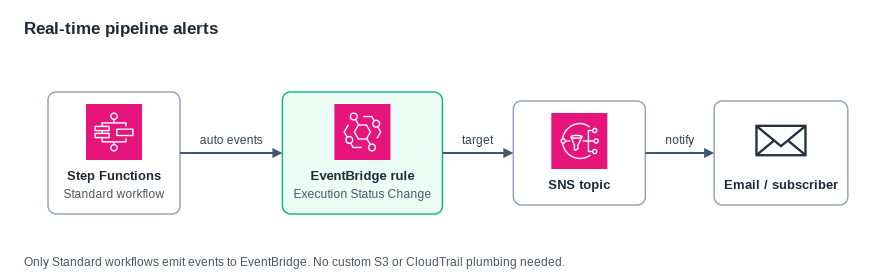
| Alert when a state machine succeeds/fails | Step Functions → EventBridge rule → SNS | Step Functions sends events to the default event bus automatically; only Standard workflows emit them. |
| Orchestrate EMR + other AWS services cheaply | Step Functions | Serverless, integrates with EMR, Lambda, Glue, DynamoDB. |
| File arrives in S3, short job, email result | S3 event notification → Lambda → SNS | S3 invokes Lambda asynchronously; no polling infrastructure. |
| Data completeness alerts | Glue Data Quality → EventBridge → SNS | Glue Data Quality publishes an EventBridge event when a ruleset evaluation completes. |
Scheduled Redshift SQL (e.g. CALL proc()) |
Query editor v2 scheduled query | Started by EventBridge; no extra compute to run. |
Data Quality rulesets can be edited in bulk through the UpdateDataQualityRuleset API (e.g. from Lambda) instead of 1,000 console edits.
Cost-aware compute
- Glue Flex execution class: for non-urgent jobs (pre-production, tests, one-time loads); needs Glue 3.0+ and G.1X/G.2X workers.
- Redshift Serverless: you pay RPU-hours per second for the workloads you run, so it fits business-hours-only query use better than a provisioned cluster.
- Lambda: CPU is allocated in proportion to configured memory. A CPU-bound function at 128 MB gets faster by raising memory (not timeout, retries or VPC).
AWS Glue troubleshooting
| Symptom | Cause / fix |
|---|---|
| Many tiny S3 files slow the job | DynamicFrame file grouping (groupFiles: inPartition), supported for csv, json, xml, ion, grokLog. |
| Job bookmark reprocesses files | Call job.init at the start and job.commit at the end; use transformation_ctx; max concurrency > 1 can also interfere. |
No space left on device |
Shuffle bound to local disk: enable --write-shuffle-files-to-s3 (Cloud Shuffle Storage Plugin); diagnose skew with Spark UI/Glue metrics; salting for skewed keys. |
| Glue job in VPC cannot reach S3 | The subnet route table needs the S3 gateway endpoint route (gateway endpoints work via route tables, not security groups). |
| Slow Iceberg queries | Managed compaction (Parquet only) and scheduled column statistics. |
EMR, Spark and SAM
- Spark cluster mode: the driver runs in the first YARN container, so its log (stderr) is in the first YARN container log, reachable through the persistent application UI (Spark history server).
- Apache Hudi on EMR gives record-level insert/update/upsert/delete on S3 data: ideal to apply small daily change sets to a large table.
- SAM flow: declare bucket + S3 event source in the template,
sam build, thensam deploy(--guidedthe first time).
Amazon Redshift
| Topic | Fact |
|---|---|
| Wide table | SELECT * EXCLUDE (col1, col2) FROM t drops columns from the result. |
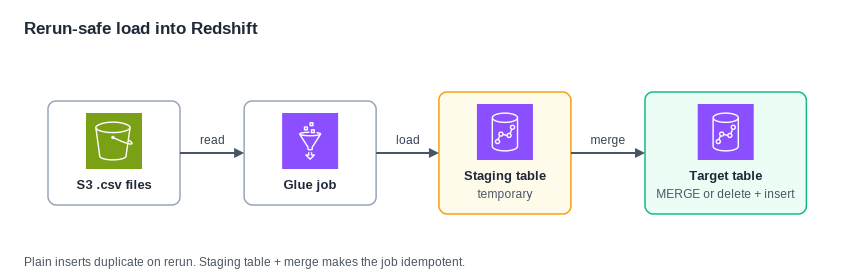
| Rerun-safe load / upsert | Staging table + MERGE (or delete matching rows + insert) so reruns do not duplicate. |
Refresh orders from staging |
Stored procedure with DELETE + INSERT in one transaction. |
| Distribution | ALL copies the table to every node: only for small, slowly changing tables. |
| Optimizer warnings | STL_ALERT_EVENT_LOG. |
| ML | Redshift ML can do remote inference on a SageMaker endpoint from SQL. |
Redshift Spectrum performance
- Use columnar formats (Parquet).
- Partition on the most common query predicates.
- Avoid very small files; if the format/compression is not splittable, split large files into smaller ones (file sizes between 64 MB and 1 GB recommended).
Athena
- Partition projection computes partition values from table properties instead of looking them up in the Glue Data Catalog: faster for highly partitioned tables and new date partitions need no registration.
- Federated Query runs SQL against relational, non-relational and object sources through connectors (SQL Server, DynamoDB, Redshift...).
Kinesis Data Streams
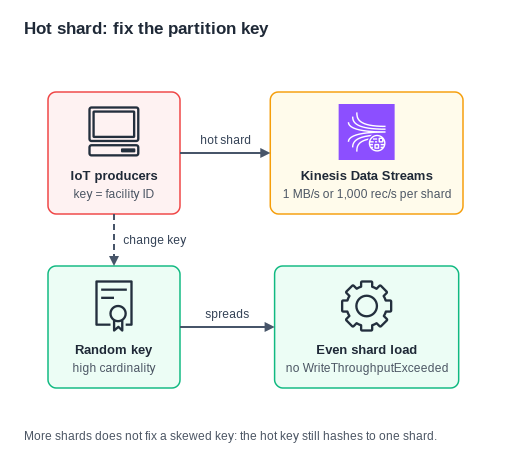
- A shard supports up to 1 MB/s and 1,000 records/s of writes. The partition key decides the shard.
WriteThroughputExceededwith idle shards = hot shard: use a high-cardinality (random) key.- Duplicates come from producer retries after network timeouts and from consumer restarts (shard/worker changes) that resume from the last checkpoint. Consumers must be idempotent.
- CloudWatch Logs → Splunk: subscription filter → Firehose delivery stream (Splunk destination).
Exam traps
- "Real-time alerts on pipeline steps": EventBridge rule on Step Functions execution status change, not CloudTrail and not S3 marker files.
- FATAL-level Step Functions logging will not show Lambda exception details: look in
/aws/lambda/<function-name>. - More shards does not fix a hot partition key.
- Bookmarks need
job.commit; max concurrency of 1 is not the problem. ALLdistribution is for small slow-moving tables, never large ones.- Redshift
EXCLUDEis the column-exclusion syntax;EXCEPT,NOT IN,TRUNCATEare not. - Raising Lambda timeout/retries does not add CPU; memory does.
- Gateway endpoints are fixed with route tables, not security groups or bucket policies.
Docs
- https://docs.aws.amazon.com/glue/latest/dg/add-job.html
- https://docs.aws.amazon.com/redshift/latest/mgmt/serverless-billing-on-demand.html
- https://docs.aws.amazon.com/step-functions/latest/dg/eventbridge-integration.html
- https://docs.aws.amazon.com/lambda/latest/dg/with-s3.html
- https://docs.aws.amazon.com/lambda/latest/dg/configuration-memory.html
- https://docs.aws.amazon.com/lambda/latest/dg/monitoring-cloudwatchlogs.html
- https://docs.aws.amazon.com/glue/latest/dg/data-quality-alerts.html
- https://docs.aws.amazon.com/glue/latest/dg/grouping-input-files.html
- https://docs.aws.amazon.com/glue/latest/dg/glue-troubleshooting-errors.html
- https://docs.aws.amazon.com/glue/latest/dg/monitor-spark-shuffle-manager.html
- https://docs.aws.amazon.com/glue/latest/dg/compaction-management.html
- https://docs.aws.amazon.com/emr/latest/ManagementGuide/app-history-spark-UI.html
- https://docs.aws.amazon.com/emr/latest/ReleaseGuide/emr-hudi.html
- https://docs.aws.amazon.com/redshift/latest/dg/r_EXCLUDE_list.html
- https://docs.aws.amazon.com/redshift/latest/dg/t_updating-inserting-using-staging-tables-.html
- https://docs.aws.amazon.com/redshift/latest/dg/c-spectrum-external-performance.html
- https://docs.aws.amazon.com/athena/latest/ug/partition-projection.html
- https://docs.aws.amazon.com/streams/latest/dev/key-concepts.html
- https://docs.aws.amazon.com/streams/latest/dev/kinesis-record-processor-duplicates.html
- https://docs.aws.amazon.com/vpc/latest/privatelink/gateway-endpoints.html