You have a Microsoft Entra tenant that includes a group named Group3 and an administrative unit named Department1.
Department1 contains the users shown in the Users exhibit. (Select the Users tab.)
Department1 contains the groups shown in the Groups exhibit. (Select the Groups tab.)
The User Administrator role assignments appear in the Assignments exhibit. (Select the Assignments tab.)
Group2 membership is shown in the Group2 exhibit. (Select the Group2 tab.)
For each statement, select Yes if it is true. Otherwise, select No.
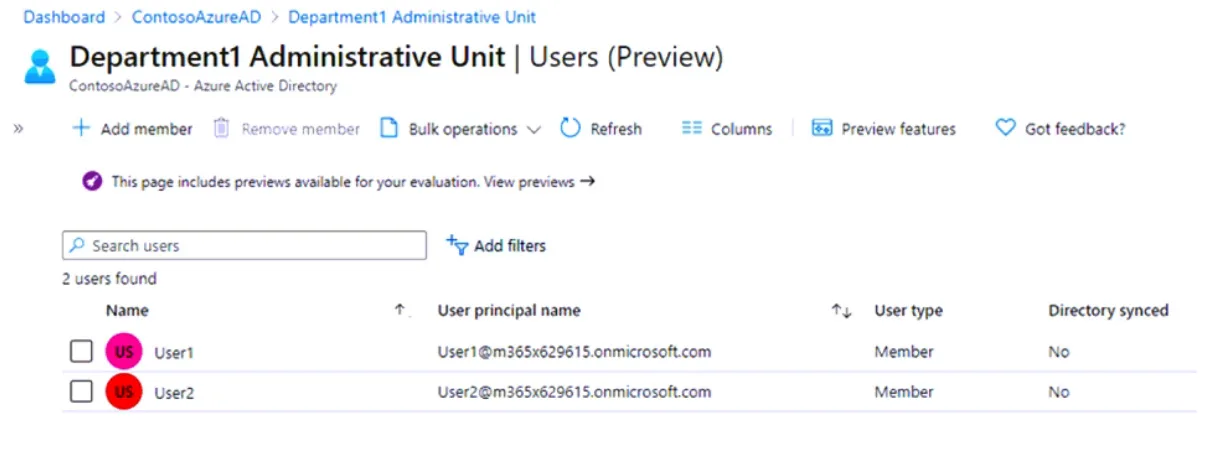
Text version
Breadcrumb: Dashboard > ContosoAzureAD > Department1 Administrative Unit
Page: Department1 Administrative Unit | Users (Preview) — ContosoAzureAD - Azure Active Directory
Toolbar: Add member, Remove member (disabled), Bulk operations, Refresh, Columns, Preview features, Got feedback?
Banner: This page includes previews available for your evaluation. View previews
2 users found
| Name | User principal name | User type | Directory synced |
|---|---|---|---|
| User1 | User1@m365x629615.onmicrosoft.com | Member | No |
| User2 | User2@m365x629615.onmicrosoft.com | Member | No |
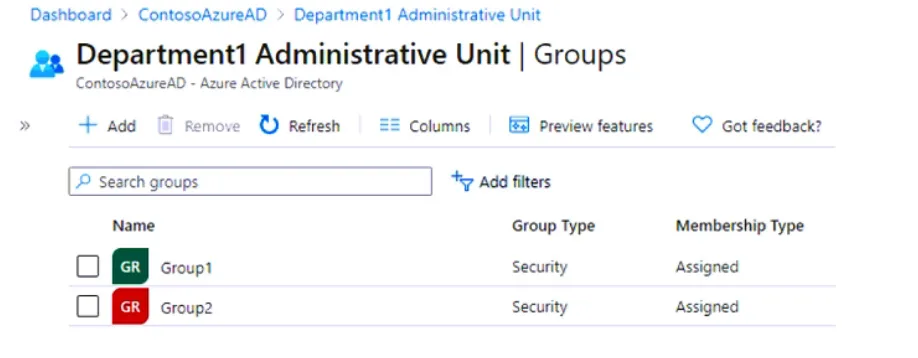
Text version
Breadcrumb: Dashboard > ContosoAzureAD > Department1 Administrative Unit
Page: Department1 Administrative Unit | Groups — ContosoAzureAD - Azure Active Directory
Toolbar: Add, Remove (disabled), Refresh, Columns, Preview features, Got feedback?
| Name | Group Type | Membership Type |
|---|---|---|
| Group1 | Security | Assigned |
| Group2 | Security | Assigned |
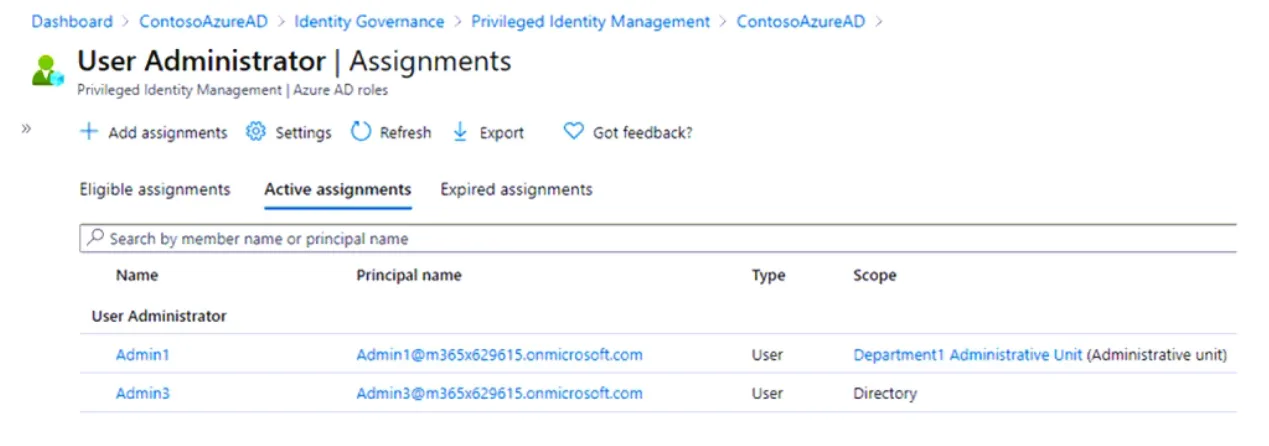
Text version
Breadcrumb: Dashboard > ContosoAzureAD > Identity Governance > Privileged Identity Management > ContosoAzureAD
Page: User Administrator | Assignments — Privileged Identity Management | Azure AD roles
Toolbar: Add assignments, Settings, Refresh, Export, Got feedback?
Tabs: Eligible assignments, Active assignments (selected), Expired assignments
| Name | Principal name | Type | Scope |
|---|---|---|---|
| User Administrator | |||
| Admin1 | Admin1@m365x629615.onmicrosoft.com | User | Department1 Administrative Unit (Administrative unit) |
| Admin3 | Admin3@m365x629615.onmicrosoft.com | User | Directory |
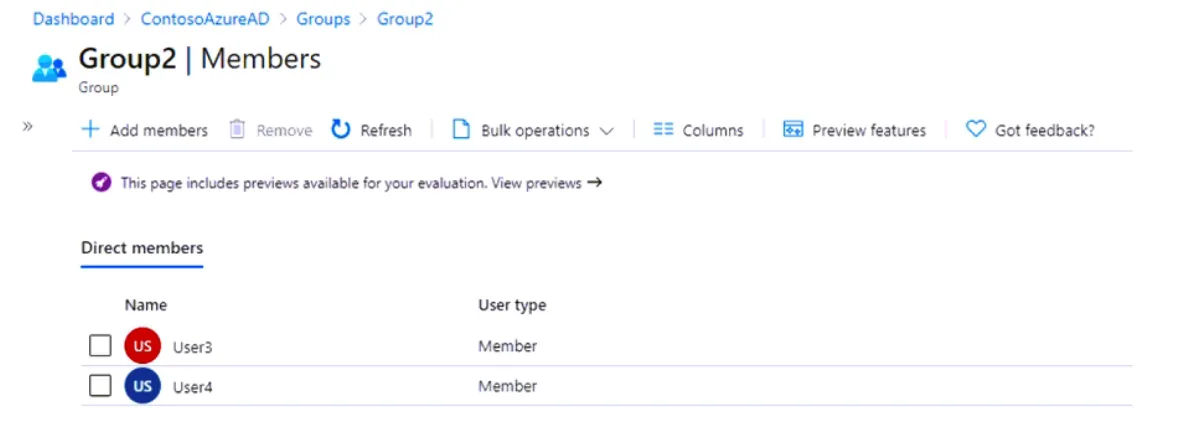
Text version
Breadcrumb: Dashboard > ContosoAzureAD > Groups > Group2
Page: Group2 | Members — Group
Toolbar: Add members, Remove (disabled), Refresh, Bulk operations, Columns, Preview features, Got feedback?
Banner: This page includes previews available for your evaluation. View previews
Tab: Direct members
| Name | User type |
|---|---|
| User3 | Member |
| User4 | Member |
| Statement | Yes | No |
|---|---|---|
| Admin1 can reset the passwords of User3 and User4. | ||
| Admin1 can add User1 to Group3. | ||
| Admin3 can reset the password of User1. |