You deploy several Azure SQL Database instances. You plan to configure the Diagnostics settings on the databases as shown in the following exhibit.
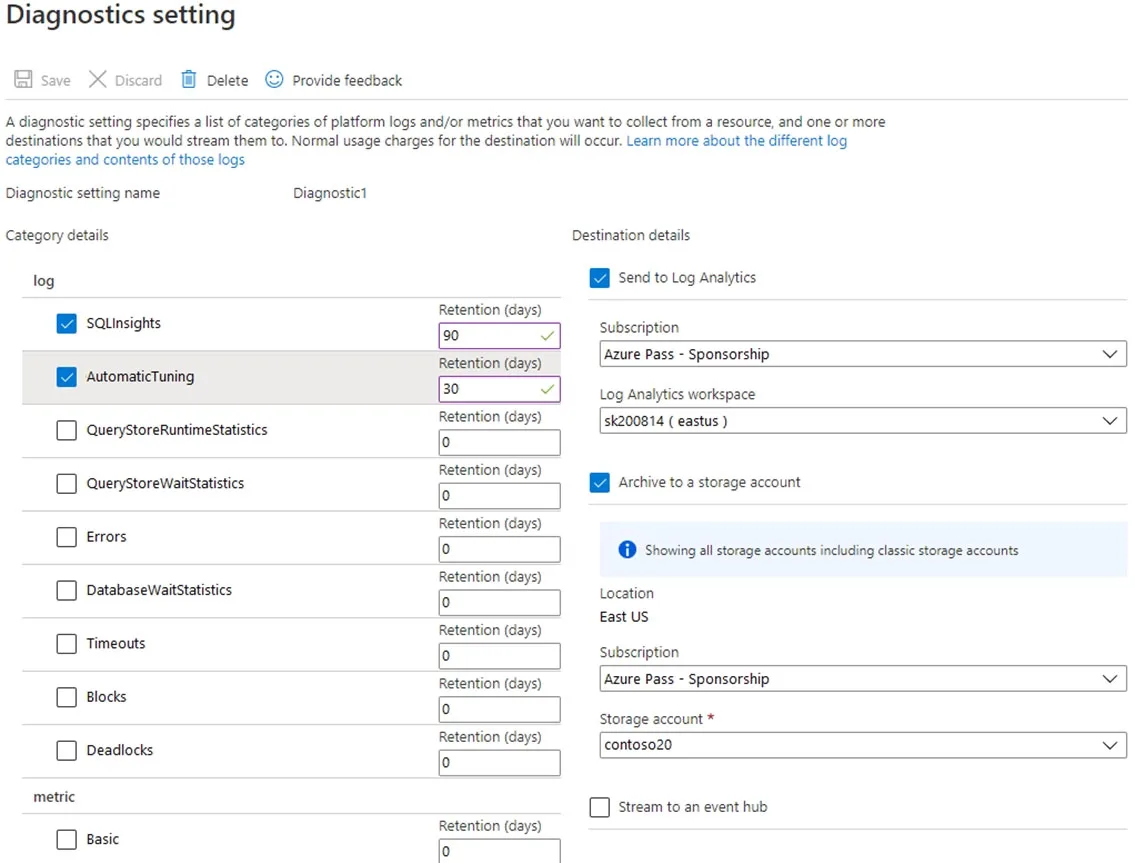
Text version
Diagnostics setting
Toolbar: Save (disabled) · Discard (disabled) · Delete · Provide feedback
A diagnostic setting specifies a list of categories of platform logs and/or metrics that you want to collect from a resource, and one or more destinations that you would stream them to. Normal usage charges for the destination will occur. Learn more about the different log categories and contents of those logs
Diagnostic setting name: Diagnostic1
Category details
log:
- SQLInsights: checked · Retention (days): 90
- AutomaticTuning: checked · Retention (days): 30
- QueryStoreRuntimeStatistics: unchecked · Retention (days): 0
- QueryStoreWaitStatistics: unchecked · Retention (days): 0
- Errors: unchecked · Retention (days): 0
- DatabaseWaitStatistics: unchecked · Retention (days): 0
- Timeouts: unchecked · Retention (days): 0
- Blocks: unchecked · Retention (days): 0
- Deadlocks: unchecked · Retention (days): 0
metric: - Basic: unchecked · Retention (days): 0
Destination details
- Send to Log Analytics: checked
- Subscription: Azure Pass - Sponsorship
- Log Analytics workspace: sk200814 ( eastus )
- Archive to a storage account: checked
- Info: Showing all storage accounts including classic storage accounts
- Location: East US
- Subscription: Azure Pass - Sponsorship
- Storage account *: contoso20
- Stream to an event hub: unchecked
The amount of time that SQLInsights data will be stored in blob storage is .
The maximum amount of time that SQLInsights data can be stored in Azure Log Analytics is .