You have an Azure Active Directory (Azure AD) tenant named contoso.onmicrosoft.com that contains the users shown in the following table.
You enable password reset for contoso.onmicrosoft.com as shown in the Password Reset exhibit.
You configure the authentication methods for password reset as shown in the Authentication Methods exhibit.
For each of the following statements, select Yes if the statement is true. Otherwise, select No.

Text version
| Name | Member of | Role assigned |
|---|---|---|
| User1 | Group1 | None |
| User2 | Group2 | None |
| User3 | Group1, Group2 | User administrator |
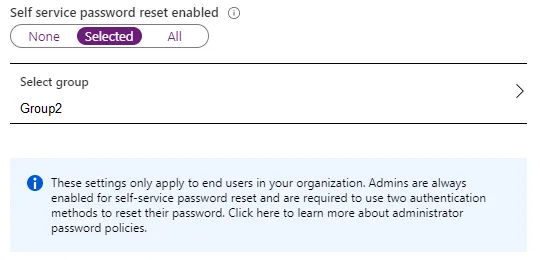
Text version
Password reset properties:
- Self service password reset enabled: None / Selected / All
- Select group: Group2
- Note: "These settings only apply to end users in your organization. Admins are always enabled for self-service password reset and are required to use two authentication methods to reset their password."
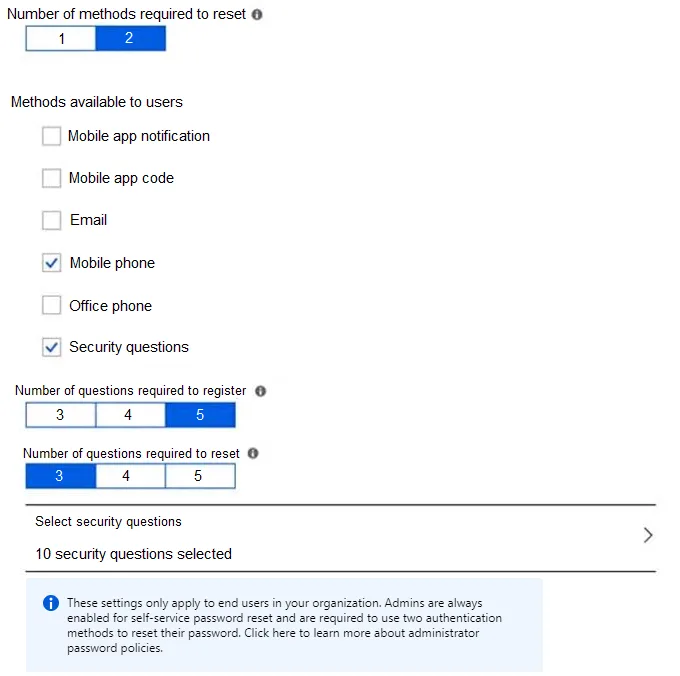
Text version
Authentication methods:
- Number of methods required to reset: 2
- Methods available to users: Mobile app notification ☐, Mobile app code ☐, Email ☐, Mobile phone ☑, Office phone ☐, Security questions ☑
- Number of questions required to register: 5
- Number of questions required to reset: 3
- Select security questions: 10 security questions selected
- Same admin note as the Password Reset exhibit.
| Statement | Yes | No |
|---|---|---|
| After User2 answers three security questions correctly, he can reset his password immediately. | ||
| If User1 forgets her password, she can reset the password by using the mobile phone app. | ||
| User3 can add security questions to the password reset process |